
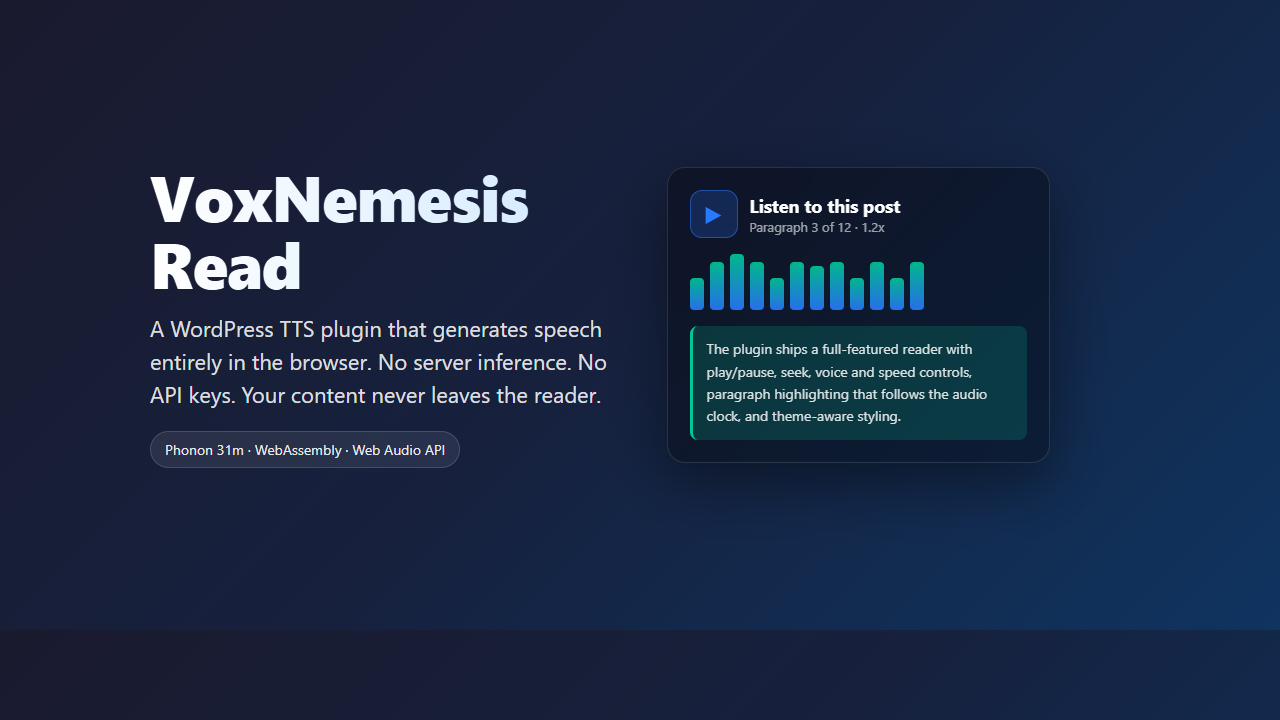
VoxNemesis Read lets WordPress readers hear posts aloud with speech generated entirely in their own browser. No server inference, no API key, no per-request cost. The text never leaves the reader’s machine.
Part of our local-first audio playbook. Pairs well with VoxNemesis Supertonic and Self-Hosted TTS with Kokoro ONNX.
TL;DR
- Browser-only TTS for WordPress — Phonon 31m runs in a WebAssembly worker; the 64 MB model is fetched once and cached.
- Privacy by design — No audio is sent anywhere. The server only serves a player and static assets.
- Theme-proof UI — Background luminance measurement and solid palettes keep contrast and borders readable on light, dark, sepia and alpha-text themes.
- War stories matter — Settings fatals, specificity bugs and a dead theme resolver taught us to test against real WordPress early.
What You’ll Learn
Privacy-first architecture
How to keep speech generation client-side and avoid API keys entirely.
Accessible reader UX
Paragraph navigation, live highlighting and level metering that follows the audio clock.
Theme integration
Measuring background luminance to pick safe palettes for any theme.
Real WordPress testing
Why a stand-in catches syntax but misses admin hooks and script printing.
Mobile ergonomics
Full-width controls, 44 px touch targets and safe-area handling.
Model hosting choices
Default public checkpoint versus self-hosted models for gated checkpoints.
Why a browser reader for WordPress
Readers asked for “read aloud” without sending content to a cloud API. For South African sites dealing with POPIA, load shedding and expensive bandwidth, that is a real requirement, not a nice-to-have. The answer we landed on is a plugin that ships a tiny WordPress admin UI and moves all of the heavy work to the reader’s browser.
The model we use is Phonon 31m, an 8-bit quantised ~64 MB checkpoint that runs in a WebAssembly worker. The browser fetches it once, caches it, and executes it on the CPU. The site itself only serves the player markup, a few assets and, optionally, a static model file. An old rack, a shared host or a static site behind a CDN is fine.
The reader experience is deliberately complete: a listen button with play/pause, stop, previous/next paragraph; a paragraph slider that doubles as the progress bar; paragraph highlighting that follows the audio clock, with click-to-start on any paragraph; a voice picker with about a hundred precomputed embeddings; speed and volume controls; a clock and a “Paragraph X of Y” readout; a live twelve-bar level meter from an AnalyserNode; a loading spinner and a determinate download bar. The player follows the theme with light, dark or auto styling, with configurable accent colours, and every control can be toggled off in the settings. Placement is configurable — under the title, at the end of the post, as a floating button, or only where the shortcode is placed manually — so the plugin never forces itself into a layout that does not want it.
How the pieces fit together
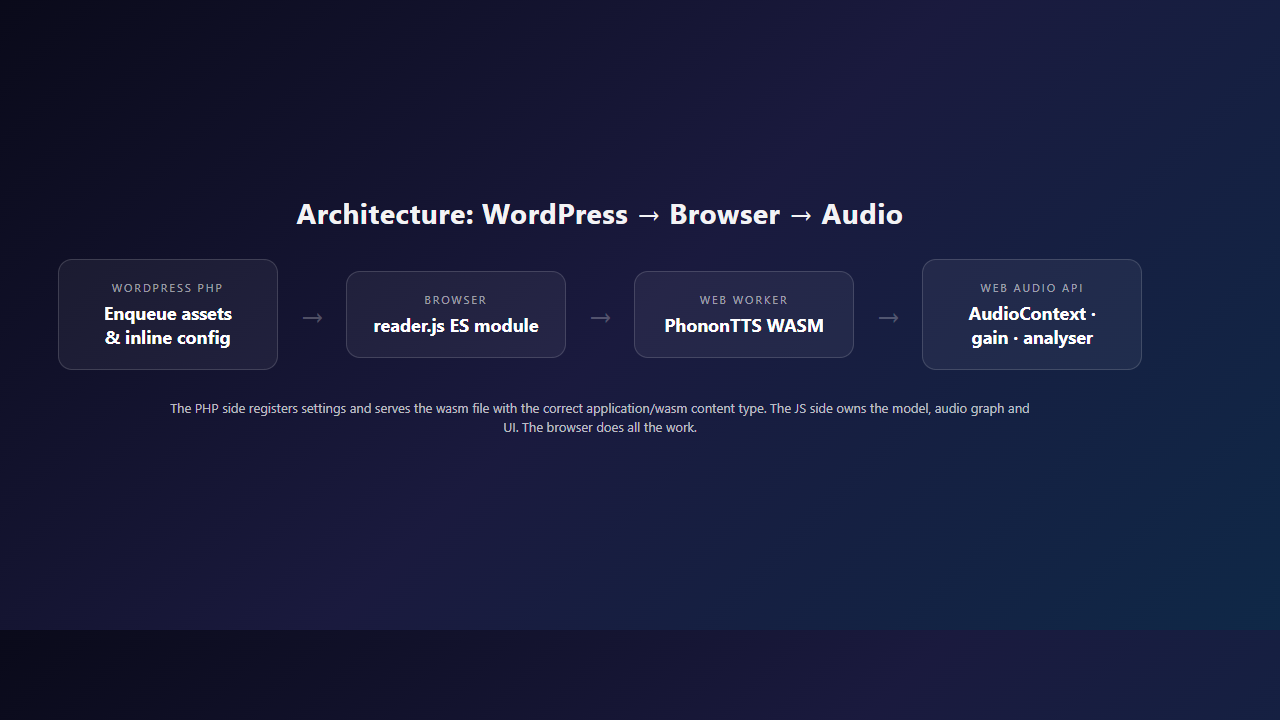
The PHP side registers settings, renders the player markup, enqueues CSS and JavaScript and serves the wasm file with the correct application/wasm content type because not every host is configured for it. The JavaScript side owns the model, the audio graph and the UI. That separation keeps the server stateless and means the model never touches our infrastructure.
Key constraints shaped the design. The browser cannot clone a voice; the wasm build has no encoder, so only precomputed embeddings from gradium/phonon-voices work. There is no token to send, so the browser cannot read gated Hugging Face repos; if you need a multilingual checkpoint you host it yourself as static files. Speech always runs on the CPU, because the current Phonon runtime’s WebGPU path computes different numbers from the CPU path and the model is calibrated against CPU output.
Language normalisation is not optional either. Phonon refuses to guess a normalisation language and the spoken form of characters like @, + and = changes with language. The plugin therefore requires an explicit lang and normalises accordingly.
The war stories that changed the build
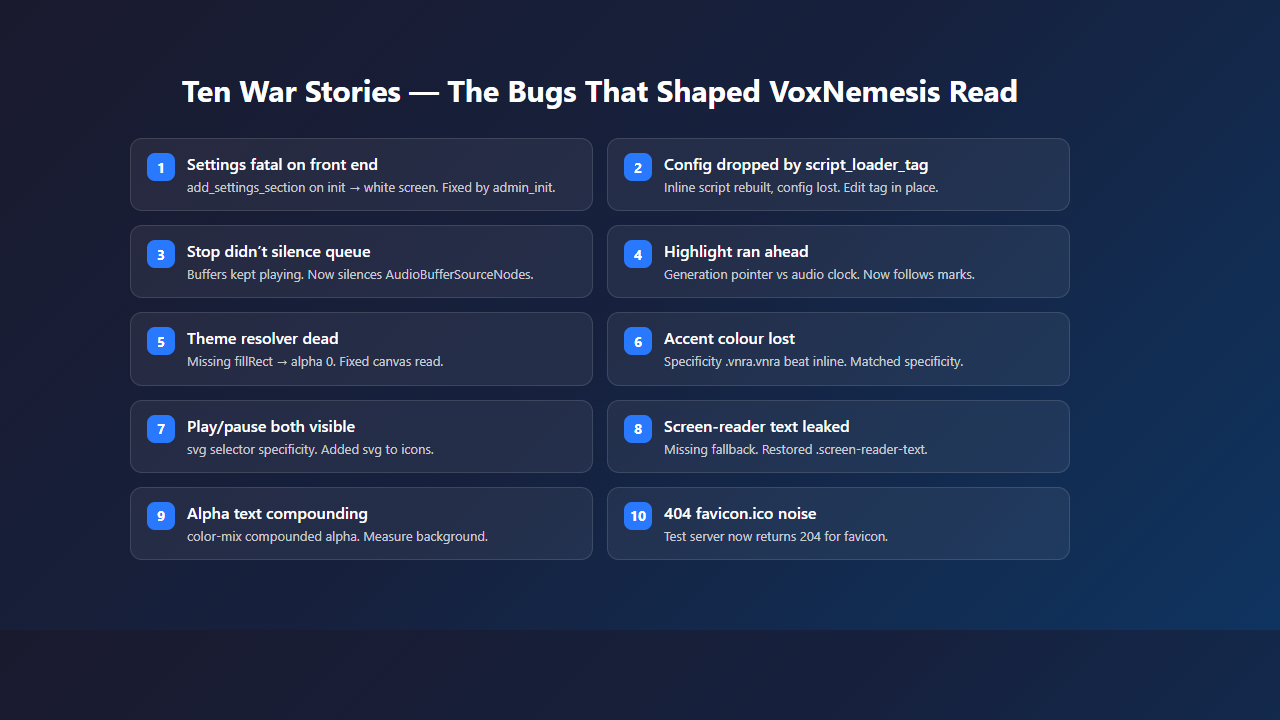
Ten bugs taught most of what matters. Some were embarrassingly small, a few cost hours of staring at a white screen. What follows is each one in the order it taught us something, because the order is the lesson.
The settings screen once fataled the entire site. Registering settings on init seemed fine until the front end tried to call add_settings_section(), a function that only exists after wp-admin/includes is loaded. The fix was to hook on admin_init, and the lesson is to run against a real WordPress install early.
The second bug was config disappearing. The reader fell back to defaults because wp_add_inline_script() data is printed before script_loader_tag runs. Filtering the tag by rebuilding it from scratch dropped the inline config. Editing the tag in place fixed it.
Pressing stop used to cancel generation but left already-scheduled AudioBufferSourceNodes playing. Generation runs ahead of the audio clock to avoid underruns, so there is always a backlog. Stopping now silences the queue and a streamed utterance is regenerated on resume from the correct point in the text.
The paragraph highlight was keyed to the generation pointer, which runs ahead of playback. Highlights ran ahead of the sound. We moved highlighting to this.marks against the audio clock, so the UI shows what is actually sounding.
Theme resolution silently disabled itself. parse() set ctx.fillStyle but never called ctx.fillRect, so getImageData read an untouched canvas with alpha zero. Colours parsed as transparent and every branch bailed. Adding fillRect and willReadFrequently:true restored it.
An inline stylesheet lost to doubled selectors. The default accents were declared on .vnra.vnra for theme-proofing. The inline rule used .vnra,.vnra-para with lower specificity, so custom accent colours never applied. Matching the specificity fixed it.
The play/pause icons both showed at once. .vnra__button svg { display:block; } outranked the icon hide rules because the element selector added specificity. Adding svg to the icon selectors aligned the specificity.
A screen-reader label leaked as visible text on themes without a fallback. Restoring the .vnra .screen-reader-text fallback and counting braces caught a stray }.
Alpha-text themes dissolved muted text into the background because color-mix compounded the theme’s text alpha. We now measure the page background, composited from all ancestors, pick a fixed light or dark palette and paint our own panel over the page.
Finally, a test reported a 404 that was not a plugin bug. Headed Chromium requests /favicon.ico. Answering that with 204 and naming failing resources in logs removed the noise.
The theme integration saga
Three days of calendar time went missing in the middle of the build, and the theme layer is where they went. One cancelled session left the stylesheet half-migrated: reader.css had been rewritten to a solid-palette design with doubled selectors and data-vnra-resolved custom properties, while the JavaScript resolver that was supposed to feed those palettes sat dead. The player rendered, but every colour decision underneath it was built on sand, and nothing errored because nothing was wired up to error.
The design that finally stuck keeps both halves honest. The resolver measures the page background exactly as the reader sees it, composited through every ancestor, then picks one of two fixed palettes — light or dark — and paints its own panel over the page. Solid palettes sidestep the alpha compounding that dissolved muted text on alpha-text themes, and painting our own panel means the player never argues with the theme about what the background is.
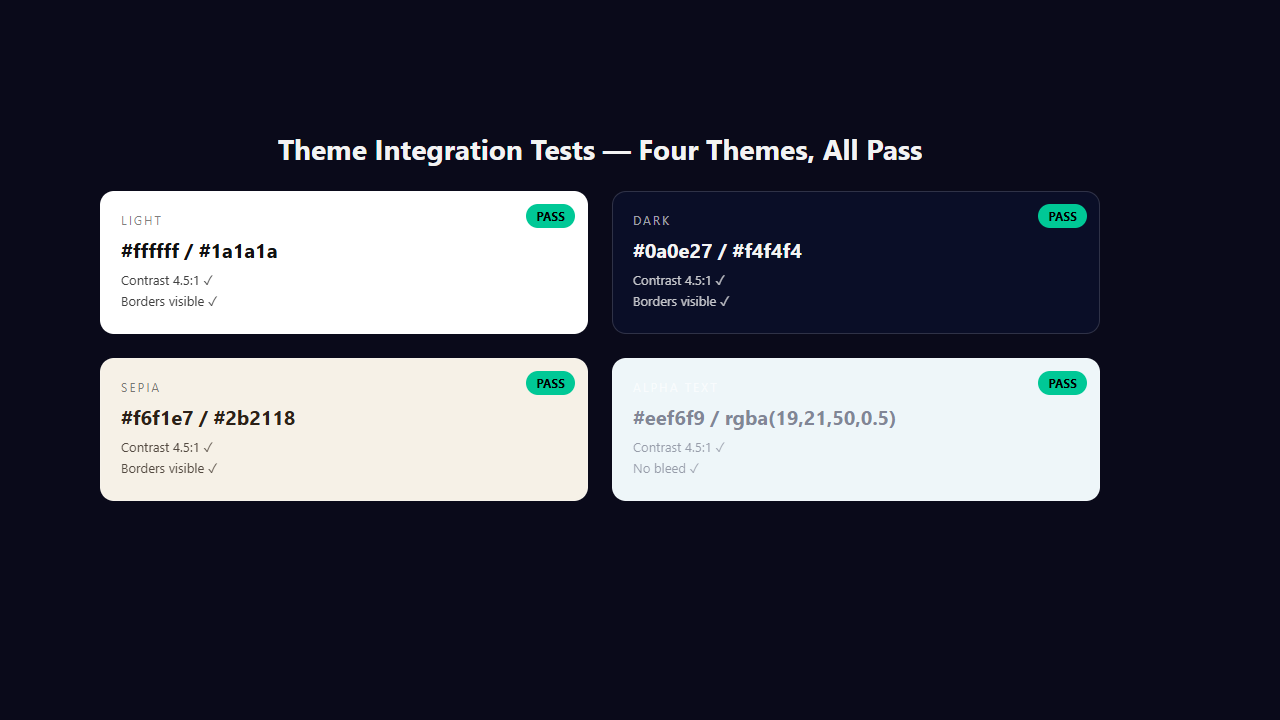
The test harness holds the line so the saga does not repeat. It reads colours through a 1×1 canvas and checks muted text contrast at 4.5:1 or better, borders at least 12/255 visible, panel separation at least 12/255, and a highlight that renders at least 8/255 different from the panel. Four themes pass today — light, dark, sepia and an alpha-text theme — and any future regression shows up as a red test instead of a silent visual bug.
Lesson: measure the page, don’t guess
The theme resolver went through three iterations—text colour derivation, alpha compounding failure, solid-palette background measurement—before it worked on every theme. Guessing from CSS variables failed on exactly the themes that needed the fallback most.
Naming, compliance and the rename
The plugin was originally “VoxNemesis Read-Aloud”. Branding advice suggested model-agnostic naming so swapping the TTS engine later does not require renaming the product, repo or WordPress slug. It became VoxNemesis Read.
WordPress.org guidelines are strict about front-facing branding. No external link, logo link or “powered by” text on the public site by default, no hidden links, no admin nags and no gating core functionality behind the credit setting. Credit is opt-in and off by default. When enabled it renders one small line linking to nemesisnet.co.za with target="_blank" rel="nofollow noopener". Text only, no logo. A filter vnra_credit_html lets site owners modify or remove the output.
Internal identifiers stayed stable: CSS prefix vnra, option name vnra_options and constant VNRA_VERSION. The model remains an implementation detail.
Mobile, testing and definition of done
The mobile pass makes the listen button full width below 480 px, raises control buttons to 44 px touch targets, bumps slider thumbs to 20 px with touch-action: manipulation and uses max(0.6rem, env(safe-area-inset-*)) for floating players.
Testing is layered. Jest with jsdom covers pure functions. A PHP test harness against a WordPress stand-in checks markup, colours, sanitisation and the wasm endpoint. A Playwright browser test drives the real reader: model loads, audio plays, clock advances, paragraphs are marked and controls work. The model re-downloads in a fresh context, so a persistent profile is used for repeat runs.
A change is done when the tests pass, the smoke test passes for engine or audio changes, README.md and CHANGELOG.md describe the change, anything surprising goes into BUGLOG.md with reasons not symptoms, and the version in voxnemesis-read.php and readme.txt match.
Appearance and accent colours
The player measures what the theme actually paints behind it — composited backgrounds, gradient stops and all — and picks the matching palette. A theme that writes its text with a transparency no longer dissolves the muted “Paragraph X of Y” text into nothing. Borders, the clock and the paragraph highlight stay readable on light, dark, or semi-transparent themes.
Style can be pinned to light or dark, overriding the theme entirely, or left on auto. The accent colour drives the play button, the paragraph slider’s filled track and the highlight ring; a second accent colour drives gradients and the live level meter. Both are configurable from the settings screen, so the player can be made to match a brand without touching CSS.
The player is built for small screens: a full-width listen button below 480 px, 44 px touch targets and slider thumbs sized for a thumb. The floating variant uses max(0.6rem, env(safe-area-inset-*)) for safe-area positioning and caps its panel at min(75vh, 650px) so it never covers the whole screen on a phone.
Hosting your own model
The multilingual checkpoints are gated on Hugging Face, and a browser has no token to send. Hosting them yourself solves that: the files are static, and the reader’s browser fetches them from your site, so no token is needed. Drop config.json, tokenizer.json and model.q8.gguf into a directory your server can reach, point the model setting at that URL, and the reader does the rest.
Your rack serves static files; the reader’s browser does the work. This is the shape of the thing if you have no compute: a shared host or an old server is enough, because nothing on it ever runs the model. The 31m checkpoint is Apache-2.0; the 40m checkpoints are CC BY-NC 4.0.
The CPU, on purpose
The plugin generates on the CPU. The current Phonon runtime’s WebGPU path computes different numbers from the CPU path — it does not quantise the activations the way the CPU does — and the model is calibrated against the CPU’s. The result on WebGPU is an utterance roughly twice as long as it should be, with noise from the second paragraph on. The CPU path is the one the native runtimes use and the one the model was built for, so that is what the plugin uses. The fix is upstream, tracked in the xn and xn-ptts issue trackers.
Ten more things we learned
The first ten war stories were about things breaking. These are about the details that only mattered once everything worked.
The wasm endpoint serves the module itself, with the correct application/wasm content type and a long cache lifetime. Not every host is configured for .wasm, so the plugin bypasses the web server entirely: the endpoint is /?vnra_wasm=relaxed|simd&ver=<VNRA_VERSION>, anything else 404s, and the ver parameter is cache-busting so a version bump forces a re-fetch.
The voice catalog is a JSONL file, not an API. The roughly hundred voices come from gradium/phonon-voices/resolve/main/voices.jsonl on Hugging Face. The reader fetches it at runtime, parses the JSONL, and populates the voice picker. No API call, no authentication, no rate limit — a static file from a public host, containing voice names, languages and precomputed embedding URLs.
The download progress is not guessable. The Phonon runtime reports progress via onProgress({ file, loaded, total, cached }). When cached is true, the file was already in the browser’s cache and the bar does not move. When false, the bar fills deterministically from loaded / total. The spinner shows for the entire loading duration either way, and the 3 px track is always visible — it just stays empty when everything is cached.
The select element is a warzone. Theme CSS for <select> is notoriously aggressive — dark text on dark backgrounds, invisible dropdowns, broken arrows. The plugin forces solid backgrounds and text colours with !important and -webkit-text-fill-color, uses a CSS gradient for the dropdown arrow so it works regardless of theme, and sets color-scheme: inherit so the open list follows the theme. appearance: none strips the browser’s default styling entirely.
Speed is a conditioner, not a playback rate. The speed control does not change playback rate after generation. It changes a conditioner on the model (durationDelta), which affects how the model generates the audio. Faster speed means a shorter utterance, generated differently. Changing speed means reloading the model. The weights are already cached, so it is quick, but it is not instant.
The paragraph slider doubles as the progress bar. The seek slider is a range input with min="0" max="0" (max is set by JavaScript to paragraph count minus one). While playing, the --vnra-progress CSS variable drives a linear-gradient background that fills from left to right. The thumb position tracks the sounding paragraph. Dragging it jumps to that paragraph. One control, two jobs.
The analyser node is tapped in-chain, not side-channel. The level meter’s twelve bars are driven by an AnalyserNode inserted between the gain node and the destination: gain → analyser → destination. fftSize: 64, smoothingTimeConstant: 0.75. The frequency data is read every frame via requestAnimationFrame and mapped to bar heights. A static full-post waveform is impossible pre-generation — the audio does not exist until it is generated.
The floating player and safe areas. On mobile, the floating player uses max(0.6rem, env(safe-area-inset-right)) and max(0.6rem, env(safe-area-inset-bottom)) for positioning. The width is min(390px, calc(100vw - 1.2rem)). The panel has max-height: min(75vh, 650px) with overflow-y: auto so it does not cover the entire screen on small devices.
Reduced motion is respected. The @media (prefers-reduced-motion: reduce) block sets animation-duration: 0.01ms, animation-iteration-count: 1, scroll-behavior: auto and transition-duration: 0.01ms on all elements. The spinner stops spinning, the meter bars do not animate, and the highlight transitions are instant. This is not optional — it is an accessibility requirement.
The busy guard is real. Two generations on one Phonon instance are queued by the runtime, not run in parallel. The plugin rejects the second with a clear error rather than letting it hang. state.generationId is bumped whenever a generation is abandoned, so a stale generation can never touch the state of a newer one. This matters because the user can click play, then stop, then play again in rapid succession.
Testing strategy
Testing is layered across three levels. npm test runs Jest with jsdom — every pure function is covered. php tests/run.php runs 81 checks against a WordPress stand-in: it instantiates the plugin, renders the player, and checks markup, colours, sanitisation, injection rejection and the wasm endpoint. node tests/reader.test.js drives the reader in a real browser — model loads, audio plays, clock advances, paragraphs are marked, controls work — and takes about 24 seconds with a warm cache.
The stand-in has known blind spots: it does not load wp-admin/includes and does not run WordPress’s script printing. Both of those produced bugs in 0.1.0 that the stand-in cheerfully passed. So the plugin was also run against a real WordPress with the SQLite drop-in, exercising the position settings, the shortcode, the settings save and the reader. That is the test that matters, and the one to repeat before a release.
The browser tests need Playwright. The 64 MB model re-downloads per fresh browser context — about 150 seconds at ~430 KB/s — so a persistent profile via the VNRA_PROFILE environment variable is used for repeat runs. node tests/theme.test.js covers four themes with contrast and visibility checks plus screenshots.
What we would do differently
Run against real WordPress earlier. The stand-in passed bugs that only showed up when wp-admin/includes was missing or when WordPress’s script printing rebuilt tags.
Specificity is the silent killer. Two bugs were pure CSS specificity issues. Calculate specificity, don’t eyeball it.
Don’t edit vendored code. Phonon is vendored on purpose. Bump it by replacing the folder and re-reading its README.
And do not promise voice cloning. The wasm build has no encoder and never will. Precomputed embeddings are the only supported path.
Need a WordPress plugin that pushes the browser, not the server?
We build local-first WordPress features, browser-based AI pipelines and accessibility tools that work on real sites. If you want text-to-speech, agent tooling or a custom player that respects privacy, let’s talk.
Repository: github.com/NemesisGuy/voxnemesis-read