
AI-assisted development has made it easier than ever to turn an idea into a working application. For founders, operations teams and small businesses, that is a genuine breakthrough, and the progress it unlocks is real. But it has also produced a new failure mode: software that looks finished, behaves exactly as expected, and still fails basic security checks. Two recently-reported South African incidents illustrated the pattern within days of each other. Neither involved a sophisticated attacker. Both involved a working application that nobody had verified.
Part of our engineering practice series on shipping software that survives production — because getting an application running is only the beginning.
AI-Assisted Development
POPIA
Production Readiness
TL;DR
- The recurring failure is shipping without adequate verification. Not AI producing bad code — code nobody read, before it faced real data.
- A login screen is not authentication. One reported incident served data down with the login page, where anyone with the URL could read it. Another left an administrator password in plain-text HTML.
- Neither required an exploit. Both were visible with a browser. Attackers now automate exactly these mistakes, around the clock.
- This is not an argument against AI-assisted development. It is an argument for keeping engineering judgement in the loop — especially the boring parts: auth, secrets, data isolation, and decommissioning.
What You’ll Learn
The failure modes
Two technical failure patterns, described precisely, without finger-pointing.
The root cause
Why a login screen proves nothing, and what to check instead.
The boring checklist
Eight unglamorous checks that decide whether an app is a demo or a product.
The POPIA angle
Why personal information in internal tools still carries obligations.
Why This Article Is Not About Any Particular Company
This is a technical engineering article. It is not an investigation, and it does not make allegations about anyone.
Recently, two South African incidents were reported publicly in which software built with AI assistance was found to expose more than it should have. The reporting identified the specific companies involved, and this article deliberately does not. The reason is straightforward: the lessons here are worth far more than the names, and there is no reason to attach a reputational cost to a business that is not our business.
So this is an engineering article, informed by recent events, about the failure modes themselves. We describe two shapes of failure, explain the technical reason each one happens, and give you the checks that prevent them. If you have read the reporting, you will recognise the patterns. If you have not, you will still have everything you need.
Lesson: Learn the pattern, not the target
Security lessons survive longer than headlines. A named company is a story that ages; a well-understood failure mode is a control you can implement on Monday.
Failure Mode One: The Login Screen That Was Not a Lock
The first pattern is a very old web security bug that has found new life. An application renders a login screen, so it looks protected. But the data behind it is being sent to the browser before authentication is checked, bundled into the same response as the login page.
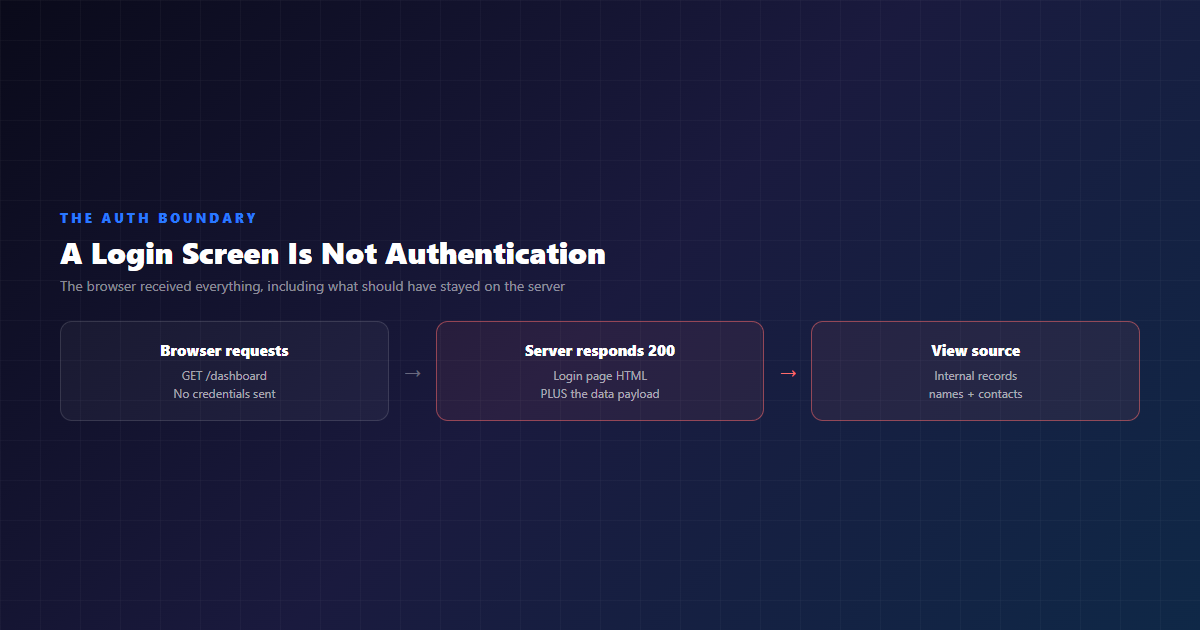
To anyone clicking through the app, this looks perfect. There is a login screen. You cannot see the data without entering details. The evidence of the flaw is invisible in the rendered page and obvious in the source — which is exactly why it can sit there unnoticed, and why it can be discovered by someone who simply looked.
Here is the shape of it in detail. A page renders and presents a login form. The data the page displays — or the API the page calls — should only be reachable after a successful authentication. But somewhere in the stack, the query that fetches the data runs before the check that verifies the session. The data is included in the same response as the login screen.
Now notice what “it has a login screen” actually proves. It proves that somebody wrote a login screen. It does not prove that the login is enforced, that it is enforced on the right request, that it cannot be bypassed by requesting a different endpoint, or that the data was not already sent in the response body. Presence of an authentication interface is not enforcement of authentication. Those are different claims, and only one of them is true.
Lesson: Test the boundary, not the screen
The check that catches this takes about two minutes: request the page with no credentials, save the response, and read it. If the response body contains data, the auth boundary is wrong. No scanner, no pentester, no exploit — just curl and eyes. Make it a non-negotiable step in your pre-launch checklist.
Failure Mode Two: The Password in the Page Source
The second pattern is simpler and arguably more common. An AI tool left an administrator password in plain text inside the site’s own code. Anyone could read it by inspecting the page with a browser’s developer tools. Nobody had checked the code before the site went live.
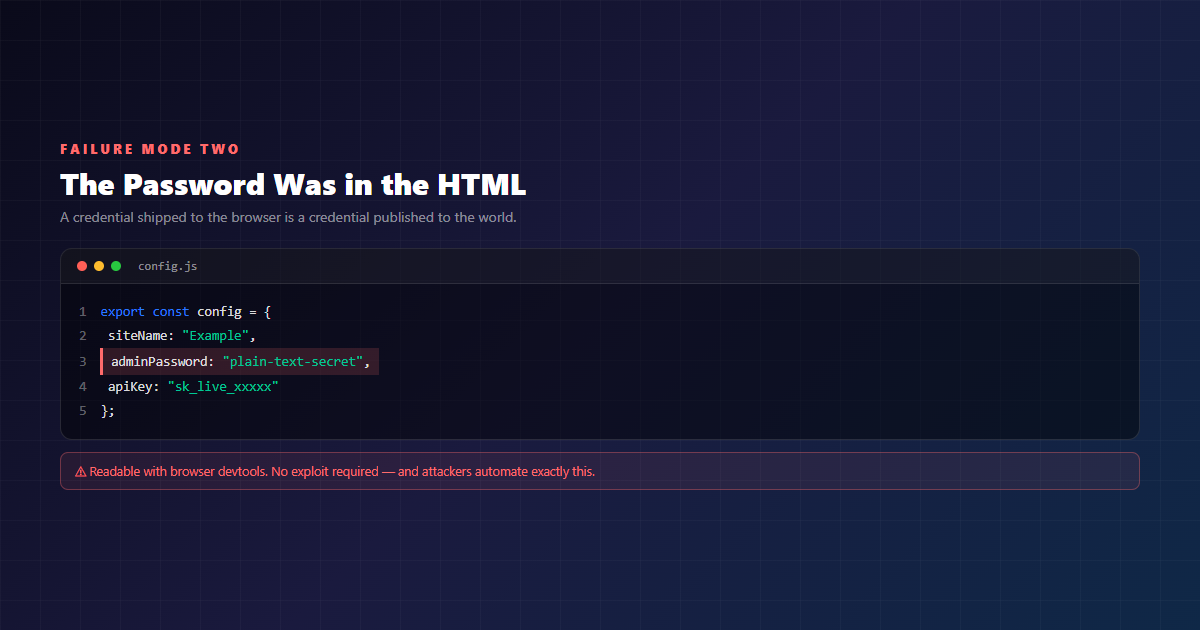
The uncomfortable part is not that a secret was in the source. It is that the secret was in the source and the site still worked perfectly. Everything looked fine. The login worked. The pages rendered. The only evidence of the problem was a value that had no business being in a file the browser downloads.
There is a compounding factor worth internalising: attackers know exactly which mistakes AI tools tend to make, and they run automated scans for them continuously. A class of vulnerability that can be detected by a machine is a class of vulnerability with a discovery window measured in hours, not months. Your review queue is now competing with a scanner that never sleeps and never gets bored. A code review that happens on launch day is already too late.
Lesson: A credential in client code is a published credential
There is no “it’s only a test password” or “nobody will look”. The file is downloaded by everyone who visits the page, and a scanner will find it before your next deploy.
How These Failures Actually Unfold
Both patterns trace back to the same sequence, and that sequence is not caused by AI. It is caused by shipping faster than we can review.
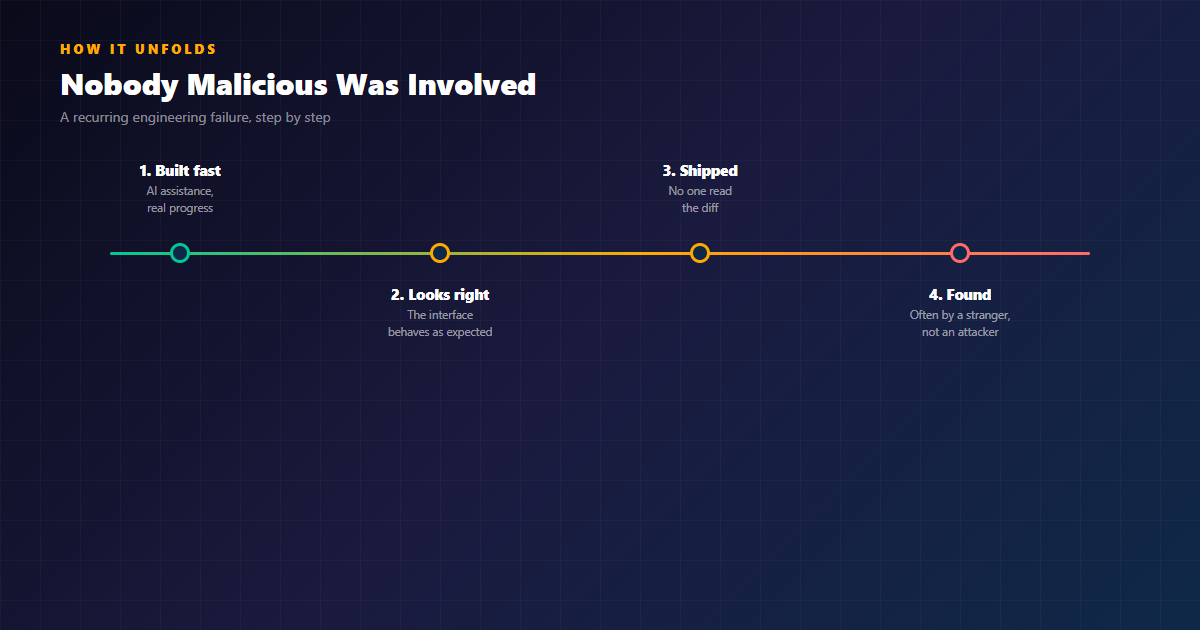
- Built fast, with real progress. The application does something genuinely useful, and the team is proud of it. Nothing is wrong here.
- It looks right. The interface behaves as expected, which is the strongest possible evidence that the thing is finished. It is also the weakest possible evidence that the thing is correct.
- Shipped, with no checkpoint. Nobody read the diff, and there was no step in the process where somebody was supposed to.
- Found by a stranger. Often not by an attacker with a scanner, but by somebody who simply looked at the wrong thing. A URL in a social post. A password in the source.
Look at step three again. That is the one worth fixing. The failure was not laziness and it was not carelessness. It was an absent checkpoint — a process gap in a process that was otherwise working very well.
Why Both Are the Same Recurring Engineering Failure
Careful framing here, because the two bugs are technically different. One is a data-before-auth ordering mistake; the other is a secret embedded in client-side code. They are not the same defect, and claiming they are would be sloppy analysis.
What they share is a common engineering failure: shipping without adequate verification. And that framing matters more than the two specifics, because it generalises to every similar class of incident that has not happened yet.
| Dimension | Failure mode one | Failure mode two |
|---|---|---|
| What shipped | An application with an internal dashboard | A public-facing site |
| The defect | Data sent with the login page | Administrator password in plain-text source |
| How it was found | Someone noticed a URL | An automated scan for known patterns |
| Skill required to find it | View source | View source |
| Missing step | Nobody read the code before it held real data | Nobody read the code before it went live |
| What would have caught it | Request the page unauthenticated | Inspect what the browser actually receives |
Both fixes are minutes of work, performed before launch rather than after an incident. That is the entire insight: the gap was not knowledge, and it was not tooling. It was a step that nobody had scheduled.
Lesson: Appearance is not verification
The dangerous state is not “I did not test it.” It is “I looked at it, and it worked.” A login screen that renders is a visual success, and visual success is exactly what an AI-generated interface is optimised to produce. Verification is a different activity: it requires reading behaviour, not appearance.
What AI-Assisted Development Gets Genuinely Right
It would be lazy to read the recent incidents as “AI doesn’t work.” That conclusion would be wrong, and it would also be commercially convenient for the vendors of AI tooling, which is exactly why we should be careful with it.
Here is what genuinely changed. A small operations team with no engineering department can now produce a working internal tool — scheduling, reporting, store visits, action items — in weeks rather than months. For a business that had been running those processes on spreadsheets and group chats, that is a material improvement in how the company operates. It is not a consolation prize.
Write that down honestly, because it is true, and because the opposite is also true. Both of these can be true at the same time:
- AI-assisted development is genuinely transformative for small and medium businesses. It closes capability gaps that used to require a development team.
- The boring parts still require a human who understands them. Not because AI is bad at them — because nobody, including the model, has verified them for your specific system.
There is a useful analogy from the IT leadership commentary around these incidents, comparing the acceptance of AI-generated code with little scrutiny to flying on autopilot without checking the instruments. It works until it doesn’t.
That is the right frame. Autopilot is not flying a plane, and nobody would suggest otherwise. It is flying a plane without instruments. The point of the instrument panel is not to make the flight faster — it is to tell you when the flight is no longer going where you think it is going.
The Verification Gap
Here is the distinction I think the industry is still getting wrong. The question “can AI build production software?” is the wrong question, because it conflates two very different activities: producing working code, and confirming that the code does the right thing.
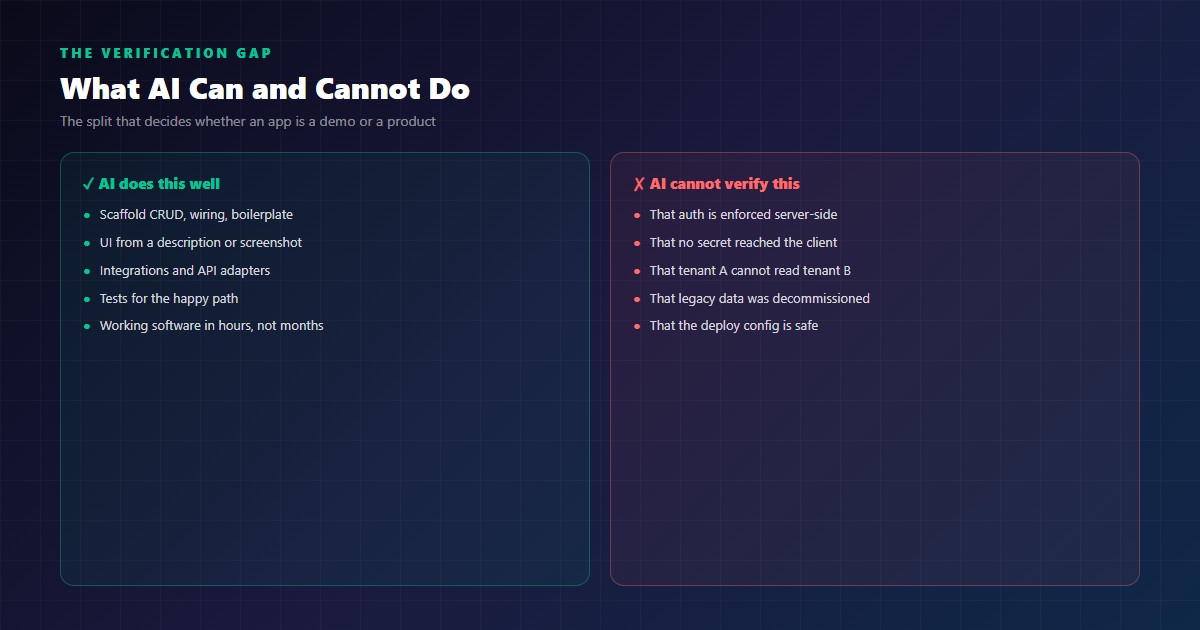
AI is excellent at the first activity. It is not capable of the second — not because the model lacks the knowledge, but because verification requires context the model does not have: which of your systems hold personal information, what your legal obligations are, what your data flow looks like, what “normal” means for your operation, and what happens if a specific request is malformed in a way no one has tried yet.
You cannot hand that context to a model and call the result an audit. An audit is a process with accountability attached: somebody reviews it, applies professional judgement, signs their name to it, and carries the consequence when it turns out to be wrong. That is not something a language model can do for you, and pretending otherwise is how you end up with a login screen that nobody ever tested.
The Mandate Problem
There is a governance lesson in these incidents that is more uncomfortable than the technical one, so let’s name it.
Rolling AI coding tools across a team is an operational change. It should be treated like one: with a named owner, a written definition of done, a security checkpoint before anything reaches production, and an incident path. That was not a missing technical control. It was a missing operational one.
The most telling detail in these stories is not that nobody read the code. It is that nobody read the code and there was no step where somebody was supposed to. The software was built by capable, motivated people doing their best with the tools they had. The failure was not in their effort. It was in the absence of a checkpoint.
One discussion thread around these incidents landed on a framing I think is exactly right: in the current conversation about AI governance, this is a fairly practical example of why the boring stuff still matters.
Lesson: Mandate the tool, define the gate
A tool rollout without a review gate is not a productivity programme — it is an unmonitored production change wearing a productivity programme as a disguise.
The Boring Checklist
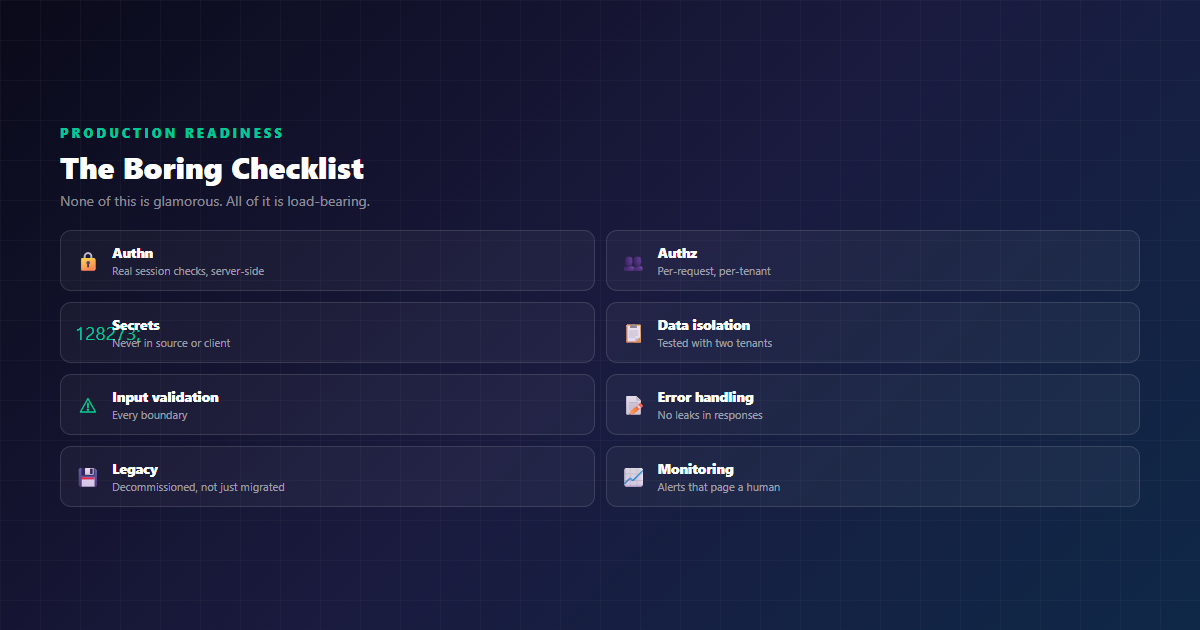
None of the following is glamorous. All of it is load-bearing. If a project has an AI-assisted build phase, this is the list that should be walked through before the application touches real data — not by the AI, and not by whoever is most excited about shipping.
1. Request the Page Without Credentials
Save the response. Read it. If it contains data, the auth boundary is broken. This single check would have prevented the first failure mode entirely, and it takes about two minutes.
2. Assume Nothing Reaches the Client
Open the browser devtools, look at the network tab and the page source. Any secret, key, token, password or internal record you find there is a secret in the wild. Configure the app so that it is structurally impossible for server-side values to render into client-side output — not “be careful not to include it”, which is a rule a model will eventually break.
3. Test Authorisation Per Request, Per Tenant
Authentication is “who are you”. Authorisation is “what may you touch”, and it has to be enforced on every single request. Log in as tenant A, request tenant B’s resource, and confirm you get a 403. Then run that as an automated test so it stays true as the code changes.
4. Run Two-Tenant Isolation Tests
If your system is multi-tenant, an isolation test with two seeded tenants is non-negotiable, and it belongs in CI. The failure mode it catches — one query missing a filter — is exactly the kind of thing a human reviewer misses in a large diff and an automated test catches every time.
5. Validate Input at Every Boundary
Every endpoint, every form, every file upload, every webhook. Assume the input is hostile, because at some point it will be.
6. Make Errors Leak Nothing
Stack traces, SQL fragments, internal hostnames, file paths. Error responses are a favourite reconnaissance tool, and they are often the easiest thing to fix and the most commonly missed.
7. Decommission, Do Not Just Migrate
When you replace a system, take the old one down: revoke its keys, remove its DNS, delete its data, shut the instances. Set a date, put it in a calendar, and treat it as a deliverable. A migrated system with historical data still reachable is a live asset on someone’s board — and often nobody on the team remembers it exists.
8. Make Sure Someone Would Notice
Monitoring, alerting, and a real human on the other end. An alert that pages nobody is a log file with ambition. This is the one that converts a six-day exposure into a six-minute one.
POPIA: Why Internal Tools Are Not Exempt
The general obligation here is worth stating plainly, because internal tooling is where teams most often forget that it applies at all.
A data protection obligation is triggered by the data, not by the customer. An internal tool with no customer records can still hold employee personal information, franchisee or supplier details, or financial information about identifiable people. Names, email addresses, phone numbers, physical addresses, ID numbers, health information — if it is personal information about an identifiable person, POPIA applies to it, whether the tool has a login screen or not.
That is also why “no customer data, so no risk” is not a safe conclusion to reach without checking. The data might not be customer data. It might be staff data, supplier data, franchisee data, or financial data about identifiable people. Determining which is a question worth answering before you ship.
Two practical points follow, and they are general rather than incident-specific:
- Controls have to work to count. A protection measure only mitigates a risk if it actually does what you believe it does. If the data was in the response before the login, the login mitigated nothing. An unverified control is not a control you can rely on with anyone’s personal information.
- Know your notification obligations before you need them. Personal information breaches carry notification duties and timelines. Deciding who tells the Information Regulator, who tells affected individuals, and in what order, is a decision you want to have made calmly in advance rather than urgently during an incident.
None of this is incident-specific legal advice, and we are not lawyers. It is the general engineering and governance framing — but if you are making incident-specific legal claims in your own business, that is a conversation for a South African attorney.
Lesson: A login screen is not a data protection control
Verified controls are what you can rely on. Unverified ones are a feeling — and a feeling is not a safeguard.
How We Work: AI-Assisted, Engineering-Verified
We use AI tools every day. We write code with them, review code with them, and would not go back to not using them. Our own blog, the theme it runs on, and most of the systems we have built for clients were produced with AI in the loop. We are not writing this article from a position of scepticism about the technology.
What we do differently is treat verification as a separate, non-optional phase with a named owner. Concretely, for any application that will hold real data or reach production:
- Architecture and data model before the first prompt. The decisions that are expensive to reverse get made by a person who understands the domain, with the trade-offs written down.
- AI accelerates the implementation, not the thinking. We use it to scaffold, to write the boring integration work, to generate tests for the happy path, and to move faster on UI — all of which it is genuinely excellent at.
- A human reads the diff. Not to check that the code is valid — the compiler does that — but to check that it does the right thing, that authorisation is enforced where it needs to be, and that no secret has wandered into the client.
- Security checks are part of the build pipeline, not a phase at the end. Dependency scanning, secret scanning, static analysis, and our own isolation tests run on every merge, because the window between deploy and discovery is now measured in hours.
- Legacy gets decommissioned as part of the project, not after it. It is a named deliverable with a date attached.
None of that is anti-AI. All of it is the boring part. And the boring part is the part that decides whether the AI-built application is something you can put in front of your customers, your staff, or the Information Regulator.
Who This Matters For
Three groups should take note of this pattern.
If you are building with AI tools today — whether you are a founder, an operations lead, or a fifteen-person team with an idea — the risk is not that the code is bad. It is that you are reading the interface when you should be reading the behaviour. Budget a review step. It does not have to be expensive; it has to exist, and it has to be somebody’s job.
If you are a business leader mandating AI across an organisation — the failure mode in these incidents was not the tool. It was a rollout without a gate. Define what “production ready” means in your organisation, put it in writing, and make it a gate rather than an aspiration.
If you build software for clients — and this applies to agencies and consultancies as much as to software companies — the commercial risk of shipping something unverified is not abstract. Your client carries the notification, the incident response, the reputational damage and the remediation. Your name is on the invoice. The verification step is not optional scope; it is the part of the engagement that makes the rest of it defensible.
The Timeline Lesson
There is a pattern in the numbers that should give every engineering lead pause. Weeks to build. Then months of a legacy platform sitting reachable, because migrating it was treated as the same thing as retiring it. The speed of the build was never the problem — the speed of the build is the good part. The problem was that nothing in the process asked a question about what the software did before it was given real data, and nothing asked a question about what was still running afterwards.
AI has made it possible to build software faster than a single person can properly review it. That is the new problem, and it is not going away. The answer is not to build more slowly. It is to review differently: with a checklist instead of intuition, with automation instead of memory, and with someone whose job it is.
Because the alternative is the version of this story where the business finds out about its exposure from a stranger on a forum.
Conclusion
Software built with AI assistance can absolutely be shipped. What cannot be shipped is software nobody checked.
Nobody in these cases did anything stupid. They moved fast, they used good tools, they built things that worked, and they trusted what they saw. Every one of those instincts is sound except the last one — because what you see in a rendered interface is exactly what a modern AI is optimised to produce, and it is exactly what an attacker is looking past.
So keep the speed. Keep the tools. Keep using AI to build things your team could never have built before. Just pair it with the unglamorous discipline of the boring checklist, an owner for verification, and a decommissioning step — and make sure your people can spot the difference between a login screen and an authentication boundary.
Getting an application running is the easy part. Shipping something that holds real data is the job.
Shipping Something That Holds Real Data?
We build AI-assisted software that survives production — architecture decisions made by engineers, verification gates that are actually enforced, and security reviews that happen before your application touches anything that matters. If you are shipping fast and want to ship safe, let’s talk.
