
You can run production-quality large language models on your own hardware. But which inference engine should you actually use? Ollama is the easiest to start with, llama.cpp gives you maximum control over every byte, vLLM handles production-scale throughput, and SGLang is purpose-built for agent pipelines. This guide compares all four with real benchmarks, a quantization deep dive, cloud pricing in Rand, migration paths between engines, and a decision framework so you pick the right one on the first try.
TL;DR
- Ollama — one-command setup, 100+ models, ~41 TPS. Use it for development and single users. You’ll outgrow it at around 5 concurrent users.
- llama.cpp — the reference engine. Runs on anything from a Raspberry Pi to an H100, supports every quantization format. Use it for edge, CPU-only, and mixed GPU/CPU setups.
- vLLM — 793 TPS peak, continuous batching, PagedAttention. The default for production APIs serving 10+ concurrent users.
- SGLang — disaggregated prefill/decode and RadixAttention. The best choice for multi-turn agent pipelines and structured output.
- Cost — on-prem RTX 4090 breaks even against RunPod in ~8 months of 24/7 use. Renting wins for sporadic workloads.
- Migration is cheap — all four expose OpenAI-compatible APIs. You usually swap one URL.
What You’ll Learn
-
Engine Comparison
Ollama vs llama.cpp vs vLLM vs SGLang — features, trade-offs, and when to use each.
-
Quantization Deep Dive
GGUF vs AWQ vs GPTQ vs FP8 — what they cost you in quality and speed.
-
Cloud vs On-Prem Pricing
RunPod, Lambda, Vast.ai, and on-prem costs in Rand — with break-even analysis.
-
Real Benchmarks
Throughput, latency, and concurrency numbers — and how to read them honestly.
-
Decision Framework
A flowchart, three real personas, and a migration path so you can change your mind later.
Why This Choice Matters More Than You Think
Running a local LLM is no longer the hard part. Model weights are a download away, GPUs are affordable, and every framework ships a Docker image. The hard part — the decision that quietly determines your costs, your latency, and how far you can scale — is choosing which inference engine to build on.
Pick the wrong one and you’ll hit one of two walls. Either you’ll hit a throughput ceiling in production because your engine can’t batch requests, or you’ll burn a month building infrastructure you never needed because you reached for a distributed serving framework to run a model on your laptop.
There are four serious options in 2026, and they are not interchangeable:
| Engine | One-liner | Origin |
|---|---|---|
| Ollama | Docker for LLMs — one command and you’re serving | Wraps llama.cpp with model management |
| llama.cpp | The reference implementation everything else is built on | ggerganov, 2023 — C/C++ from scratch |
| vLLM | The production serving engine | UC Berkeley SkyLab, 2023 |
| SGLang | Built for agent and compound AI workloads | UC Berkeley SkyLab, 2024 |
One thing to understand up front: these engines are layered, not competing. Ollama uses llama.cpp under the hood. vLLM and SGLang share research lineage. When you choose, you’re choosing an abstraction level and an operational profile, not picking a winner in a horse race.
This guide covers the engine comparison, quantization (which matters more than most guides admit), real benchmark numbers and how to interpret them, current GPU cloud pricing in Rand, three worked scenarios from laptop to production cluster, the migration path when you outgrow your first choice, and the mistakes that actually cost teams time.
The Engine Comparison
Each engine occupies a distinct niche. Here’s the full picture:
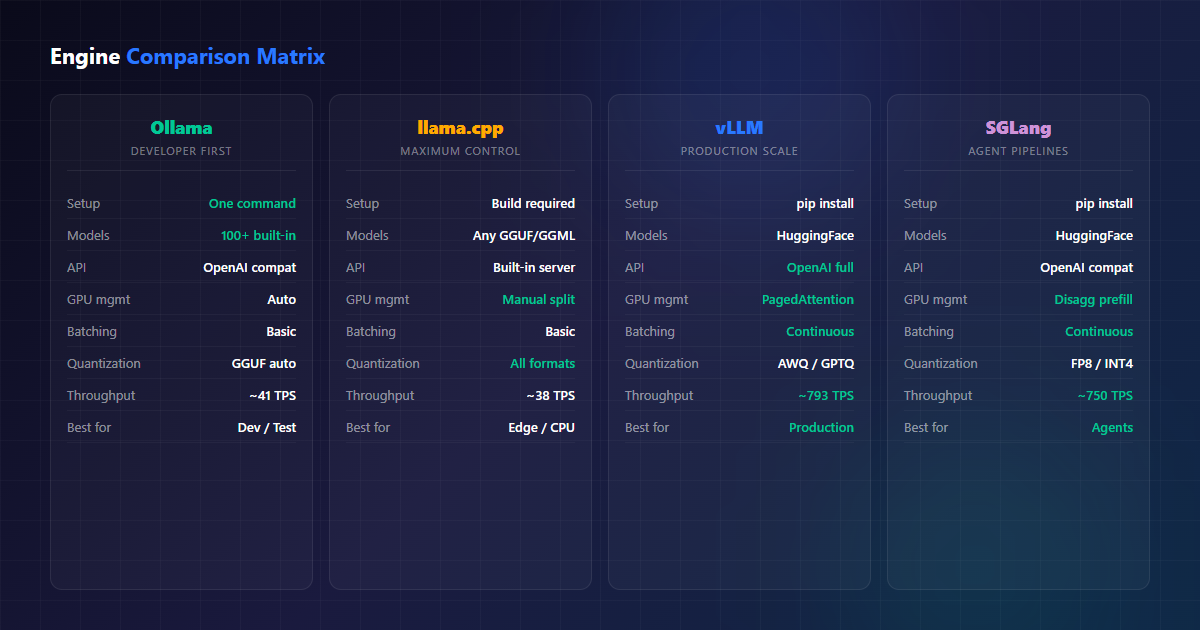
Ollama — The Docker of LLMs
Ollama wraps model downloading, quantization, and serving into a single CLI. One command to install, one command to run. It auto-detects your GPU, manages memory, and gives you an OpenAI-compatible API out of the box. The model library carries quantized versions of every major open model — Llama, Qwen, Mistral, Gemma, DeepSeek — and pulling one is as easy as ollama pull qwen3:14b.
Under the hood it’s llama.cpp, but with the sharp edges removed. That’s the point: you give up configurability in exchange for not thinking about configuration at all.
Strengths
- One-command install:
curl -fsSL https://ollama.com/install.sh | sh - 100+ pre-packaged models, all tested against the runner
- Auto GPU detection and memory management — it offloads layers until VRAM runs out, then falls back to CPU
- Built-in OpenAI-compatible API on port 11434
- Cross-platform: macOS (Metal), Linux (CUDA/ROCm), Windows
- Modelfile system for custom system prompts, templates, and parameters
- Zero-dependency daemon — no Python environment to manage
Limitations
- ~41 TPS peak throughput — versus vLLM’s 793 on comparable hardware
- No continuous batching; requests are handled serially by default (a background queue exists but it isn’t real batching)
- P99 latency balloons under concurrency — measured at 673ms vs vLLM’s 80ms in Red Hat’s benchmark
- GGUF quantization only — you can’t serve AWQ/GPTQ/FP8 checkpoints directly
- Limited observability: no Prometheus metrics endpoint out of the box
Use Cases
- Local development — test prompts, evaluate models, prototype chains
- Single-user workstations — coding assistants, document analysis, private chat
- Small internal tools — 1-5 concurrent users on a shared box
- CI and evaluation pipelines — spin up, run a model suite, tear down
- Learning — the fastest way to understand what local LLMs can and can’t do
llama.cpp — Maximum Control
The reference implementation for LLM inference. It was written in C/C++ from the ground up to run on everything from a Raspberry Pi to an H100, and it still has the broadest hardware support of any engine: CUDA, Metal, Vulkan, SYCL, and bare CPU with NEON and AVX kernels.
llama.cpp’s real superpower is quantization control. It supports the full GGUF zoo — Q4_K_M, Q5_K_M, Q6_K, Q8_0, and more — plus layer-by-layer GPU offloading. If you’ve ever wanted to run a 13B model on a 6GB card by splitting layers between VRAM and system RAM, this is the engine that lets you do it.
Strengths
- Runs on CPU, GPU, Apple Silicon, Vulkan, SYCL — and hybrid CPU+GPU splits
- Every GGUF quantization level, with fine-grained control over which layers offload where
- Smallest memory footprint of any engine — ideal for constrained hardware
- Built-in HTTP server with /completion, /chat/completion, and embeddings endpoints
- Perplexity and benchmark tooling included
- llama-server supports parallel slots for basic multi-request handling
Limitations
- Full GPU support usually means building from source (though prebuilt binaries have improved)
- ~38 TPS — marginally behind Ollama, which wraps it with fewer per-call overheads
- No continuous batching —
--parallelslots help, but they’re not PagedAttention - Configuration is manual: context size, batch size, KV cache type, offload layers — all yours to tune
- Model acquisition is your job (convert HF checkpoints to GGUF yourself)
Use Cases
- Edge deployment — ARM boards, Raspberry Pi, embedded and industrial hardware
- CPU-only servers — no GPU available, run it on the hardware you already have
- Mixed GPU/CPU — fill VRAM, spill the rest into system RAM without OOM
- Custom quantization — trade accuracy against memory at a granularity nobody else offers
- Privacy-critical offline use — no telemetry, single static binary, air-gap friendly
vLLM — Production Serving
Built for one thing: high-throughput production serving. Two innovations carry it. PagedAttention treats KV cache memory like operating-system pages, so multiple sequences share blocks instead of each reserving its own contiguous buffer — this is where the 19x throughput gap over Ollama comes from. Continuous batching recomputes the batch every iteration, slotting new requests in as others finish rather than waiting for the whole batch to drain.
Strengths
- 793 TPS peak throughput — 19x faster than Ollama on an A100 (Red Hat benchmark)
- PagedAttention: near-zero KV cache waste, more sequences per GPU
- Continuous batching: the GPU never sits idle waiting for a slow sequence
- Full OpenAI-compatible API — chat, completions, embeddings, and more
- Tensor parallelism and pipeline parallelism for multi-GPU
- AWQ, GPTQ, FP8, and INT8 quantization support with kernel-level acceleration
- Speculative decoding, LoRA serving, structured output via guided decoding
- Prometheus metrics endpoint — you can actually monitor it
Limitations
- GPU-only — no CPU inference path at all
- NVIDIA CUDA required (ROCm support exists but lags behind)
- Meaningful memory overhead just to boot — long sequences need planning
- Python dependency stack — heavier operational surface than a static binary
- Model must be in HuggingFace format (or converted); no GGUF
Use Cases
- Production API serving — SaaS products, customer-facing endpoints with an SLA
- Multi-tenant platforms — shared inference infrastructure across customers
- High-throughput batch — document processing, evaluation runs, RAG corpora
- Enterprise deployments — monitored, load-balanced, autoscaled on Kubernetes
SGLang — The Agent Engine
SGLang is the newest entrant and the only one designed around how modern LLM applications actually behave: many short calls chained together. Its two headline features are disaggregated prefill/decode — separating prompt processing from token generation so the two phases don’t contend for the same resources — and RadixAttention, a prefix tree over the KV cache that lets shared prompt prefixes be reused across requests instead of recomputed.
That second one matters enormously for agents. If your agent sends the same 4,000-token system prompt and tool definitions on every single call, RadixAttention computes it once and reuses it. For a 50-step agent loop, that’s the difference between paying for 200K prompt tokens and paying for 4K.
Strengths
- Disaggregated prefill/decode — prefill-heavy agent traffic no longer blocks generation
- RadixAttention — automatic KV cache reuse across shared prefixes and conversation turns
- Structured output (JSON schema, regex) and function calling as first-class features
- FP8 and INT4 quantization with fused kernels
- Zero-overhead scheduler — less scheduling overhead than vLLM under load
- OpenAI-compatible API, plus an HTTP server that can batch across heterogeneous requests
Limitations
- Younger project — smaller community, fewer deployment examples than vLLM
- GPU-only, NVIDIA CUDA required
- Smaller model coverage — the long tail of architectures may not be supported
- Documentation and API stability still maturing
- Fewer third-party integrations and managed offerings
Use Cases
- AI agent pipelines — multi-step tool-calling loops with shared context
- Multi-turn chat — long conversations where prefix reuse compounds fast
- Structured output at scale — JSON-mode extraction, schema-constrained generation
- Compound AI systems — chains of LLM calls sharing a KV cache
Quantization: The Trade-off Nobody Explains Properly
Before you pick an engine, you need to understand quantization — because it determines how big a model you can fit, how fast it runs, and how much quality you lose. And the engines don’t just differ in speed; they differ in which quantization formats they accept.
| Format | Used by | Bits/weight | Quality loss | Notes |
|---|---|---|---|---|
| Q4_K_M | llama.cpp, Ollama | ~4.5 | Noticeable | The default choice — fits 7B in ~4.5GB |
| Q5_K_M | llama.cpp, Ollama | ~5.5 | Small | Sweet spot if you have the VRAM |
| Q6_K | llama.cpp, Ollama | ~6.6 | Very small | Near-lossless for most tasks |
| Q8_0 | llama.cpp, Ollama | 8 | Negligible | Basically FP16 in 8 bits |
| AWQ | vLLM, SGLang | 4 | Small | Activation-aware — protects important weights |
| GPTQ | vLLM, SGLang | 4 | Small | Needs a calibration set; widely available |
| FP8 | vLLM, SGLang | 8 | ~Zero | Native on H100/B200 — fastest path on modern GPUs |
| INT4 (Marlin) | vLLM | 4 | Small | Fused kernels — best 4-bit throughput in vLLM |
The practical consequence: an engine choice locks you into a quantization family. If you build your prototype on Ollama pulling qwen3:14b (Q4_K_M GGUF) and later move to vLLM, you don’t move the file — you swap in the AWQ or FP16 checkpoint from HuggingFace. The model is the same, the packaging is different.
How Much Quality Do You Actually Lose?
Honest answer: it depends on the task, and 4-bit is not “free”. Evaluation suites like lm-eval-harness generally show:
- Q8_0 / FP8 — indistinguishable from FP16. Use it whenever VRAM allows.
- Q6_K — a fraction of a point below FP16. Safe for almost everything.
- Q5_K_M / AWQ-4 — small measurable drops, rarely noticeable in chat and RAG.
- Q4_K_M / GPTQ-4 — noticeable on math, code, and long-range reasoning; fine for summarisation and casual chat.
- Below 4 bits (Q3, Q2) — expect real degradation. Only for squeezing a model onto hardware that can’t otherwise hold it.
Lesson: Match the Format to the Engine, Not the Other Way Round
Don’t choose your quantized checkpoint first and then hunt for an engine that runs it. Decide the engine from your workload (below), then use that engine’s native format: GGUF for Ollama/llama.cpp, AWQ or FP8 for vLLM/SGLang. Converting between them later is wasted work.
VRAM Budgeting — A Worked Example
A rough rule of thumb for a decoder-only transformer:
VRAM ≈ (parameters × bytes_per_weight) + KV_cache + overhead

Example: Llama-3.1-8B at Q5_K_M on a 16GB card
  8B × ~5.5 bytes  =  ~4.4 GB weights
  KV cache (4K ctx) =  ~1.0 GB
  Runtime overhead  =  ~1.0 GB
  Total             =  ~6.4 GB  ✅ comfortable

Same model at FP16:
  8B × 2 bytes      =  ~16 GB weights  ❌ doesn't fit
The KV cache term scales with context length and batch size — which is exactly why PagedAttention buys vLLM so much headroom. Two engines can hold the same weights, but only one of them can hold 50 concurrent 8K-context conversations without thrashing.
Performance Benchmarks — And How to Read Them
The canonical public comparison comes from Red Hat’s A100 benchmark (Llama 3.1 8B instruct, single A100-PCIE-40GB, vLLM 0.9.1 vs Ollama 0.9.2), supplemented by community tests for llama.cpp and SGLang:
| Metric | Ollama | llama.cpp | vLLM | SGLang |
|---|---|---|---|---|
| Peak throughput | 41 TPS | ~38 TPS | 793 TPS | ~750 TPS |
| P50 latency | 24ms | ~26ms | 8ms | 9ms |
| P99 latency | 673ms | ~700ms | 80ms | 85ms |
| Concurrent users tested | 1–256 | 1–8 | 1–256 | 1–256 |
| Batching | None | None (slots) | Continuous | Continuous |
| Memory efficiency | Good | Best | Good (PagedAttn) | Good (RadixAttn) |
| Cold start | Seconds | Seconds | Minutes | Minutes |
| Setup complexity | One command | Moderate | Moderate | Moderate |
What the Numbers Really Mean
Three caveats before you quote these in a design doc:
- The 19x gap is a concurrency result, not a single-request result. For one user sending one message, Ollama and vLLM feel similar. The gap opens as you pile on concurrent requests — which is precisely what “production” means.
- P99 is the number that pages you at 3am. Ollama’s 673ms P99 under load versus vLLM’s 80ms is the difference between “slightly slow” and “users are retrying, which makes it worse”.
- Workload shape changes the winner. Prefill-heavy agent traffic with long shared prefixes is where SGLang’s RadixAttention can beat vLLM outright. Pure decode-heavy bulk generation, vLLM holds the edge. Benchmark your traffic, not a synthetic suite.
Lesson: Start with Ollama, Graduate to vLLM
Use Ollama for development and prototyping — it’s the fastest way to get started. When you hit the throughput ceiling (around 5 concurrent users), migrate to vLLM. Both expose an OpenAI-compatible API, so your application code doesn’t change — you swap the base URL and the model name.
Hardware Sizing per Engine
The same GPU is a great experience on one engine and a poor one on another. Here’s how to match hardware to engine:
| Your Hardware | Best engine | Realistic model | Expected throughput |
|---|---|---|---|
| Laptop CPU only | llama.cpp | 7B Q4 on 16GB RAM | 8–15 TPS |
| Apple Silicon (M-series) | llama.cpp / Ollama | 14B Q4, unified memory | 20–40 TPS |
| RTX 3060 12GB | Ollama | 8B Q5, 14B Q4 | 25–40 TPS |
| RTX 4090 24GB | Ollama → vLLM | 14B AWQ or 8B FP16 | 45 TPS single; 400+ batched |
| A100 80GB | vLLM / SGLang | 70B AWQ comfortably | 700+ TPS batched |
| 2× H100 80GB | vLLM (tensor parallel) | 70B FP16, 405B quantized | Thousands TPS |
| Old Xeon, no GPU | llama.cpp | 7B Q4_K_M | 5–12 TPS |
| Raspberry Pi 5 | llama.cpp | 3B Q4 | 3–8 TPS |
Note the pattern: Ollama and llama.cpp own the low end, vLLM and SGLang own the high end. There’s a genuine middle ground — a single RTX 4090 — where the right answer depends entirely on your concurrency, which is why scenario planning (next section) beats spec sheets.
GPU Cloud Pricing — September 2026
If you don’t want to buy hardware, GPU cloud providers offer on-demand access with per-second billing. Here’s what you’ll pay right now:
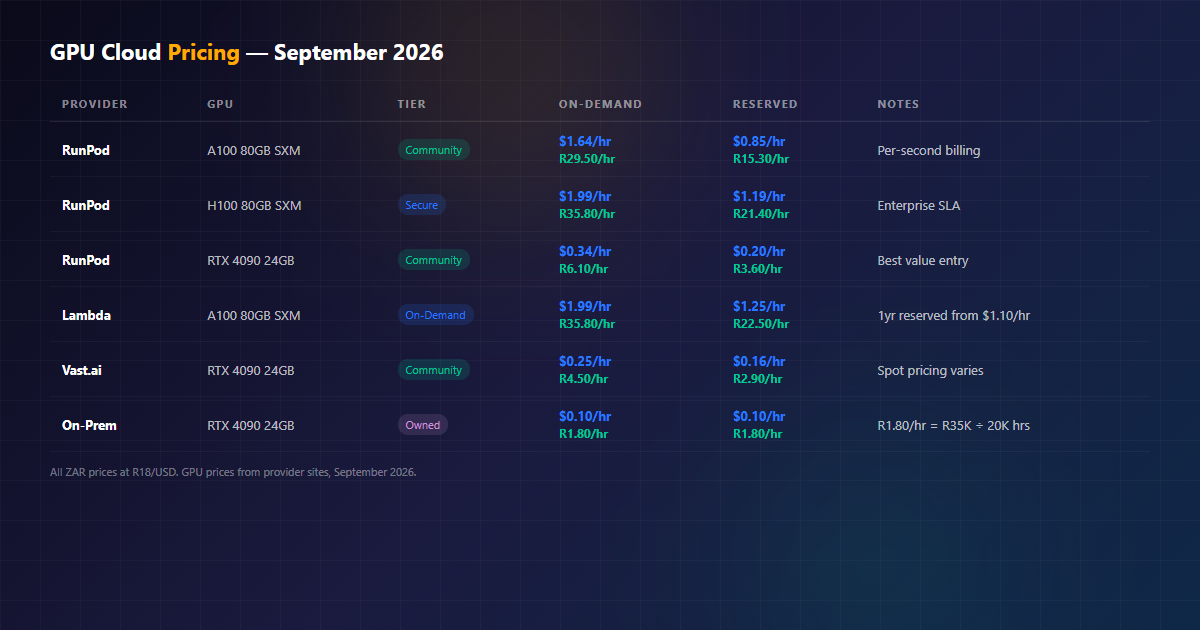
| Provider | GPU | On-Demand | Reserved | Notes |
|---|---|---|---|---|
| RunPod | A100 80GB SXM | $1.64/hr (R29.50) | $0.85/hr (R15.30) | Community cloud, per-second billing |
| RunPod | H100 80GB SXM | $1.99/hr (R35.80) | $1.19/hr (R21.40) | Secure cloud, enterprise SLA |
| RunPod | H200 SXM | $4.31/hr (R77.60) | — | 141GB VRAM — fits 70B FP16 |
| RunPod | RTX 4090 24GB | $0.34/hr (R6.10) | $0.20/hr (R3.60) | Best entry point for experimentation |
| Lambda | A100 80GB SXM | $1.99/hr (R35.80) | $1.25/hr (R22.50) | 1yr reserved from $1.10/hr |
| Vast.ai | RTX 4090 24GB | $0.25/hr (R4.50) | $0.16/hr (R2.90) | Marketplace — price varies by host |
| CoreWeave | H100 80GB | ~$2.49/hr (R44.80) | Committed use | Kubernetes-native, enterprise |
| On-Prem | RTX 4090 24GB | $0.10/hr (R1.80) | Same | R35K purchase ÷ 20,000 hrs lifecycle |
Rent vs Reserve vs Buy
- Rent on-demand (RunPod, Vast.ai) — sporadic workloads, experimentation, short projects. You pay only while the GPU runs. Default choice until you have a steady load.
- Reserve (RunPod, Lambda) — predictable workloads running 6+ months continuously. Reserved pricing typically cuts 40-50% off on-demand.
- Buy on-prem — always-on workloads, data residency, POPIA compliance, or egress costs that spiral. Requires someone to own the hardware.
Lesson: The Break-Even Math
An RTX 4090 costs ~R35,000 to buy. On RunPod Community Cloud it costs R6.10/hr — R53,400/year at 24/7. On-prem amortises to about R1.80/hr (R15,700/year over a 20,000-hour lifespan). Break-even: roughly 8 months of continuous use. Running a few hours a day? Rent. Running always? Buy. Add electricity (~R1.50/hr at 450W under load and SA tariff) and idle draw to the on-prem side of the ledger — it’s still cheaper than cloud at 24/7, but include it.
Cost Modelling: A Worked Monthly Example
| Scenario | Engine | Hardware | Monthly cost |
|---|---|---|---|
| 1 developer, 4 hrs/day | Ollama | Own RTX 4090 | ~R1,100 (amortised + power) |
| Team of 5, business hours | vLLM | RunPod 4090, 8h × 22d | R6.10 × 176 = R1,074 |
| Prod API, always on | vLLM | RunPod A100 on-demand | R29.50 × 720 = R21,240 |
| Prod API, always on | vLLM | On-prem 4090 | ~R1,300 (amortised + power) |
| Agent pipeline, 12h/day | SGLang | RunPod A100 reserved | R15.30 × 360 = R5,508 |
The always-on production row is where on-prem savings get dramatic — an order of magnitude. The one-developer row is where renting would have been fine too. Match the model to the duty cycle.
Decision Framework
Stop overthinking it. Answer three questions:
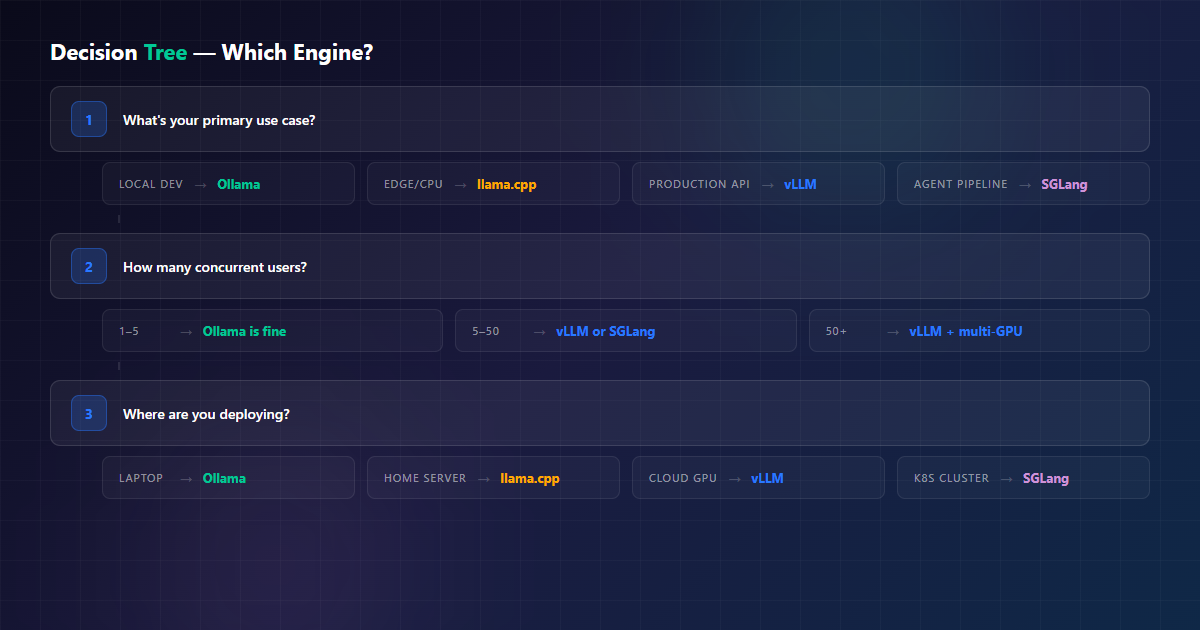
| If you need… | Use this | Why |
|---|---|---|
| Quick local testing | Ollama | One command, zero config |
| Run on a Raspberry Pi | llama.cpp | Only engine with native ARM CPU support |
| CPU-only server | llama.cpp | Built for it; Ollama adds overhead you don’t need |
| Serve 10+ users | vLLM | Continuous batching, 19x throughput |
| AI agent with tool calls | SGLang | Disaggregated prefill + RadixAttention prefix reuse |
| Structured JSON output | SGLang or vLLM | Guided decoding is first-class, not bolted on |
| Production with an SLA | vLLM + RunPod | Tried-and-tested, per-second billing, metrics |
| Maximum model variety | Ollama | 100+ tested models in the library |
| Split a model across GPU+RAM | llama.cpp | Layer-level offload control |
Three Real Scenarios
Frameworks are nice. Here’s how this plays out for three teams that actually exist.
Persona 1 — Solo Dev, One Workstation
Profile: One developer on an RTX 4090 workstation, building a RAG assistant. Usage: 3-6 hours a day, single user, iterating constantly.
Choice: Ollama. Startup time is seconds, model switching is instant, and the OpenAI-compatible endpoint plugs straight into the app. Throughput of 41 TPS is irrelevant — there’s one user.
What changes later: If this becomes a shared internal tool for five people, the same box runs vLLM against an AWQ checkpoint of the same model. Same GPU, same app code, different base URL — and suddenly concurrency isn’t a problem.
Persona 2 — Product Team Shipping an AI Feature
Profile: 50-200 daily active users, an SLA to keep, and a budget that must be predictable. Traffic is bursty — lunchtime peaks, quiet nights.
Choice: vLLM on RunPod. Continuous batching absorbs the peaks; per-second billing means quiet nights cost almost nothing. Deploy with autoscaling so the replica count tracks demand. Wire the Prometheus endpoint into Grafana before launch, not after.
Why not on-prem yet: At this duty cycle (well under 24/7), reserved cloud still beats buying. Revisit when traffic makes the GPU busy most hours of the day — that’s the 8-month break-even flipping in your favour.
Persona 3 — Agent Platform with Tool-Calling Loops
Profile: Agents running 20-60 steps per task, each step sending the same system prompt plus tool schemas. Prefill dominates the workload; conversations are long.
Choice: SGLang. RadixAttention means the shared 6K-token prefix is computed once, not sixty times. Disaggregated prefill/decode keeps generation smooth while new steps get prefilled. Structured output for tool calls is native.
Watch out for: SGLang is younger. Pin your version, keep a vLLM fallback config in the repo, and benchmark with your real prompt distribution — prefix-reuse benefits are workload-dependent and synthetic benchmarks can oversell them.
Deployment Patterns
Development — Ollama on your laptop
Install Ollama, pull a model, point your IDE at localhost:11434. No Docker, no Python env, no config files.
Small team — Ollama in Docker
docker run -d --gpus all \
  -v ollama:/root/.ollama \
  -p 11434:11434 \
  --restart unless-stopped \
  ollama/ollama
Good for 1-5 users. Beyond that, the lack of real batching starts showing.
Production — vLLM behind a load balancer
vllm serve meta-llama/Llama-3.1-8B-Instruct \
  --host 0.0.0.0 --port 8000 \
  --max-model-len 8192 \
  --gpu-memory-utilization 0.90 \
  --quantization awq_marlin \
  --enable-metrics        # Prometheus /metrics
Run one replica per GPU, put nginx or a cloud LB in front, scrape the metrics endpoint. Scale on queue depth, not CPU — the GPU is the resource that saturates.
Agent pipeline — SGLang with structured output
python -m sglang.launch_server \
  --model meta-llama/Llama-3.1-8B-Instruct \
  --host 0.0.0.0 --port 8000 \
  --tp 1 \
  --context-length 16384
Set a stable, well-ordered system prompt so prefix reuse actually hits. Randomise nothing in the shared prefix — every byte that varies is a cache miss.
Edge / on-prem — llama.cpp
./llama-server -m models/qwen3-14b-q4_k_m.gguf \
  --host 0.0.0.0 --port 8080 \
  -ngl 99 -c 8192 \
  --parallel 4
-ngl 99 offloads as many layers as fit in VRAM; the rest run on CPU. That graceful spill is exactly why llama.cpp wins on constrained hardware.
Migrating Later Is Cheap — If You Do One Thing Right
The best part of this decision: it’s reversible. All four engines expose OpenAI-compatible endpoints, so most migrations are a config change:
# Your app config — that's the whole migration surface
OLLAMA_URL     = "http://localhost:11434/v1"   # dev
VLLM_URL       = "http://gpu-box:8000/v1"      # prod
SGLANG_URL     = "http://gpu-box:8000/v1"      # agents
MODEL_NAME     = "llama-3.1-8b-instruct"       # must exist on target
What Actually Changes When You Migrate
| Migration | Code change | Real work |
|---|---|---|
| Ollama → llama.cpp | Base URL | Download/convert a GGUF with the exact chat template you were using |
| Ollama → vLLM | Base URL + model name | Swap GGUF for an AWQ/HF checkpoint; add quantization flag |
| vLLM → SGLang | Base URL | Same HF checkpoint usually works; verify supported ops |
| llama.cpp → vLLM | Base URL + model name | Lose GGUF; pick AWQ/GPTQ/FP16 equivalent |
| Any → Any (multi-GPU) | Endpoint config | Tensor-parallel flags, memory utilisation tuning |
Lesson: Keep an OpenAI-Compatible Client
Never bind your application to an engine’s native SDK. Use the standard OpenAI client with a configurable base URL and you retain the freedom to switch engines — or add a cloud fallback — in an afternoon. The one portability trap is model names: qwen3:14b is an Ollama tag, not a portable identifier. Keep a mapping of your logical model names to each engine’s actual identifiers.
Common Pitfalls (That Cost Real Time)
| Pitfall | Symptom | Fix |
|---|---|---|
| Serving production traffic on Ollama | P99 latency spikes, requests queue | Move to vLLM — same API, real batching |
| Ignoring KV cache in VRAM math | OOM at load despite weights “fitting” | Budget cache = f(context × batch); use PagedAttention or cap context |
| Choosing Q4 to “save memory” on an 80GB card | Mystery quality drops in evals | If VRAM allows, run FP8/Q8 — the savings weren’t worth it |
| Random tokens in your shared system prompt | SGLang slower than expected | Stabilise the prefix so RadixAttention can hit |
| No metrics from day one | You find out from users | Expose Prometheus metrics (vLLM) or wrap with a proxy that counts |
| Buying a GPU for a 4h/day workload | Break-even never arrives | Run the duty-cycle math first — renting wins under ~12h/day |
| Forcing vLLM onto a CPU-only box | It won’t start at all | vLLM is GPU-only. Use llama.cpp. |
| Never re-benchmarking after a model swap | New model is 3x slower, no one knows why | Different architectures have different decode profiles — retest on model change |
Lesson: Benchmark Your Own Traffic
Every number in this guide comes from someone else’s workload. Before you commit, run a short load test with your real prompt lengths, your real concurrency, and your real output lengths. An agent sending 6K-token prompts behaves nothing like a chatbot sending 200-token ones — and no public benchmark will tell you that.
Quick Start Commands
Ollama
# Install
curl -fsSL https://ollama.com/install.sh | sh

# Run a model
ollama run llama3.1:8b

# API available at http://localhost:11434/v1
llama.cpp
# Build with CUDA support
git clone https://github.com/ggml-org/llama.cpp
cd llama.cpp && make CUDA=1

# Run the server
./llama-server -m models/llama-3.1-8b.gguf \
  --host 0.0.0.0 --port 8080 \
  -ngl 99 -c 4096
vLLM
# Install
pip install vllm

# Serve a model
vllm serve meta-llama/Llama-3.1-8B-Instruct \
  --host 0.0.0.0 --port 8000 \
  --max-model-len 4096 \
  --tensor-parallel-size 1

# API available at http://localhost:8000/v1
SGLang
# Install
pip install sglang[all]

# Serve a model
python -m sglang.launch_server \
  --model meta-llama/Llama-3.1-8B-Instruct \
  --host 0.0.0.0 --port 8000 \
  --tp 1

# API available at http://localhost:8000/v1
Conclusion
There’s no single “best” inference engine — there’s the engine that fits your workload, your hardware, and your duty cycle:
- Ollama for getting started fast, and for anything with one or two users.
- llama.cpp for edge, CPU, and hybrid setups where every megabyte counts.
- vLLM for production API serving where concurrency and tail latency are the whole game.
- SGLang for agent pipelines and multi-turn conversations where prefix reuse compounds.
The good news: they’re all open source, they all expose OpenAI-compatible APIs, and migrating between them is usually an afternoon’s work. Start with Ollama, benchmark your actual workload, and graduate to vLLM or SGLang when the numbers say it’s time — not before, and not three months too late.
Need Help Choosing or Deploying?
We help businesses select and deploy the right LLM inference stack — from single-GPU setups to multi-node production clusters, with monitoring and cost modelling included. We’ll benchmark your workload and get you running on the engine that actually fits.
Related Reading
- Running Local LLMs: A Practical Guide for Production — Hardware sizing, GPU selection, and deployment architecture
- Self-Hosted TTS with Kokoro ONNX — CPU-only inference for text-to-speech
- Self-Hosted AI Infrastructure — NemesisNet’s AI deployment services
