
AI models are powerful, but they’re stuck in a box. They can reason about text, generate code, analyse data — but they can’t click buttons, query databases, or publish content without help. Every team solving this problem was building the same integration over and over: custom glue code, per-model adapters, brittle workflows.
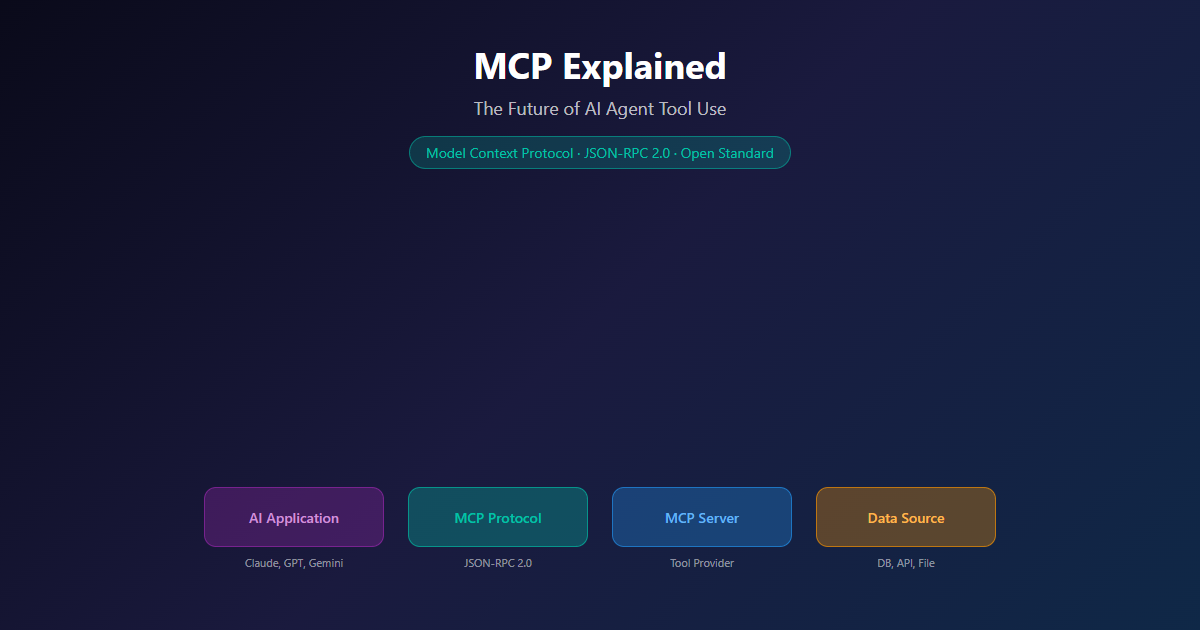
Model Context Protocol (MCP) is the open standard that breaks that pattern. Released by Anthropic in November 2024 and now governed as an open specification, MCP is the USB-C port for AI agents — one protocol, every tool, every agent. Build the server once. Any MCP-compatible agent can use it.
We’re going deep on this. Architecture, primitives, transports, SDKs, security, and the South African context for adopting it. If you’re building with AI agents — or want to — this is the protocol you need to understand.
What You’ll Learn
-
MCP Architecture
Hosts, clients, and servers — the three-tier model.
-
The Six Primitives
Tools, Resources, Prompts, Sampling, Roots, Elicitation.
-
Build Your First Server
Production-ready MCP server in 30 lines of TypeScript.
-
Security Model
User consent, tool safety, and production security.
TL;DR
MCP (Model Context Protocol) is the open standard that lets AI agents interact with your tools, data, and systems. Instead of building custom integrations for every AI model, you build one MCP server and every compatible agent — Claude, GPT, Cursor, VS Code — can use it.
The protocol uses JSON-RPC 2.0 over two transports: stdio (local, no network) and Streamable HTTP (remote, multi-tenant). It defines six primitives — three for servers (Tools, Resources, Prompts) and three for clients (Sampling, Roots, Elicitation) — plus utilities for progress tracking, cancellation, and logging.
There are 10 official SDKs across three tiers, with TypeScript, Python, C#, and Go at Tier 1. The current spec is 2025-06-18.
For South African teams, MCP matters because it eliminates the per-model integration tax. You build the connector once, in your preferred language, and every agent that supports MCP can use it. No more rewriting the same WordPress integration for Claude, then again for GPT, then again for Gemini.
The Problem MCP Solves
Here’s the pattern we kept seeing across every AI project at NemesisNet.
You want Claude to publish a blog post to WordPress. You write a custom integration. Works fine. Then a client asks for the same thing but with GPT-4. You rewrite the integration. Then Cursor wants to use it. Another rewrite. Then someone wants it in a SaaS dashboard. Yet another rewrite.
Every team we talked to had the same experience: N integrations × M agents = N×M custom connectors. It’s the integration tax. And it gets worse as you add more tools, more agents, and more workflows.
MCP fixes this by standardising the integration layer. Build your WordPress connector once as an MCP server. Claude uses it. GPT-4 uses it. Cursor uses it. Your custom agent uses it. The protocol handles discovery, capability negotiation, and message framing. You focus on the actual tool logic.
The shift: MCP moves AI integrations from “custom code per agent” to “one server, any agent.” This is the same pattern that took down the Language Server Protocol wars in developer tooling — one protocol, every editor, every language.
MCP Architecture: Host, Client, Server
MCP follows a three-tier architecture inspired by the Language Server Protocol — the same standardisation pattern that made it possible to support every programming language in every code editor.
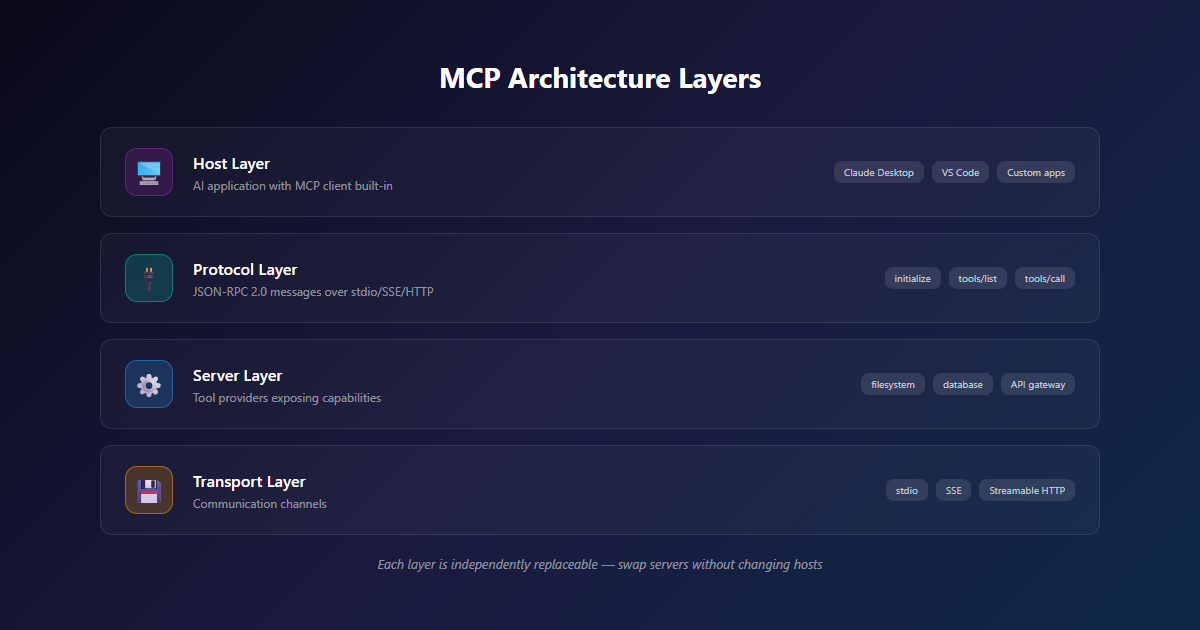
Host is the AI application the user interacts with — Claude Code, Claude Desktop, VS Code, Cursor, MCPJam, or your own custom agent framework. The host coordinates everything: it spawns clients, routes messages, enforces permissions, and manages the user experience.
Client is a connector that lives inside the host. Each client maintains a dedicated 1:1 connection with one MCP server. The host creates one client per server it wants to talk to. Clients handle protocol details, message routing, and capability negotiation.
Server is the program that provides context and capabilities. Servers expose tools (functions the agent can call), resources (data the agent can read), and prompts (templated workflows). Servers can run locally on the same machine as the host (stdio transport) or remotely across a network (Streamable HTTP transport).
The beauty of this model: the host doesn’t need to know what any server does ahead of time. It connects, asks the server what capabilities it offers, and dynamically adds those capabilities to the agent’s available tool set. New servers, new tools, zero changes to the host.
For South African teams: This architecture is a gift for local-first development. You can run sensitive MCP servers (database connectors, file system access) on-prem or in a local homelab, while the host runs in the cloud. The protocol handles both.
The Six Primitives
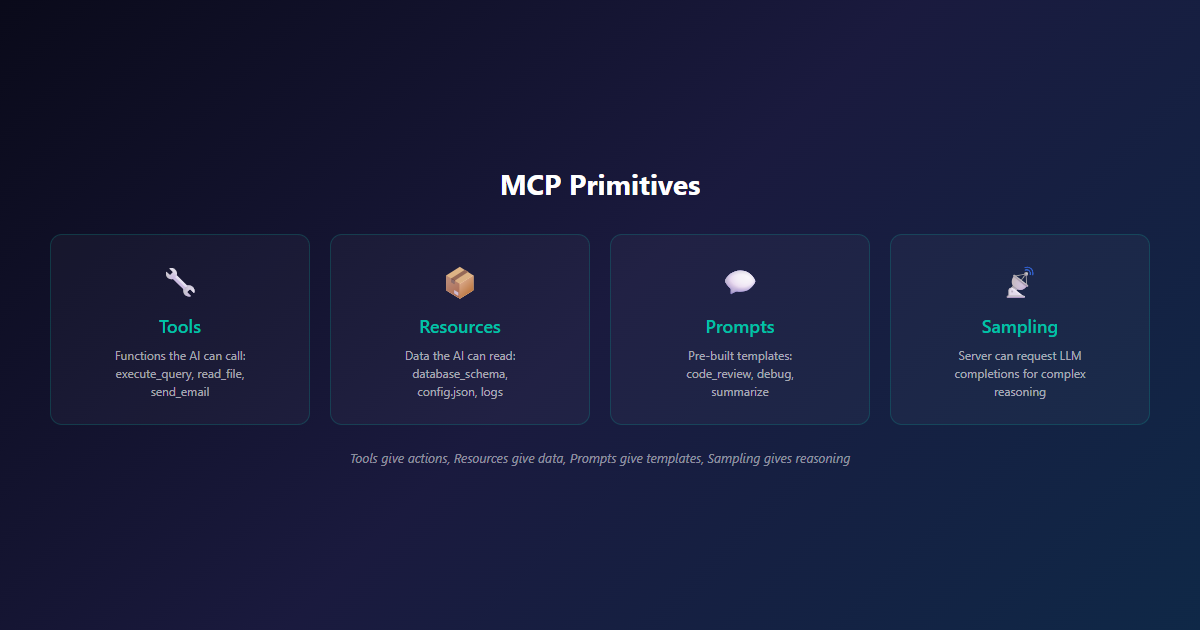
MCP’s power comes from its primitives — the building blocks that servers expose and clients offer. The current spec defines six, plus a set of cross-cutting utilities.
Server Primitives (What Servers Expose)
Resources are data sources the agent can read. Think files, database records, API responses, document contents. Resources have URIs and can be subscribed to for change notifications. A file system MCP server might expose file:///home/user/notes.md as a resource. A database MCP server might expose db://customers/schema as a resource describing the table structure.
Tools are functions the agent can execute. This is where the real action happens — create_post, send_email, query_database, deploy_application. Each tool has a name, description, and JSON Schema for its inputs. Tools are how agents do things in the world.
Prompts are reusable message templates that help structure interactions. They’re not just strings — they can include embedded resources, dynamic arguments, and multi-turn flows. A WordPress MCP server might expose a publish-blog-post prompt that takes the content and tags, then orchestrates the tools to format, upload images, set categories, and publish.
Client Primitives (What Clients Offer Back)
Sampling lets the server ask the client’s LLM to run a completion. This is powerful for agentic workflows: a server can use sampling to have the LLM summarise a fetched resource, generate a draft response, or make a decision based on data it just retrieved. The server stays model-agnostic — it doesn’t ship its own LLM SDK.
Roots lets the server ask the client for URI or filesystem boundaries. “What directories am I allowed to operate in?” “What URI schemes are in scope?” This is how servers enforce access control without the host having to pre-configure every permission.
Elicitation lets the server ask the user for additional information. “I need your API key to continue.” “Which project should I deploy this to?” “Are you sure you want to delete this?” Elicitation is the user-consent layer for MCP.
Utility Features
Beyond the six primitives, the protocol supports:
- Progress tracking for long-running operations
- Cancellation for user-initiated aborts
- Error reporting with standardised JSON-RPC error codes
- Logging for debugging and observability
- Notifications for real-time updates (e.g., tool list changes)
- Tasks (experimental) — durable execution wrappers for deferred result retrieval
The pattern: Servers expose capabilities. Clients offer capabilities. The protocol orchestrates the conversation. Every primitive is discoverable, well-documented, and tested across SDKs.
MCP vs Traditional APIs
If you’ve ever built an API integration, you know the drill: read the docs, handle authentication, parse responses, manage errors, deal with rate limits. Every API is different. MCP doesn’t replace APIs — it standardises how AI agents interact with them.
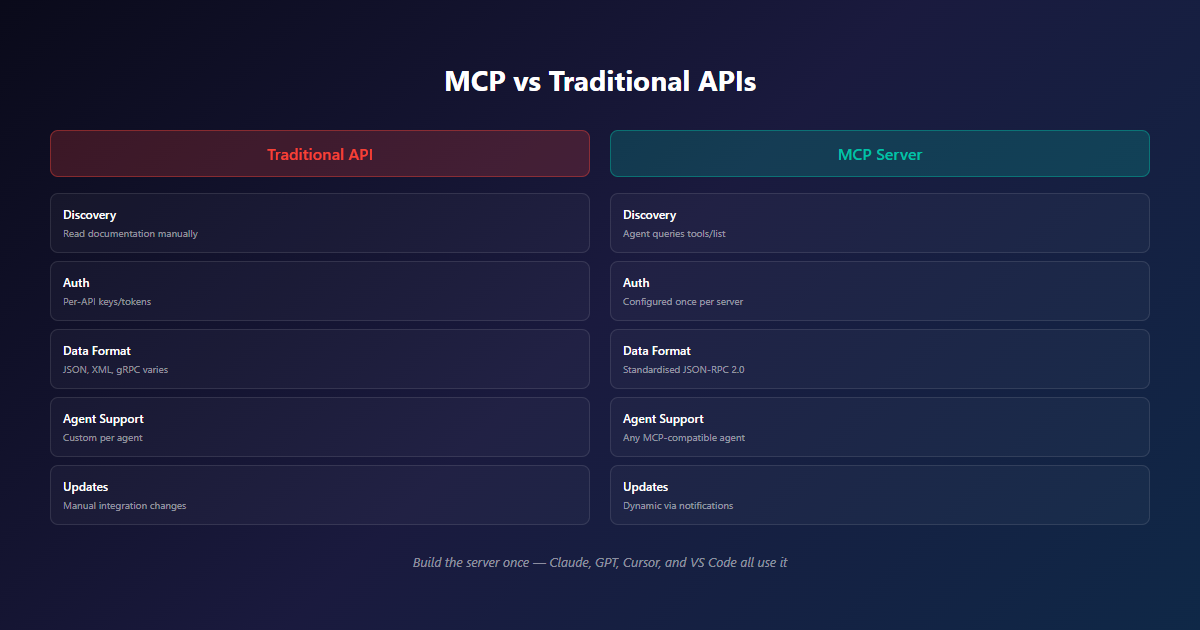
The key difference: with traditional APIs, the developer writes the integration. With MCP, the AI agent discovers and uses tools automatically. The integration code stays the same; the consumer changes.
| Dimension | Traditional API | MCP Server |
|---|---|---|
| Discovery | Read documentation | Agent queries tools/list |
| Authentication | Per-API keys/tokens | Configured once per server |
| Data format | Varies per API (JSON, XML, gRPC) | Standardised JSON-RPC 2.0 |
| Error handling | Per-API error codes | Standardised JSON-RPC errors |
| Agent compatibility | Custom per agent | Any MCP-compatible agent |
| Tool documentation | Separate docs site | Self-describing JSON Schema |
| Capability updates | Manual integration update | Dynamic via notifications |
Build the MCP server once, and Claude, GPT-4, Gemini, Cursor, and VS Code can all use it without any additional code on your end. This is why MCP is winning — it shifts the integration cost from “every consumer” to “the one server builder.”
Two Transports: Stdio and Streamable HTTP
MCP supports two transport mechanisms for moving JSON-RPC 2.0 messages between clients and servers. They’re not competing — they’re for different deployment scenarios.
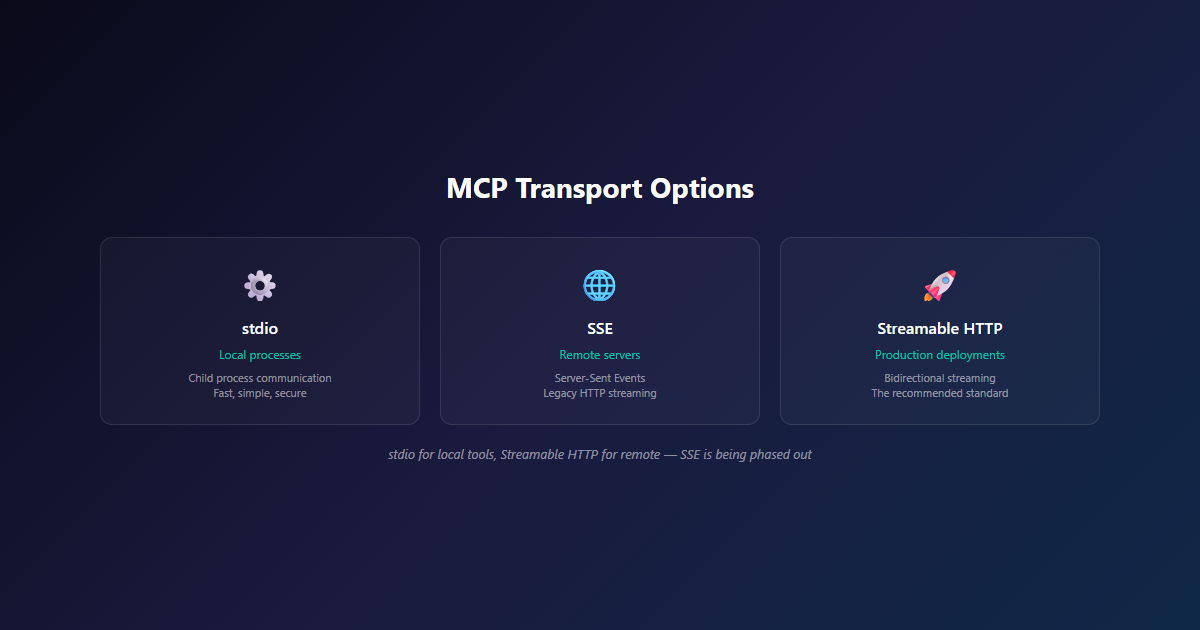
Stdio Transport (Local)
What it is: The server runs as a child process. The host spawns the server, communicates via standard input/output streams, and tears it down when done.
Best for: Local file access, database wrappers, CLI tools, dev environments, anything that should run on the same machine as the agent.
Pros: Zero network overhead, optimal performance, no authentication needed (process-level isolation handles it), works offline.
Cons: Single-client only (one process per server instance), no remote access.
South African context: Perfect for local-first AI tools. Run a PocketBase MCP server on your homelab, connect Claude Desktop to it, and your workshop data never leaves your network.
Streamable HTTP Transport (Remote)
What it is: The server runs as an HTTP service. The client sends JSON-RPC messages via HTTP POST, and the server can stream responses back via Server-Sent Events.
Best for: SaaS platforms, multi-tenant servers, public APIs, enterprise tools, anything that needs to serve many clients.
Pros: Multi-client, network-reachable, standard HTTP tooling (load balancers, CDNs, monitoring), OAuth for authentication.
Cons: Network latency, more complex deployment, requires authentication.
South African context: Essential for AI services that serve multiple clients. Our WordPress MCP server uses Streamable HTTP so any of our agents (and any external agent) can connect from anywhere.
The Rule
Use stdio for local tools. Use Streamable HTTP for remote, multi-tenant, or internet-facing services. The JSON-RPC 2.0 messages are identical — only the transport changes.
The SDK Ecosystem: 10 Official Implementations
MCP has official SDKs across 10 languages, organised into three tiers based on feature completeness and maintenance commitment.
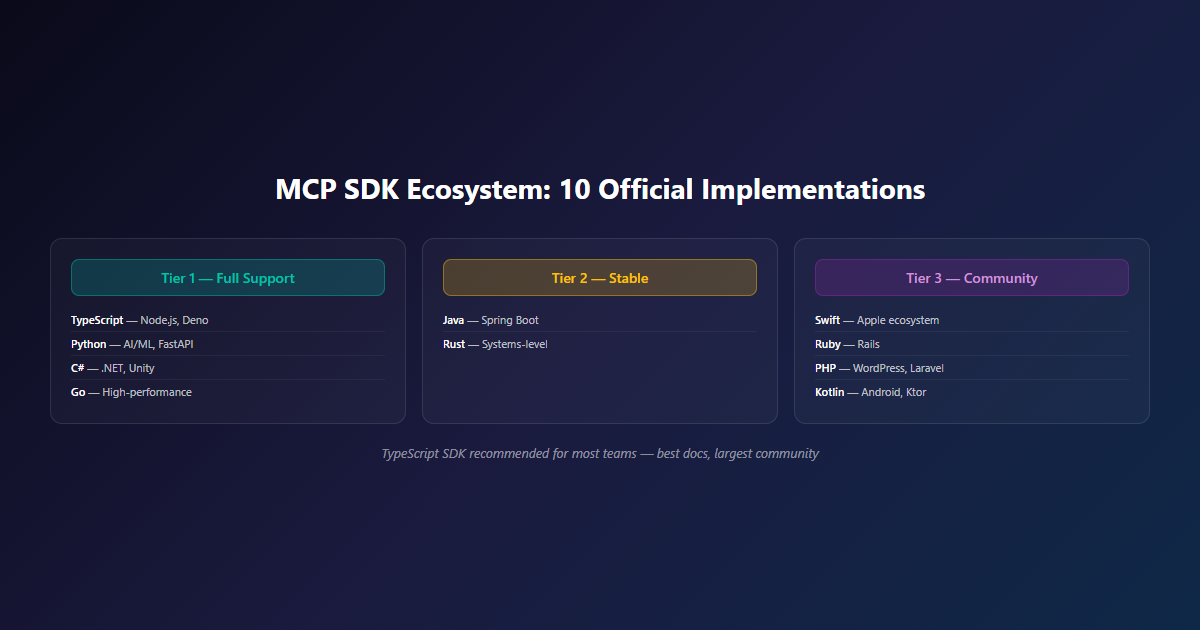
Tier 1 — Full Support
These are production-ready with complete feature coverage, type safety, and active maintenance by the MCP core team.
- TypeScript — Best for Node.js and Deno servers/clients
- Python — Best for AI/ML workflows, FastAPI integrations
- C# — Best for .NET shops and Unity tooling
- Go — Best for high-performance, concurrent servers
Tier 2 — Stable
Tier 3 — Community
- Swift — Apple ecosystem
- Ruby — Rails integrations
- PHP — WordPress, Drupal, Laravel
- Kotlin — Android, Ktor
Reference Servers
The MCP team maintains a set of official reference server implementations you can clone, learn from, or run as-is:
- Filesystem — Read/write files with permission boundaries
- GitHub — Query repos, issues, PRs
- Git — Local git operations
- Google Drive — Search and read documents
- PostgreSQL — Query databases with schema inspection
- Slack — Read channels, send messages
These are the best way to learn MCP — clone one, read the code, modify it for your own use case.
Our recommendation: For most teams, the TypeScript SDK is the fastest path to a working MCP server. The documentation is excellent, the community is large, and you’ll find the most examples. We use it for production WordPress and TTS servers.
Build Your First MCP Server
Let’s build a real MCP server. The example is a simplified WordPress publisher that exposes two tools: create_post and list_categories. It’s the same pattern we use in production for our WordPress MCP automation.
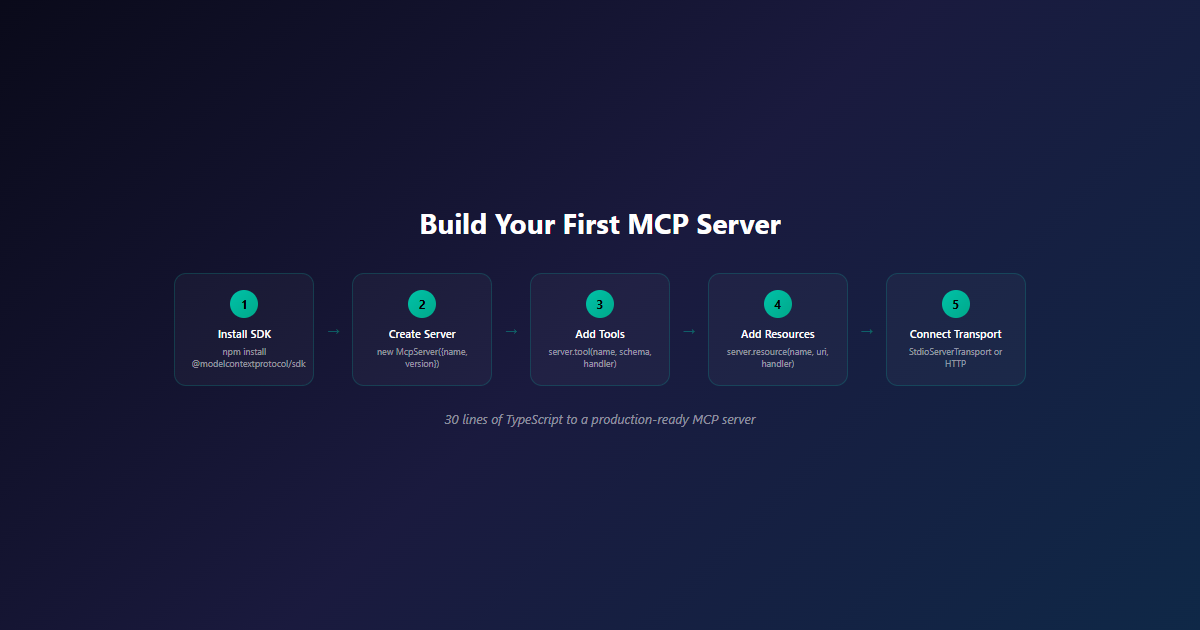
// wordpress-mcp-server.ts
import { McpServer } from '@modelcontextprotocol/sdk/server/mcp.js';
import { StdioServerTransport } from '@modelcontextprotocol/sdk/server/stdio.js';
import { z } from 'zod';

const server = new McpServer({
  name: 'wordpress-publisher',
  version: '1.0.0'
});

// Tool: Create a WordPress post
server.tool(
  'create_post',
  {
    title: z.string().describe('Post title'),
    content: z.string().describe('Post content (HTML)'),
    categories: z.array(z.number()).optional().describe('Category IDs'),
    status: z.enum(['draft', 'publish']).default('draft')
  },
  async ({ title, content, categories, status }) => {
    const response = await fetch(`${process.env.WP_URL}/wp-json/wp/v2/posts`, {
      method: 'POST',
      headers: {
        'Authorization': `Basic ${Buffer.from(
          `${process.env.WP_USER}:${process.env.WP_PASS}`
        ).toString('base64')}`,
        'Content-Type': 'application/json'
      },
      body: JSON.stringify({ title, content, categories, status })
    });

    if (!response.ok) {
      throw new Error(`WordPress API error: ${response.status}`);
    }

    const post = await response.json();
    return {
      content: [{
        type: 'text',
        text: `Post created: ${post.link} (ID: ${post.id}, status: ${post.status})`
      }]
    };
  }
);

// Tool: List available categories
server.tool(
  'list_categories',
  {},
  async () => {
    const response = await fetch(
      `${process.env.WP_URL}/wp-json/wp/v2/categories?per_page=100`
    );
    const categories = await response.json();
    return {
      content: [{
        type: 'text',
        text: JSON.stringify(
          categories.map(c => ({ id: c.id, name: c.name, count: c.count })),
          null,
          2
        )
      }]
    };
  }
);

// Start the server
const transport = new StdioServerTransport();
await server.connect(transport);
console.error('WordPress MCP server running on stdio');
That’s it. Run it with node wordpress-mcp-server.ts, configure Claude Desktop or any MCP host to point at it, and the agent now has access to your WordPress instance.
What Just Happened
The server exposes two tools. Each tool has a JSON Schema describing its inputs (via Zod) and a handler that does the actual work. The transport is stdio, so the host spawns this process and communicates over stdin/stdout. The agent discovers the tools via tools/list, reads their descriptions, and decides when to call them.
Want the agent to upload images, set featured images, or manage tags? Add more server.tool() calls. The protocol handles the rest.
For South African developers: If you’re running a WordPress site and want to automate publishing with AI, we offer this as a production MCP integration service starting from R55,000. For a DIY path, the TypeScript SDK docs are the best starting point.
Security: Consent, Privacy, and Tool Safety
MCP is powerful. That power comes with real risk — agents can read your files, query your databases, and trigger actions in your systems. The protocol was designed with security as a first-class concern, but the responsibility ultimately falls on the host application and the server implementer.
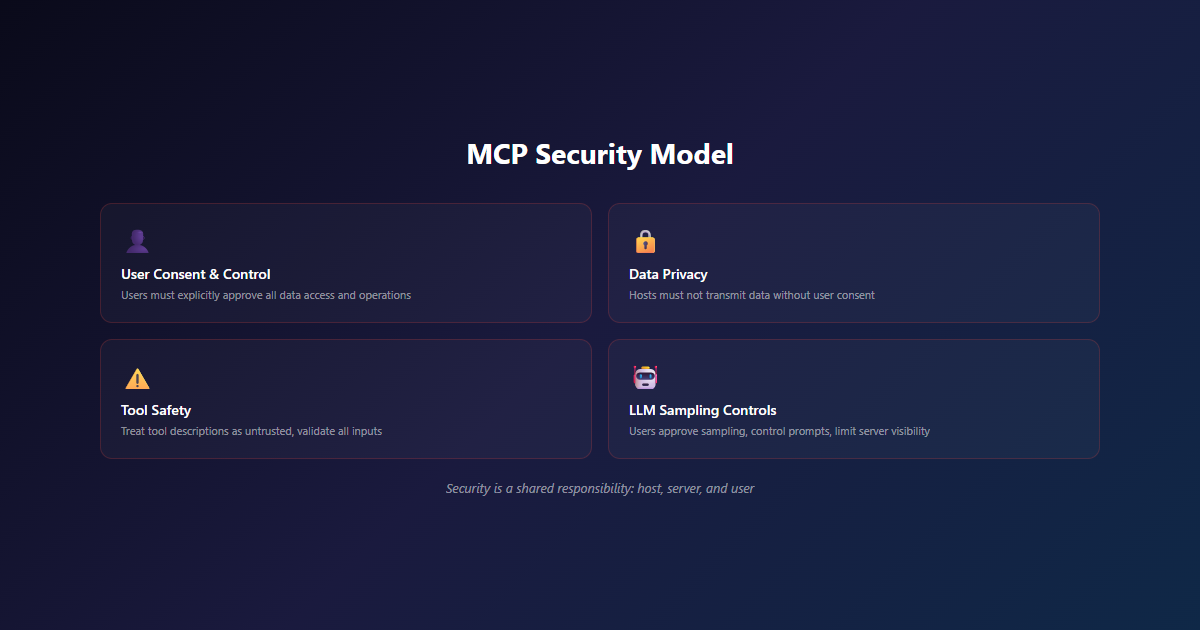
Key Security Principles
1. User Consent and Control
- Users must explicitly consent to and understand all data access and operations
- Users retain control over what data is shared and what actions are taken
- Hosts must provide clear UIs for reviewing and authorising activities
2. Data Privacy
- Hosts must obtain explicit user consent before exposing user data to servers
- Hosts must not transmit resource data elsewhere without user consent
- User data should be protected with appropriate access controls
3. Tool Safety
- Tools represent arbitrary code execution — treat them with appropriate caution
- Tool descriptions (annotations) should be considered untrusted unless from a trusted server
- Hosts must obtain explicit user consent before invoking any tool
- Users should understand what each tool does before authorising its use
4. LLM Sampling Controls
- Users must explicitly approve any LLM sampling requests
- Users should control whether sampling occurs, what prompt is sent, and what results the server can see
- The protocol intentionally limits server visibility into prompts
Practical Security Checklist
When building or deploying MCP servers:
- Scope permissions tightly — Each tool should have the minimum permissions needed
- Validate every input — Never trust agent-provided data, even from your own agent
- Audit log everything — Log every tool invocation with user, timestamp, inputs, and outputs
- Rate limit aggressively — Prevent runaway agents from overwhelming downstream systems
- Use secrets managers — Don’t hardcode API keys; use environment variables or secret stores
- Test prompt injection — Adversarial inputs in tool arguments can manipulate the agent
- Monitor for abuse — Track usage patterns, alert on anomalies
Our take: The biggest MCP security risk isn’t the protocol — it’s servers that don’t follow the security principles. A poorly-written MCP server is just a poorly-written API with extra steps. Treat server development like any other production service: threat model it, test it, monitor it.
For high-stakes integrations, we recommend a scoping session with our team before building. R10,000 gets you a security review, architecture design, and a build plan. Cheaper than rebuilding after a breach.
Real-World Use Cases
MCP isn’t theoretical. Here are the integrations we’ve built and the patterns we see working in production.
WordPress Automation
Our WordPress MCP server exposes post creation, media upload, and taxonomy management as MCP tools. An AI agent can write content, select categories, upload images, and publish — all through natural language.
Result: 80% reduction in publishing time. From 15 minutes per post to under 2 minutes. This is the same pattern we use to publish every article on this blog, including this one.
Database Querying
An MCP server wrapping a PostgreSQL database lets agents query data directly. Instead of writing SQL, the agent says “show me all customers who haven’t ordered in 90 days” and the MCP server translates that into the appropriate query — with schema awareness, connection pooling, and permission controls.
Result: Business users can self-serve data insights without learning SQL. Analysts spend time on analysis, not query writing.
File System Operations
The official Filesystem MCP server lets agents read, write, search, and organise files within configured boundaries. Combined with a code editor, you get AI-powered file management that respects your permissions.
Result: Agents can analyse directories, generate reports, and write documentation without custom file handling code.
TTS and Voice Integration
Our PocketTTS-MCP project wraps text-to-speech as MCP tools. Agents can generate speech, manage voice models, and integrate audio into workflows — all through the same protocol.
Result: Any MCP-compatible agent can now speak, not just chat. Voice becomes a first-class output.
Custom SaaS Integrations
Any SaaS with an API can be wrapped in an MCP server. CRM systems, payment processors, monitoring tools, deployment platforms — if it has an API, it can be an MCP tool. The agent doesn’t need to know how the API works. It just calls the tool.
Result: Your internal tools become agent-accessible without rewriting them. Build the MCP server once; every agent uses it.
The Future of MCP
MCP is gaining traction fast. Here’s where the ecosystem is heading.
What’s Already Here
- Anthropic, OpenAI, Google — All major AI labs support or are implementing MCP
- VS Code, Cursor, Claude Code, MCPJam — Major development tools have native MCP support
- LangChain, CrewAI, AutoGen — Agent frameworks are adding first-class MCP support
- Reference servers — Filesystem, GitHub, Git, PostgreSQL, Slack, Google Drive, and dozens more
What’s Coming
- More SDKs — Swift and Kotlin SDKs are maturing to Tier 2
- Tasks primitive — Currently experimental, will become standard for long-running operations
- Better auth — OAuth 2.1 support for Streamable HTTP servers
- Server discovery — Registries and marketplaces for finding vetted MCP servers
- Enterprise features — Audit logging, compliance, role-based access at the protocol level
The Bigger Picture
MCP is part of a larger shift in how we build software. We’re moving from “applications that have AI features” to “AI agents that use applications.” The protocol layer is what makes that shift possible without every team reinventing the integration wheel.
For South African businesses, this matters more than it might seem. We can’t all build our own AI models. But we can build MCP servers that connect our local tools, our data, our workflows to whatever AI agent our teams are using — Claude, GPT, Gemini, or something new. The protocol levels the playing field.
Our take: MCP isn’t just a technical standard. It’s an architectural commitment — building AI integrations that outlive any specific model. The teams that adopt it now will have a structural advantage as the agent ecosystem fragments and consolidates over the next few years.
Final Thoughts
Most developers interact with AI APIs constantly. Far fewer end up building the integration layer that makes AI agents actually useful in production.
MCP changes that. It’s the missing standard that turns “AI that can chat” into “AI that can do.” The protocol is mature. The SDKs are production-ready. The reference servers are battle-tested. The major labs are aligned.
Once you’ve built one MCP server, the pattern clicks. You stop thinking about “which model should I integrate with” and start thinking about “what tool should I expose.” That’s the right level of abstraction for the agent era.
The best AI integration is the one you build once and never have to rewrite.
What’s Next
MCP continues to evolve. The spec is on a predictable release cadence, with the next major revision expected later in 2026. We’re tracking:
- Tasks primitive moving from experimental to stable
- Improved auth flows for Streamable HTTP servers
- More SDKs reaching Tier 1 and Tier 2
- Server discovery mechanisms (registries, marketplaces)
- Compliance features for enterprise deployments
For South African teams specifically, we see two big opportunities:
- Local-first AI tools — MCP servers that run on your homelab or on-prem infrastructure, keeping data in-country
- Multi-tenant SaaS wrappers — Expose your existing SaaS products to AI agents without building per-model integrations
Both patterns are early. The teams that start now will own the standards and patterns the rest of the market follows.
Ready to Build With MCP?
We build custom MCP servers for South African businesses — connecting your existing tools, data, and workflows to any AI agent. From scoping sessions to production deployment, we handle the integration layer so you can focus on the tools.
Related Reading
- MCP Integrations Service — Custom MCP servers for your stack, starting from R55,000
- AI Architecture Consulting — Scoping sessions for AI integration projects, R10,000 starting
- AI Development Services — Custom AI solutions, including MCP integrations
- WordPress MCP Automation Case Study — 80% publishing time reduction with MCP
- Agent Skills Explained — The next layer: packaging capabilities for agents
- Self-Hosted AI vs Cloud APIs — When to run MCP servers locally
References
- MCP Official Documentation — Architecture, spec, and guides
- MCP Specification 2025-06-18 — Current authoritative spec
- TypeScript SDK — Production-ready Node.js SDK
- Python SDK — Production-ready Python SDK
- Reference Servers — Official example servers
- Language Server Protocol — The inspiration for MCP
- JSON-RPC 2.0 Specification — The wire protocol MCP is built on
