
The Composition API is not just a syntax change — it is a paradigm shift. After building three production applications with it, we have developed patterns that make Vue 3 codebases more maintainable, more testable, and more enjoyable to work on.
TL;DR
The Composition API solves three problems that plagued Options API: implicit mixin dependencies, poor TypeScript support, and scattered related logic. Composables replace mixins with explicit, type-safe, testable units. Pinia stores handle global state. The result: codebases that scale without drowning in complexity. Here are the patterns we use in production.
What You’ll Learn
-
Composable Patterns
useFetch, useAuth, useTenant — extract reusable logic into clean, testable functions.
-
State Management
When to use Pinia stores vs composables — and why the distinction matters.
-
Migration Strategy
Incremental migration from Options API — no big bang rewrites required.
Why Composition API?
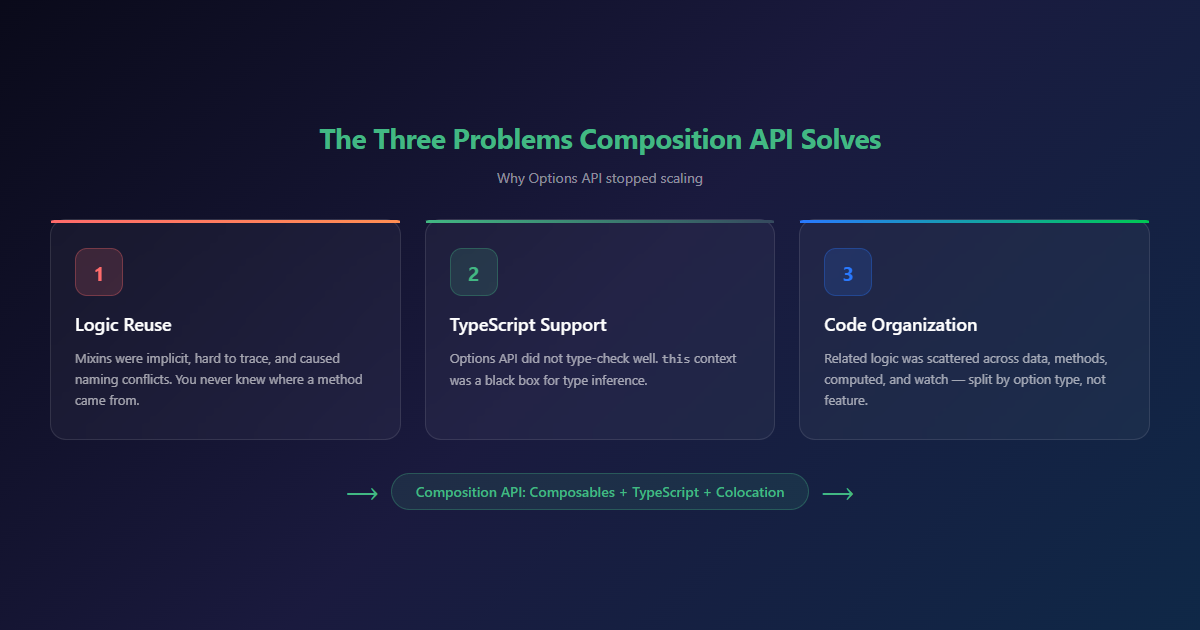
Options API served Vue well for years. But as applications grew, three problems emerged:
- Logic reuse — Mixins were implicit, hard to trace, and caused naming conflicts
- TypeScript support — Options API did not type-check well
- Code organization — Related logic was split across data, methods, computed, and watch
Composition API solves all three. Composables replace mixins. TypeScript is first-class. Related logic lives together. The result: codebases that are easier to read, refactor, and debug.
Composable Patterns
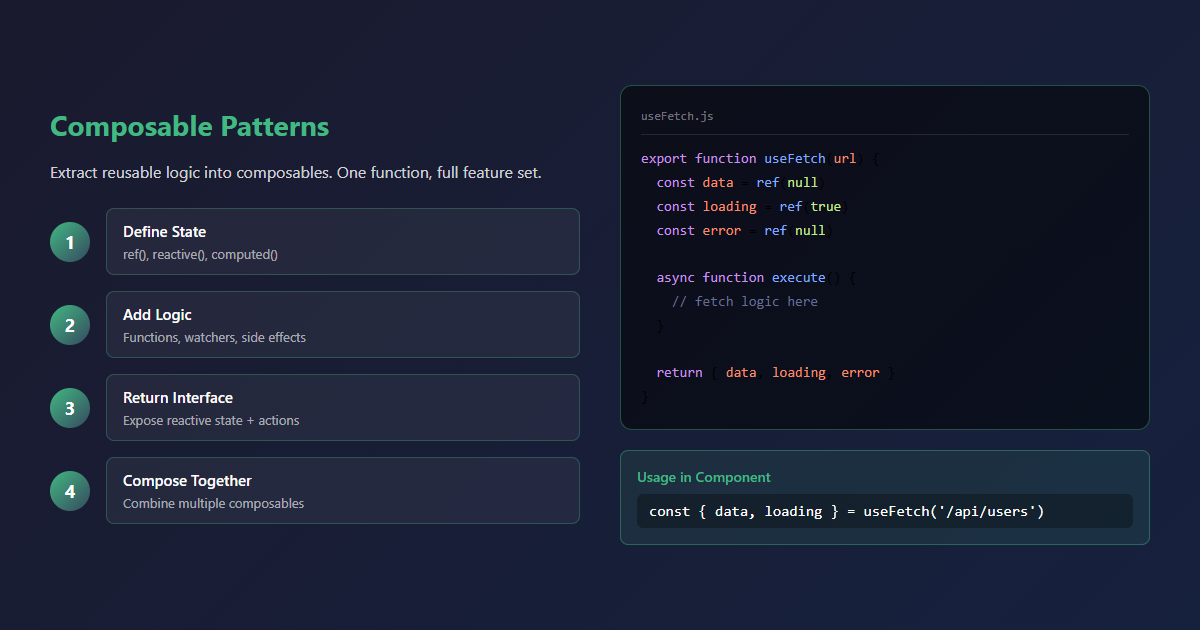
The useFetch Pattern
Every application needs data fetching. A reusable composable handles loading, error, and retry logic:
export function useFetch(url, options = {}) {
  const data = ref(null)
  const error = ref(null)
  const loading = ref(true)

  async function execute() {
    loading.value = true
    error.value = null
    try {
      const response = await fetch(url.value || url, options)
      data.value = await response.json()
    } catch (e) {
      error.value = e
    } finally {
      loading.value = false
    }
  }

  if (typeof url === 'ref') {
    watchEffect(execute)
  } else {
    execute()
  }

  return { data, error, loading, refetch: execute }
}
Usage in a component:
const { data: users, loading, error } = useFetch('/api/users')One line. Loading state, error handling, and refetch capability — all included.
The useAuth Pattern
Authentication state is needed everywhere. A composable wraps the auth store:
export function useAuth() {
  const store = useAuthStore()

  const isAuthenticated = computed(() => !!store.user)
  const user = computed(() => store.user)
  const tenantId = computed(() => store.user?.tenantId)

  function login(credentials) {
    return store.login(credentials)
  }

  function logout() {
    store.logout()
  }

  return { isAuthenticated, user, tenantId, login, logout }
}
Components do not need to know about Pinia stores. They call useAuth() and get reactive state and actions.
The useTenant Pattern
In multi-tenant applications, every API call needs tenant context. A composable handles this:
export function useTenant() {
  const auth = useAuthStore()

  const tenantId = computed(() => auth.user?.tenantId)
  const tenantName = computed(() => auth.user?.tenantName)

  function scopedFetch(url, options = {}) {
    return $fetch(url, {
      ...options,
      headers: {
        'X-Tenant-ID': tenantId.value,
        ...options.headers
      }
    })
  }

  return { tenantId, tenantName, scopedFetch }
}
Developers do not remember to add tenant headers — the composable handles it. The multi-tenancy concern is in one place, not scattered across every API call.
State Management with Pinia
Store Patterns
Pinia is Vue’s recommended state management. The Composition API makes stores clean and type-safe:
export const useAuthStore = defineStore('auth', () => {
  const user = ref(null)
  const token = ref(null)

  const isAuthenticated = computed(() => !!user.value)
  const tenantId = computed(() => user.value?.tenantId)

  async function login(credentials) {
    const response = await $fetch('/api/auth/login', {
      method: 'POST',
      body: credentials
    })
    user.value = response.user
    token.value = response.token
  }

  function logout() {
    user.value = null
    token.value = null
  }

  return { user, token, isAuthenticated, tenantId, login, logout }
})
Composables vs Stores
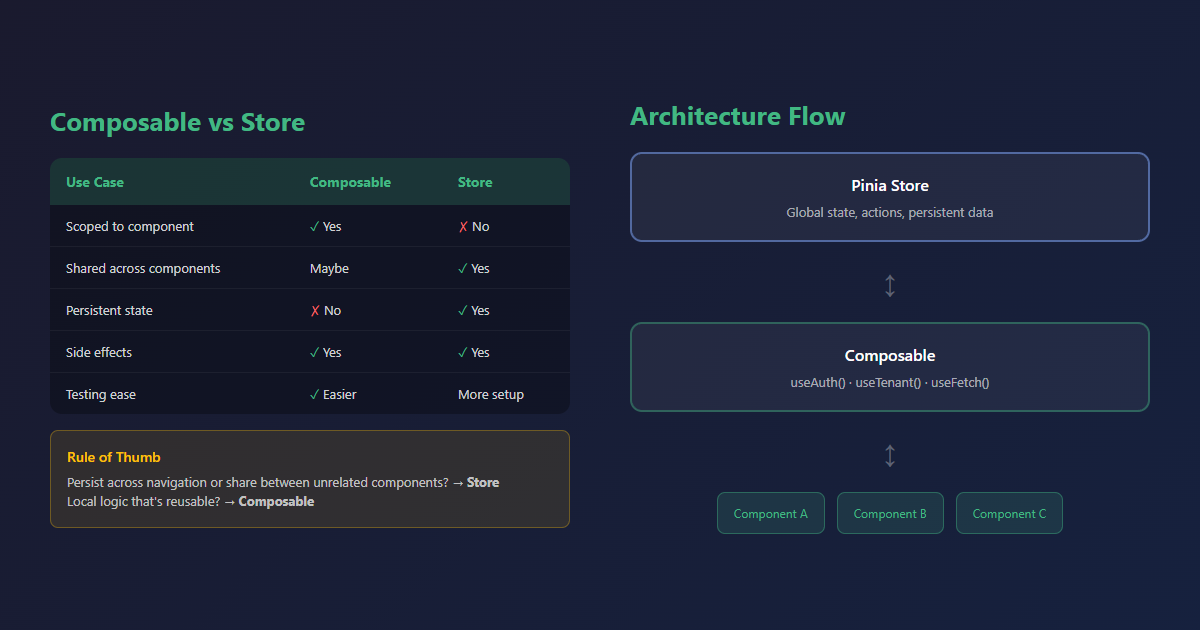
The question that comes up constantly: when to use a composable, when to use a store?
| Use Case | Composable | Store |
|---|---|---|
| Scoped to a component | Yes | No |
| Shared across components | Maybe | Yes |
| Persistent state | No | Yes |
| Side effects | Yes | Yes |
| Testing | Easier | More setup |
Rule of thumb: if it needs to persist across page navigations or be shared between unrelated components, use a store. If it is local logic that happens to be reusable, use a composable.
Real-World Component Patterns
Composable Components
Components that wrap composable logic into reusable UI:
<script setup>
import { useFetch } from '@/composables/useFetch'

const props = defineProps({
  url: { type: String, required: true },
  columns: { type: Array, required: true }
})

const { data, loading, error, refetch } = useFetch(props.url)
</script>

<template>
  <div v-if="loading">Loading...</div>
  <div v-else-if="error">{{ error }}</div>
  <table v-else>
    <thead>
      <th v-for="col in columns" :key="col.key">{{ col.label }}</th>
    </thead>
    <tbody>
      <tr v-for="row in data" :key="row.id">
        <td v-for="col in columns" :key="col.key">{{ row[col.key] }}</td>
      </tr>
    </tbody>
  </table>
</template>
One component, any data source, any columns. The composable handles the data fetching. The component handles the presentation.
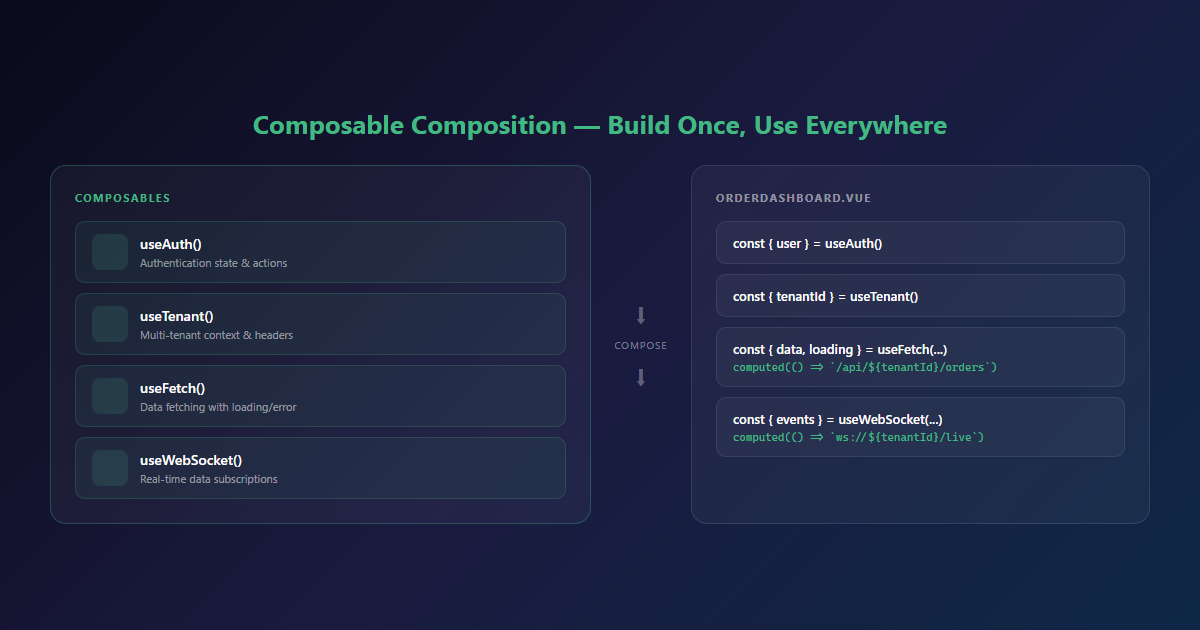
Composable Composition
Composables compose naturally — combine multiple composables in a single component:
const { user } = useAuth()
const { tenantId, scopedFetch } = useTenant()
const { data: orders, loading } = useFetch(
  computed(() => `/api/tenants/${tenantId.value}/orders`)
)
Each composable is independent. Together, they provide the full feature set. No mixin conflicts, no implicit dependencies.
Performance Optimizations
Computed Properties
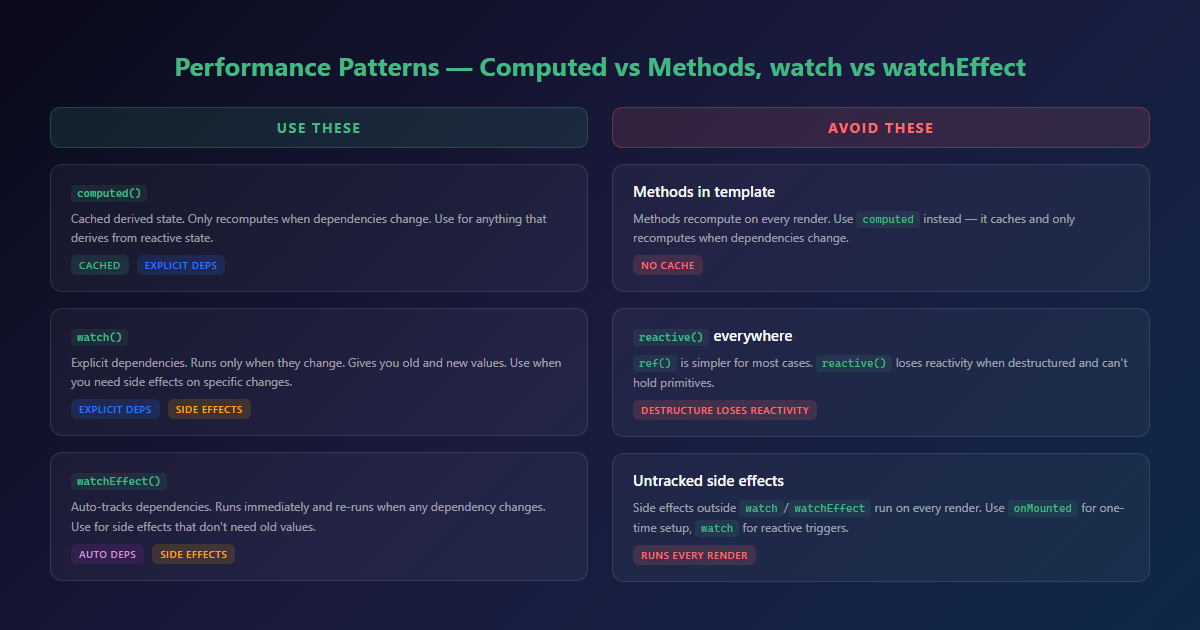
Use computed for derived state. It is cached and only recomputes when dependencies change:
const fullName = computed(() => `${firstName.value} ${lastName.value}`)Do not use methods for derived state — methods recompute on every render.
Watch vs watchEffect
watch— Explicit dependencies, runs only when they change. Use when you need old/new values.watchEffect— Auto-tracks dependencies, runs immediately. Use for side effects.
Migration Strategy
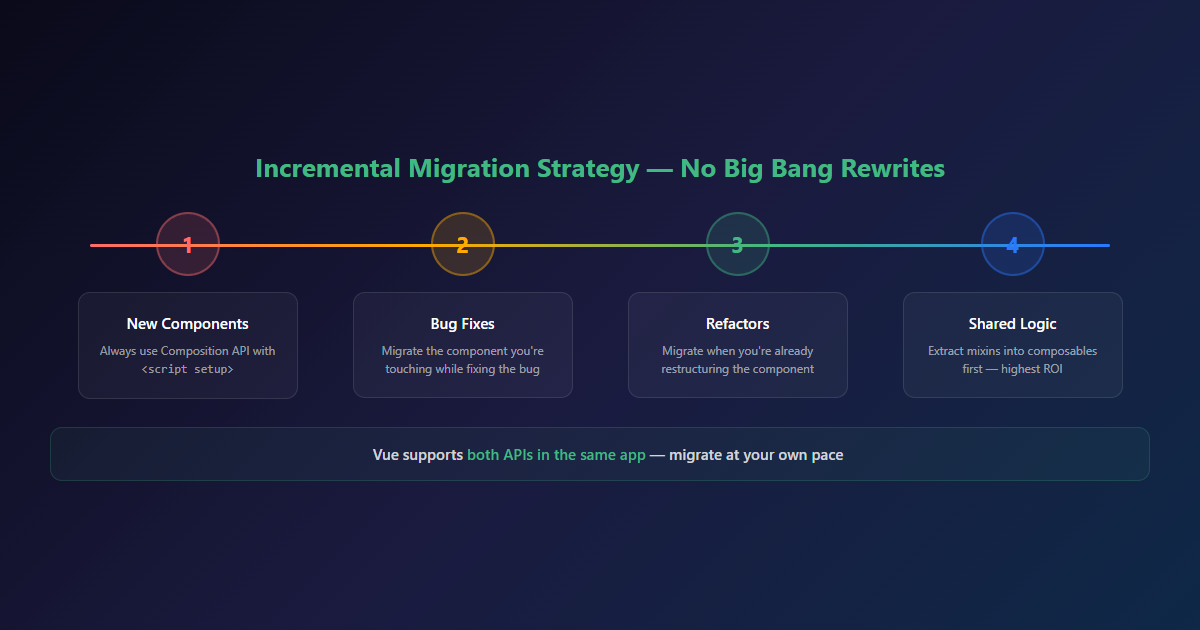
Migrating from Options API to Composition API does not have to be all-or-nothing:
- New components — Always use Composition API
- Bug fixes — Migrate the component you are touching
- Refactors — Migrate when you are already restructuring
- Shared logic — Extract mixins into composables first
Vue supports both APIs in the same application. Migrate incrementally, not in a big bang.
Common Pitfalls
- Forgetting
ref()— Reactive state needsref()orreactive(). Plain variables are not reactive. - Destructuring refs — Use
.valuein script, not in template. Destructuring loses reactivity. - Overusing
reactive()—ref()is simpler for most cases.reactive()is for complex objects.
Conclusion
The Composition API makes Vue 3 codebases more maintainable. Composables replace mixins. TypeScript is first-class. Related logic lives together. The patterns are simple, and once your team adopts them, you will not go back.
If you are building a Vue 3 application and need architecture guidance, let us talk. We build Vue 3 applications with patterns that scale.
Need Help Building Vue 3 Applications?
We design and build Vue 3 applications for South African businesses. From single-page apps to full-stack SaaS platforms, we can help you build something that works.
Related Reading
- Vue 3 vs React for Enterprise SaaS — The framework comparison that matters for production
- Building Since: Self-Hosted Claim Tracker — Vue 3 in a production multi-tenant app
- SaaS Development Services — Full-stack SaaS platforms
