
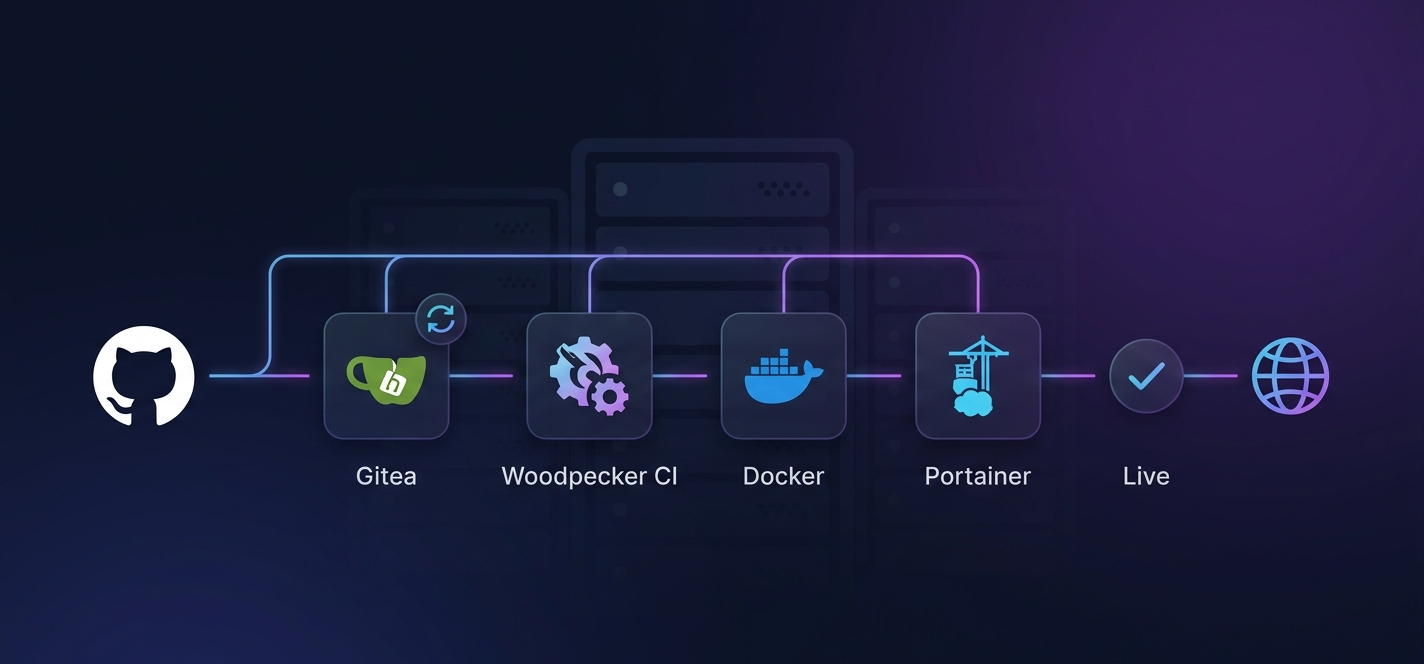
Depending on your team size and build volume, you could be spending anywhere from a few hundred to several thousand rand per month on cloud CI/CD services — from our experience working with South African SaaS teams. Your code lives on GitHub, but your infrastructure sits in a rack at home. Here’s how we built a pipeline that costs nothing in CI fees and deploys on every push.
Let’s start with a reality check: R3,000 to R10,000+ per month. That’s what a growing SaaS team can spend on cloud CI/CD services when build volume scales. GitHub Actions minutes, CircleCI seats, Vercel deployments, Docker Hub upgrades — it all adds up. And the worst part? You don’t own any of it. The platform can change its pricing model, throttle your builds, or go down, and your deployment pipeline is dead in the water.
At NemesisNet, we replaced our entire cloud CI setup with a self-hosted pipeline running on our home rack. GitHub as the source of truth, Gitea as a local mirror, Woodpecker CI as the pipeline engine, and Portainer CE for deployment. The whole thing costs roughly R1,300 per month in electricity — but that server runs eight different workloads, so CI/CD’s share is closer to R200. Zero cloud CI fees. Full audit trail. Rollback in under a minute.
This isn’t a tutorial that assumes everything works on the first try. This is the story of what actually broke, what we fixed, and the configuration that finally stuck.
The Goal
Auto-deploy our production site on every GitHub push, fully self-hosted on our home rack, with zero cloud CI costs. That sounds simple until you realise that GitHub, Gitea, Woodpecker, Docker Hub, and Portainer all need to talk to each other — and none of them were designed to work together out of the box.
We broke it into five phases. Each one solved a distinct problem. Each one had at least one “oh, that’s why it doesn’t work” moment.
| Phase | Problem | Solution |
|---|---|---|
| 1. Mirror Sync | Gitea polling is too slow | GitHub webhook triggers immediate sync |
| 2. Woodpecker CI | Agent can’t connect to server | Expose gRPC port, share Docker network |
| 3. Docker Build | docker login fails in CI | Pipe password via stdin, tag with SHA |
| 4. Portainer Deploy | CE webhooks are paid-only | REST API + curl pipeline step |
| 5. Cleanup & Rollback | Image sprawl, no rollback plan | Prune old images, SHA-tagged archive |
How the Pipeline Actually Works
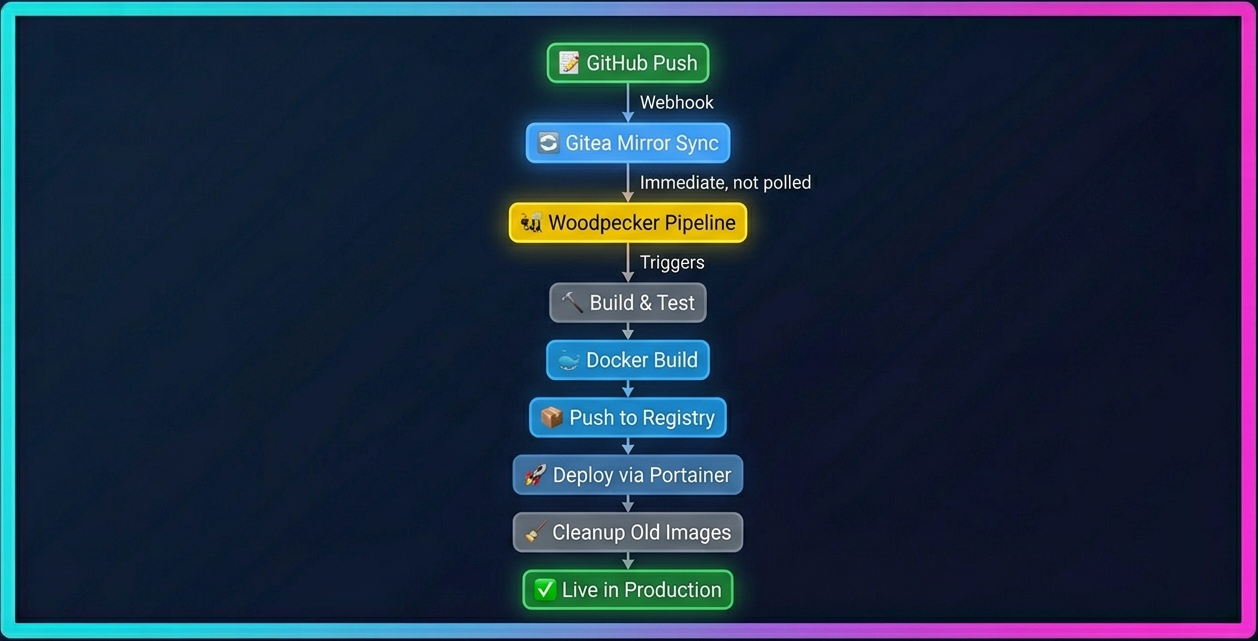
Here’s the complete flow in one paragraph: A developer pushes code to GitHub. A webhook fires immediately to our Gitea instance, triggering a mirror sync. Gitea’s webhook then notifies Woodpecker CI, which spins up a pipeline container. Woodpecker builds the Docker image, tags it with both a fixed dev tag and the commit SHA, and pushes it to Docker Hub. A final pipeline step calls Portainer’s REST API to redeploy the stack with the new image. Old images are pruned locally, while Docker Hub retains every SHA-tagged build as a free rollback archive. Total time: typically 2-4 minutes from push to production.
Operational Numbers
| Metric | Value |
|---|---|
| Average deployment time | 2-4 minutes |
| Idle RAM (Gitea + Woodpecker) | Under 1GB combined |
| Server idle power draw | 100-200W |
| Docker image size (typical) | 150-300MB |
| Services on the rack | 8 workloads sharing one server |
| Monthly CI cost | R100-200 (marginal electricity share) |
Phase 1: Mirror Sync — GitHub to Gitea
Gitea has a built-in mirror feature that pulls from a remote repository on a schedule. The problem? The default polling interval is slow. You push to GitHub and wait up to 24 hours for Gitea to notice. That’s not CI/CD — that’s CI/eventually.
The Fix: GitHub Webhook for Immediate Sync
We added a GitHub webhook that fires on every push and calls Gitea’s mirror-sync API endpoint directly:
POST /api/v1/repos/{owner}/{repo}/mirror-syncThe auth token is passed as a query parameter. We generated a scoped Gitea API token with repo read/write only — no admin, no user permissions. Minimum viable scope.
Securing the Webhook: ALLOWED_HOST_LIST
Gitea restricts which hosts can send webhooks via the ALLOWED_HOST_LIST configuration. Since we run Gitea behind Cloudflare Tunnel, GitHub’s webhook doesn’t hit Gitea directly — Cloudflare’s edge does. So the real source IPs hitting our Gitea instance are Cloudflare’s own IP ranges.
Instead of wildcarding the host list (which most people copy-paste without reading the warning), we restricted it to Cloudflare’s published IP ranges:
GITEA__webhook__ALLOWED_HOST_LIST=173.245.48.0/20,103.21.244.0/22,103.22.200.0/22,104.16.0.0/13,104.24.0.0/14,172.64.0.0/13,131.0.72.0/22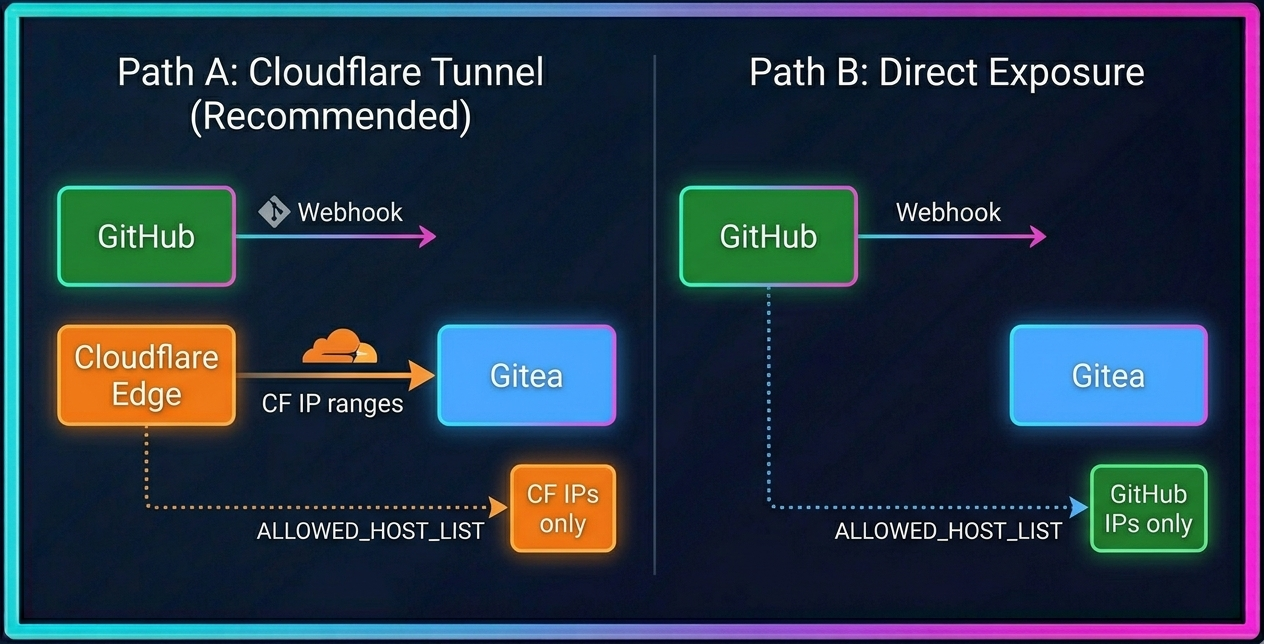
curl https://api.github.com/meta | jq '.hooks'. This returns the current webhook IP ranges as CIDR blocks.
Lesson: Scope Your Tokens to the Minimum
Don’t use an admin token where a read/write repo token works. If that token leaks, the blast radius is limited to one repository. Gitea’s token system lets you scope permissions granularly — use it. And never wildcard your webhook host list — use the actual IP ranges of your proxy or source.
Phase 2: Woodpecker CI Setup
Woodpecker is a lightweight, Docker-native CI engine. It’s simpler than Jenkins, more self-hostable than GitHub Actions, and integrates cleanly with Gitea. We ran both the Woodpecker server and agent in the same docker-compose stack.
The gRPC Gotcha
The Woodpecker agent communicates with the server over gRPC — that’s a separate port from the HTTP UI. Both need to be exposed. If you only expose the web UI port, the agent can’t connect, and your pipelines will sit in a pending state forever.
services:
  woodpecker-server:
    image: woodpeckerci/woodpecker-server:latest
    ports:
      - "8080:8000"   # HTTP UI
      - "9000:9000"   # gRPC (agent communication)

  woodpecker-agent:
    image: woodpeckerci/woodpecker-agent:latest
    environment:
      - WOODPECKER_SERVER=woodpecker-server:9000
      - WOODPECKER_AGENT_SECRET=${WOODPECKER_AGENT_SECRET}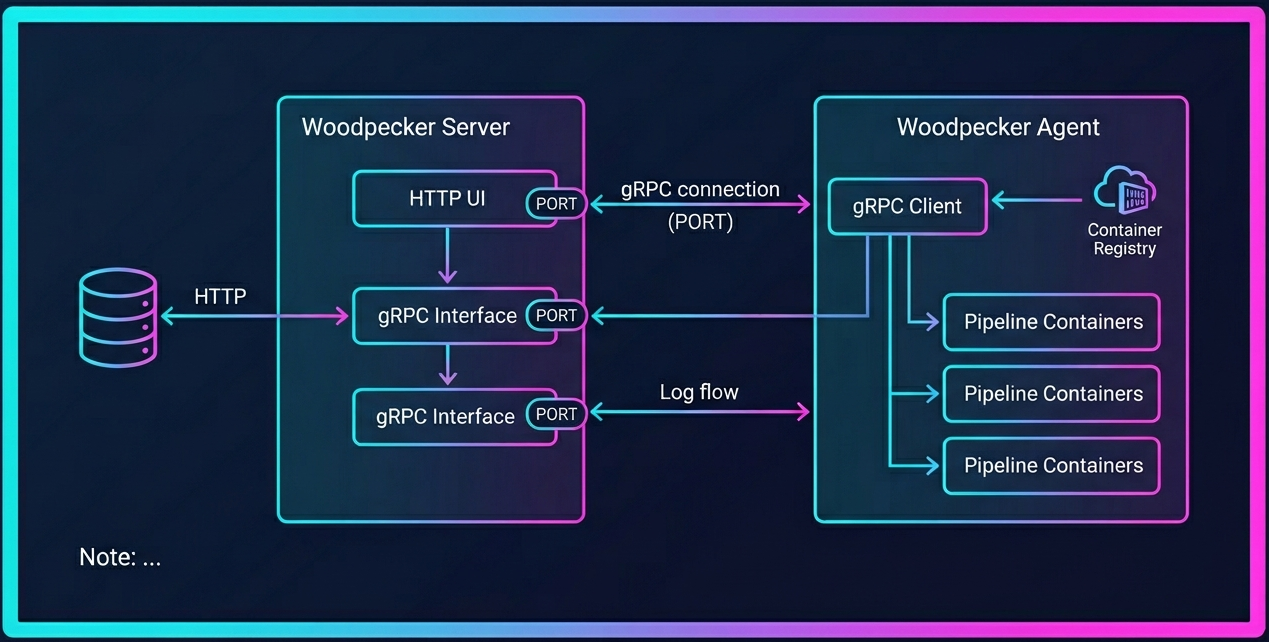
Network and Logs
Pipeline containers need to share the same Docker network as the server, or they can’t report logs back. We also configured database-backed log storage:
WOODPECKER_LOG_STORE=databaseWithout this, logs disappear on container restart. With it, you can review pipeline history across restarts.
Lesson: Keep the Agent Secret Long and Random
The agent secret is the only authentication between the agent and server. Generate it with openssl rand -hex 32 and store it as an environment variable, never hardcoded. If someone gets this secret, they can submit arbitrary pipelines to your CI server.
Phase 3: Docker Build and Push
Standard docker login fails in non-TTY CI environments. The fix is simple: pipe the password via stdin instead of passing it as an argument.
- name: docker-login
  image: docker:latest
  commands:
    - echo "$DOCKER_PASSWORD" | docker login -u "$DOCKER_USERNAME" --password-stdin
Secrets Management
We stored Docker Hub credentials as repository-scoped secrets in Woodpecker, not user-level secrets. This means the credentials are tied to the specific repository, not to a user account. If someone leaves the team, their user-level secrets don’t affect the pipeline.
DOCKER_PASSWORD, reference it as $docker_password in your pipeline YAML. This caught us out for about 20 minutes.
Tagging Strategy
We tag every build twice:
dev— a fixed tag that always points to the latest build. Portainer pulls this for auto-deploy.<commit-SHA>— a unique tag for every build. This gives us a free audit trail and enables rollback to any previous deployment.
- name: docker-build
  image: docker:latest
  commands:
    - docker build -t yourorg/yourapp:${CI_COMMIT_SHA} .
    - docker tag yourorg/yourapp:${CI_COMMIT_SHA} yourorg/yourapp:latest
    - docker push yourorg/yourapp:${CI_COMMIT_SHA}
    - docker push yourorg/yourapp:latest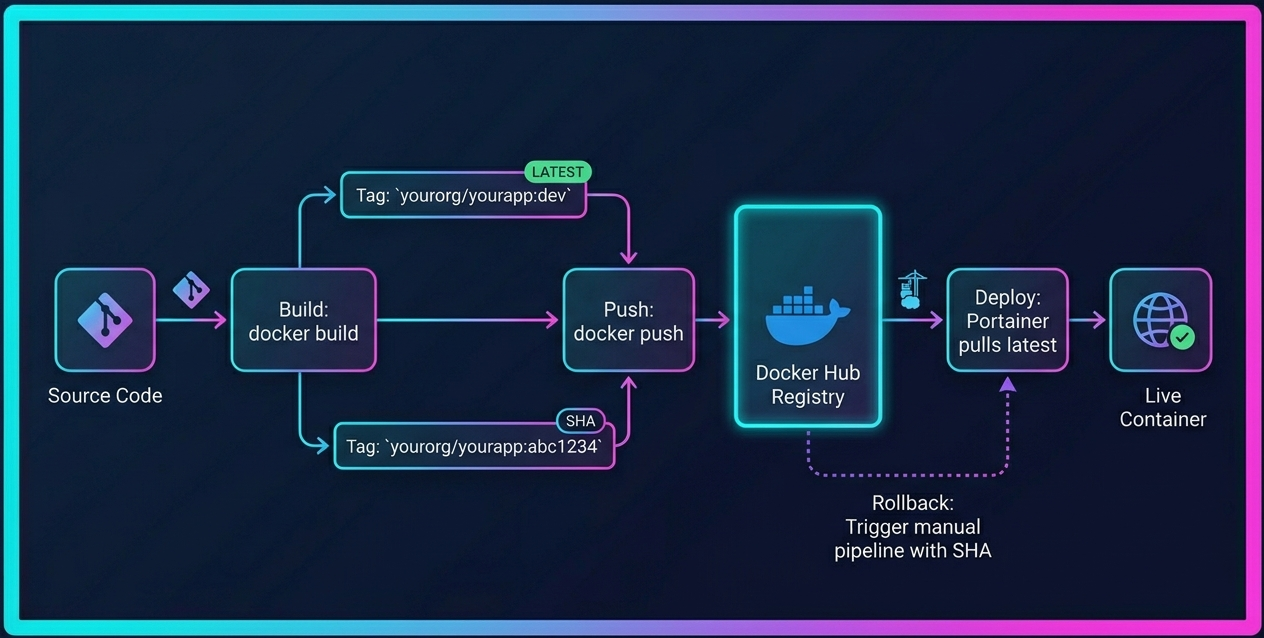
dev tag for auto-deploy and a commit SHA tag for audit trail and rollback.Lesson: Tag Every Build with a Commit SHA
It costs nothing in storage (Docker Hub free tier is generous) and makes rollback trivial. You’ll thank yourself when a deployment breaks at 2am and you need to revert to the last known-good version in under a minute.
Phase 4: Portainer Auto-Deploy via REST API
Here’s where things get interesting. Portainer CE’s stack webhooks are a paid feature (Business edition). If you’re running CE like we are, you need an alternative.
The REST API Workaround
We use Portainer’s REST API directly. The flow:
- Generate a Portainer API access token (scoped to your user only)
- Store it as a Woodpecker secret
- Use
curlimages/curlas a lightweight pipeline step to call the API
- name: deploy
  image: curlimages/curl:latest
  commands:
    - |
      curl -s -X POST \
        "https://portainer.example.com/api/stacks/${PORTAINER_STACK_ID}/git/redeploy?pullImage=true" \
        -H "X-API-Key: ${PORTAINER_API_TOKEN}" \
        -H "Content-Type: application/json"
The Endpoint ID and Stack ID are visible in the Portainer URL when you navigate to your stack. No guessing needed.
Alternative: Direct Docker Socket
For the simplest CE-compatible approach, you can skip the Portainer API entirely and interact with Docker directly:
- name: deploy-direct
  image: docker:latest
  volumes:
    - /var/run/docker.sock:/var/run/docker.sock
  commands:
    - docker pull yourorg/yourapp:latest
    - docker compose -f /opt/stacks/myapp/docker-compose.yml up -d
This requires the Woodpecker agent to have access to the Docker socket, which has security implications. But for a home rack setup, it’s the simplest path.
Lesson: Portainer CE Is Powerful but Paywalled in Places
Stack webhooks, advanced RBAC, and some automation features require the Business edition. The REST API fills most of the gaps. Read the API docs — they’re comprehensive and well-organised. Don’t let the paywall stop you from automating.
Phase 5: Cleanup and Rollback
A CI/CD pipeline isn’t complete without a cleanup strategy and a rollback plan. Both are easy to forget until your disk fills up or a bad deploy goes live.
Local Image Cleanup
We keep only the current and previous image locally. Anything older gets pruned:
- name: cleanup
  image: docker:latest
  commands:
    - docker image prune -f || true
    - docker system prune -f --filter "until=24h" || true
The || true ensures that a prune failure never breaks the pipeline. We’ve seen prune fail due to running containers, dangling volumes, and network conflicts. The pipeline should never fail because cleanup couldn’t run.
Docker Hub as a Deep Archive
Docker Hub retains all SHA-tagged images remotely. This means our free Docker Hub account acts as a deep rollback archive. We can roll back to any previous deployment by triggering a manual Woodpecker pipeline with the target commit SHA.
Rollback Procedure
- Find the last good commit hash on GitHub
- Trigger a manual Woodpecker pipeline with that tag
- Live in under a minute
# In Woodpecker UI: click "Restart" on the pipeline for the target commit
# Or via API:
curl -X POST "https://ci.example.com/api/repos/{owner}/{repo}/pipelines/{pipeline_id}" \
  -H "Authorization: Bearer ${WOODPECKER_TOKEN}"
Lesson: Separate Your Concerns
Mirror sync, CI, registry, and deploy are four distinct problems. Don’t try to solve them all in one script. Each phase has its own failure modes, and isolating them makes debugging actually possible. When something breaks, you should be able to point at exactly which phase failed.
Cost Breakdown
Here’s the real question: does self-hosting actually save money? Let’s break it down honestly.
The CI/CD Stack Itself
| Component | Monthly Cost | Notes |
|---|---|---|
| GitHub (Free) | R0 | Public repos: unlimited Actions minutes. Private repos: 2,000 free minutes/month. |
| GitHub (Pro) | R74 ($4/user) | Private repos: 3,000 free minutes/month. |
| Gitea | R0 | Self-hosted — local mirror, Woodpecker integration |
| Woodpecker CI | R0 | Self-hosted — pipeline engine, no minute limits |
| Portainer CE | R0 | Self-hosted — container management, deployment (v2.2x) |
| Docker Hub | R0 | Free tier — image registry, 1 private repo |
The Infrastructure Reality
A single CI/CD-class server running 24/7 at typical load draws roughly 100-200W. Enterprise-grade 1U servers idle at around 30-50% of peak power — a modern server with a CPU TDP ceiling of 330W might idle around 150W. At Cape Town’s 2025/26 residential tariffs (R3.91-R4.75/kWh depending on tier), that’s roughly R280-R680/month for that one node.
But here’s the critical framing: that server runs more than just CI/CD. In a typical SME on-prem setup, the same machine hosts:
- Gitea / source control
- Internal wiki and documentation
- Monitoring stack (Prometheus/Grafana)
- File storage (Nextcloud/MinIO)
- VPN gateway
- DNS resolver
- Internal chat (Mattermost)
- Development databases
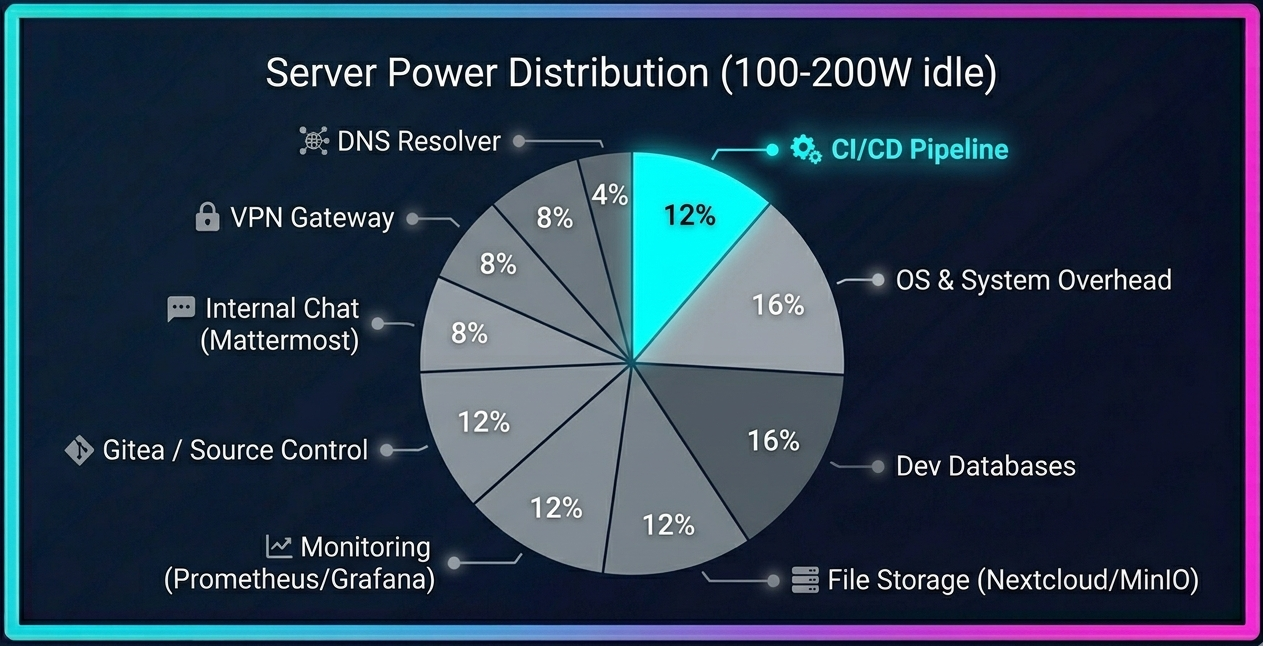
The electricity cost is shared across all of them. CI/CD is just one tenant. If you’re already running a home rack or on-prem server for other workloads, the marginal cost of adding CI/CD is negligible.
The GitHub Actions Pricing Context
In December 2025, GitHub announced a $0.002/minute platform fee for self-hosted runners in private repos, effective March 2026. This would have meant that even running CI on your own hardware would consume your included minute quota. After significant community backlash, GitHub postponed this change indefinitely to re-evaluate their approach, acknowledging they “missed the mark.” As of May 2026, self-hosted runners remain free — but the announcement signals that GitHub views self-hosted CI as a revenue opportunity, not a free feature. This may change in the future.
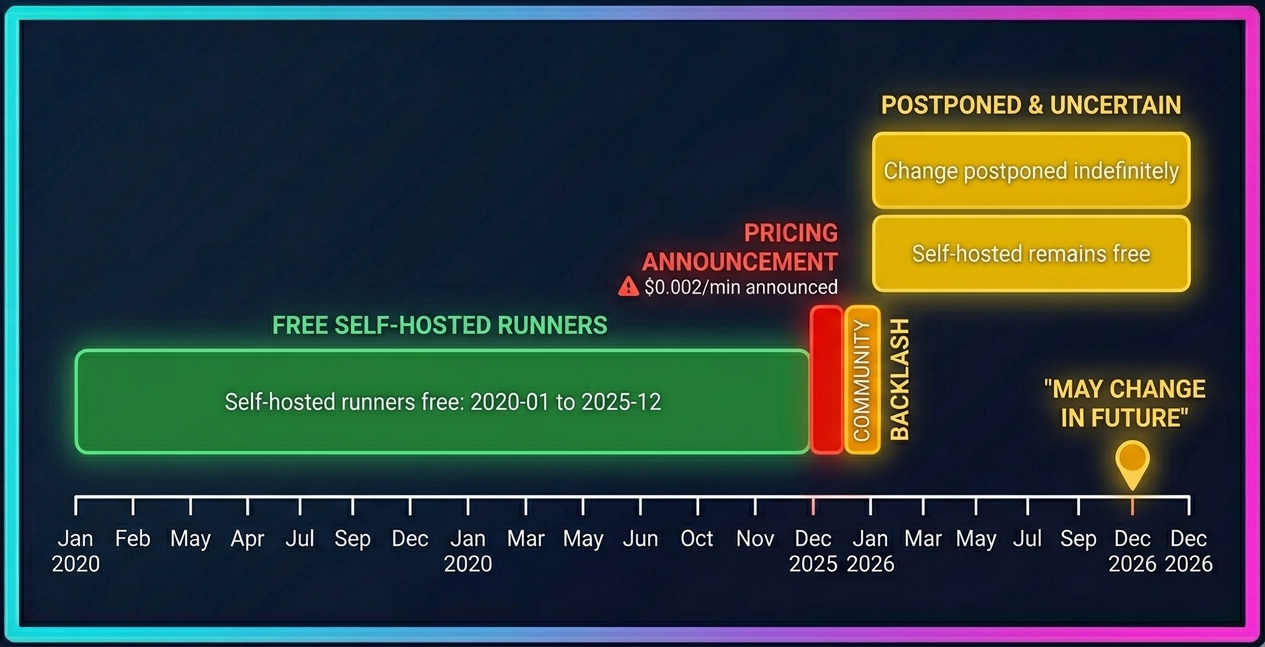
For context, GitHub Actions remains free for public repositories — developers used 11.5 billion Actions minutes on public projects in 2025 at no cost.
The Honest Comparison
| Scenario | Cloud CI (USD) | Cloud CI (ZAR) | Self-Hosted (ZAR) |
|---|---|---|---|
| Solo developer, light builds | $0 (GitHub Free) | R0 | R0 (marginal) |
| Small team (5 devs), moderate builds | $15-45/mo (CircleCI Performance) | R280-R830 | Shared infra cost |
| Growing team (10+ devs), heavy builds | $100-500+/mo (CircleCI Scale / GitHub Pro) | R1,850-R9,250+ | Shared infra cost |
Exchange rate: R18.50/USD. CircleCI pricing from official 2026 plans: Performance at $15/month base (includes 5 users, 30,000 credits) + $0.0006/credit overage, Scale at $2,000+/month custom. GitHub Pro at $4/user/month + $0.006/min for Linux 2-core runners (after Jan 2026 price cut).
The savings aren’t absolute — they depend on your build volume and whether you already have infrastructure running. If you’re a solo developer on GitHub Free, cloud CI is genuinely free. If you’re a growing team burning through minutes, self-hosting starts looking very attractive.
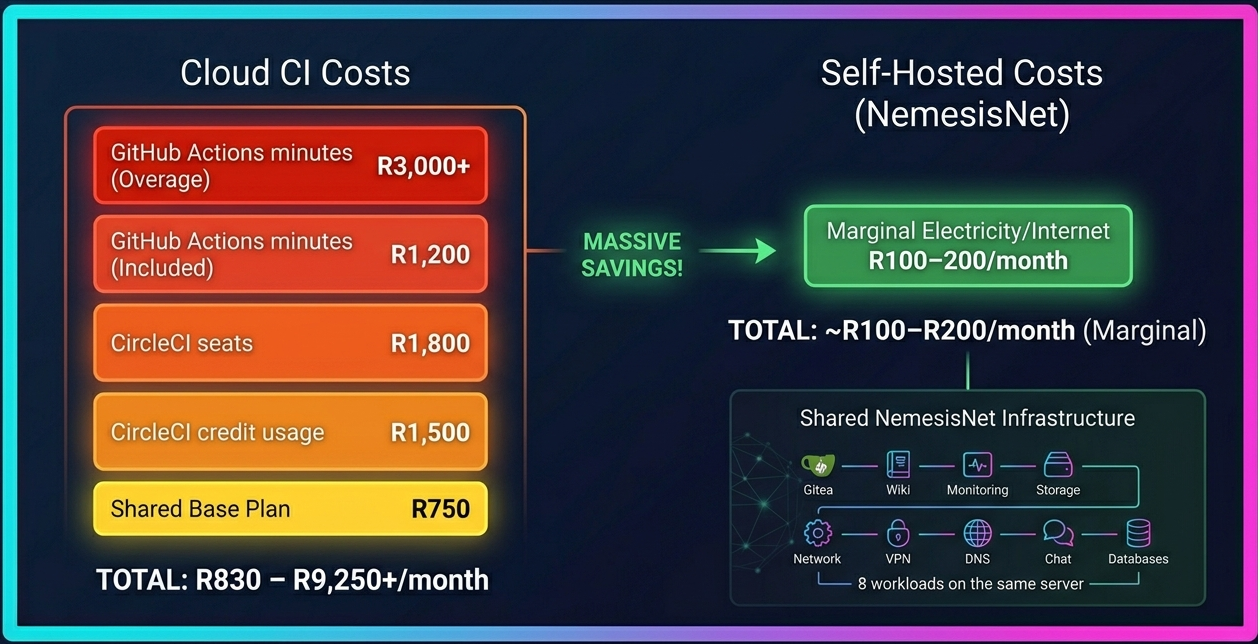
Quick Maths — Small Team CI/CD Costs
Cloud CI (CircleCI Performance, 5 devs):
Base: $15/month (includes 5 users + 30,000 credits)
Overage (50k extra credits): 50,000 × $0.0006 = $30/month
Total: $45/month ≈ R830/month
Self-hosted (marginal cost on existing rack):
Server share (CI/CD portion of 8-workload server): ~R100-200/month
Total: ~R100-200/month marginal
Assumptions: R18.50/USD, Cape Town 2025/26 tariffs R3.91-R4.75/kWh, server idle 100-200W, CI/CD is 1 of 8 workloads sharing the machine.
The real cost of cloud CI isn’t the monthly bill. It’s the dependency. When the platform changes its pricing, throttles your builds, or goes down, your deployment pipeline is out of your control. Self-hosting buys you predictability.
When Self-Hosted CI Doesn’t Make Sense
We’ve spent the last thousand words making the case for self-hosting. Now let’s be honest about where cloud CI is the better choice.
Large Teams with Complex Workflows
If you have 20+ developers pushing code constantly, the operational overhead of managing your own CI server becomes significant. Cloud CI platforms handle scaling, queuing, and resource allocation automatically.
No Reliable Infrastructure or Power Backup
If you don’t have a server, reliable internet, or power backup, self-hosting CI is a non-starter. In South Africa, this means loadshedding is a real consideration. Running CI on a home rack requires UPS backup or generator capacity — that’s an additional cost and complexity that cloud CI doesn’t have. If your server goes offline during stage 4 loadshedding, your builds queue up and your deployments stall. Factor battery backup into your total cost of ownership.
Heavy Ecosystem Dependencies
If your pipeline depends on specific cloud integrations — AWS CodeDeploy, Azure Container Apps, GCP Cloud Run — staying in that ecosystem is simpler than bridging to self-hosted.
Key Lessons Summary
- Separate concerns — mirror sync, CI, registry, and deploy are four distinct problems. Solve each one independently.
- Portainer CE is powerful but paywalled in places — the REST API fills the gap. Learn it. Note: feature gating changes between versions, so verify against your installed version.
- Every secret has a minimum viable scope — don’t use admin tokens where a read/write repo token works.
- Tag every build with a commit SHA — it costs nothing and makes rollback trivial.
- Self-hosted CI on a home rack is completely viable for production-grade deployments. The only cost is electricity and your time — but factor in loadshedding backup.
- Woodpecker lowercases secret names — match that in your YAML or spend 20 minutes debugging.
- Use
|| trueon cleanup commands — a prune failure should never break a deployment pipeline. - Don’t wildcard your webhook host list — use Cloudflare’s or GitHub’s published IP ranges instead.
Conclusion: Own Your Pipeline
This pipeline replaced our cloud CI setup and cut our monthly CI costs to essentially zero. The trade-off is operational overhead — we’re responsible for keeping Gitea, Woodpecker, and Portainer running. But for a team that already manages a home rack, that’s a marginal addition.
The real value isn’t just cost savings. It’s control. We decide when pipelines run, how long logs are kept, which images are deployed, and how rollbacks work. No platform can change its pricing model and catch us off guard. No third-party outage can block our deployments.
South African developers face unique challenges: expensive cloud services, unreliable connectivity, loadshedding, and a strong rand-to-dollar conversion penalty. Self-hosted CI/CD isn’t just a cost play — it’s a sovereignty play. Your build pipeline should be as independent as your deployment target.
You trade convenience for ownership. When the pipeline breaks at 2am, you are the cloud provider. That’s not a downside — it’s the point. Every outage you debug, every webhook you fix, every deployment you roll back teaches you something that no managed CI platform ever will.
This setup is probably overkill for beginners, but extremely valuable if you want to learn platform engineering, DevOps, self-hosting, and infrastructure ownership. It’s not about being cheap — it’s about building operational maturity that no cloud subscription can buy.
Need Help Building Your Self-Hosted Pipeline?
We design and deploy self-hosted CI/CD infrastructure for South African businesses. Whether you need a full pipeline assessment, a proof-of-concept setup, or ongoing DevOps support, our team can help you own your deployment end-to-end.
Related Reading
- Inside the NemesisNet Homelab — The rack infrastructure that runs this entire CI/CD pipeline
- Shared Identity Layer — How we evolved from per-app auth to centralized identity (deployed via this pipeline)
- Runtime Env Injection for Docker Frontends — How we deploy the same Docker image across environments without rebuilding
- Managed Retainer — Ongoing infrastructure management, monitoring, and DevOps support
- Infrastructure & DevOps Services — Docker, CI/CD, cloud networking, and infrastructure automation
