
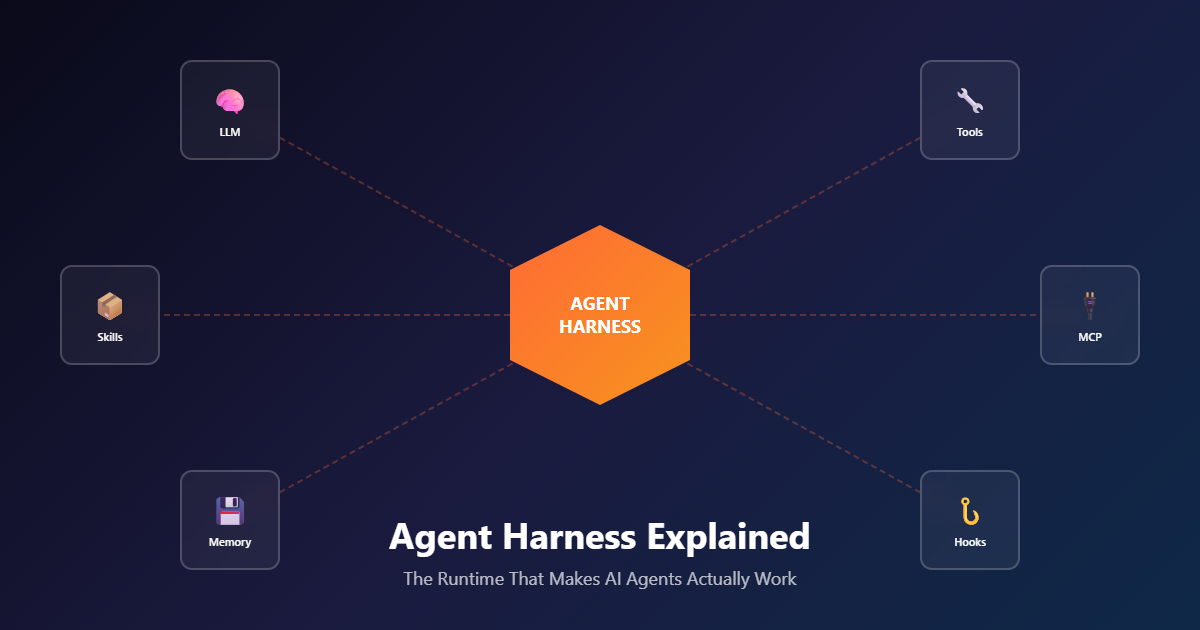
Every agent architecture article talks about LLMs, tools, and skills. Nobody talks about the thing that actually makes them work: the harness. It’s the runtime that takes your prompt, decides what tools to call, manages context, handles errors, and returns a result. Without it, you have components. With it, you have an agent.
This is the third layer in the agent stack. We covered MCP (the protocol layer) and Agent Skills (the capability layer). Now we’re covering the runtime that ties them together — and explaining why every production agent needs one.
What You’ll Learn
-
What an Agent Harness Is
The runtime that turns components into an agent.
-
The Agent Loop
Receive → Context → LLM → Tools → Return.
-
Harness Capabilities
Context, permissions, sessions, hooks, subagents.
-
Build Your First Agent
Working code with Claude Agent SDK.
TL;DR
An Agent Harness is the runtime that orchestrates an AI agent: it receives prompts, loads context (system prompts, Skills, conversation history), calls the LLM, executes tools (MCP servers, scripts, file operations), handles errors, manages permissions, and returns results. It’s the operating system for AI agents.
Claude has two main harness options: the Claude Agent SDK (a library that runs the agent loop in your process) and Managed Agents (a hosted REST API that runs the agent in Anthropic’s infrastructure). The Claude Code CLI uses the same harness internally for interactive development.
Key capabilities include: agent loop management, context loading, tool execution, permission system, session management, hooks for custom code, and subagents for delegation. The harness sits on top of MCP (the protocol) and Skills (the capabilities) to produce a working agent.
If MCP is the transport and Skills are the expertise, the Harness is where it all runs. Most production agents need a harness by month three — building one from scratch is possible, but using a battle-tested one is almost always the right choice.
The Problem: Components Don’t Make an Agent
Here’s where most teams get stuck. They’ve got:
- An LLM API (Claude, GPT, Gemini)
- A list of MCP servers that expose tools
- A set of Agent Skills for domain expertise
They wire them together with a simple loop: “call the LLM, see if it wants to use a tool, call the tool, call the LLM again.” It works for a demo. It breaks in production.
Why? Because the simple loop doesn’t handle:
- Context overflow — Long conversations blow past the context window
- Error recovery — A failed tool call kills the whole agent
- Permission control — The agent can do anything the tools allow
- Session persistence — Every conversation starts from zero
- Observability — No way to see what the agent actually did
- Cost control — No way to cap spending or interrupt runaway loops
An Agent Harness is the solution. It handles all of this so you can focus on capabilities, not plumbing.
Think of the harness as the operating system for AI agents. The LLM is the CPU, MCP servers are the peripherals, and Skills are the applications. The harness is what makes them all work together reliably.
The Agent Stack: Three Layers
Modern AI agent architecture is three distinct layers. Each one solves a different problem.
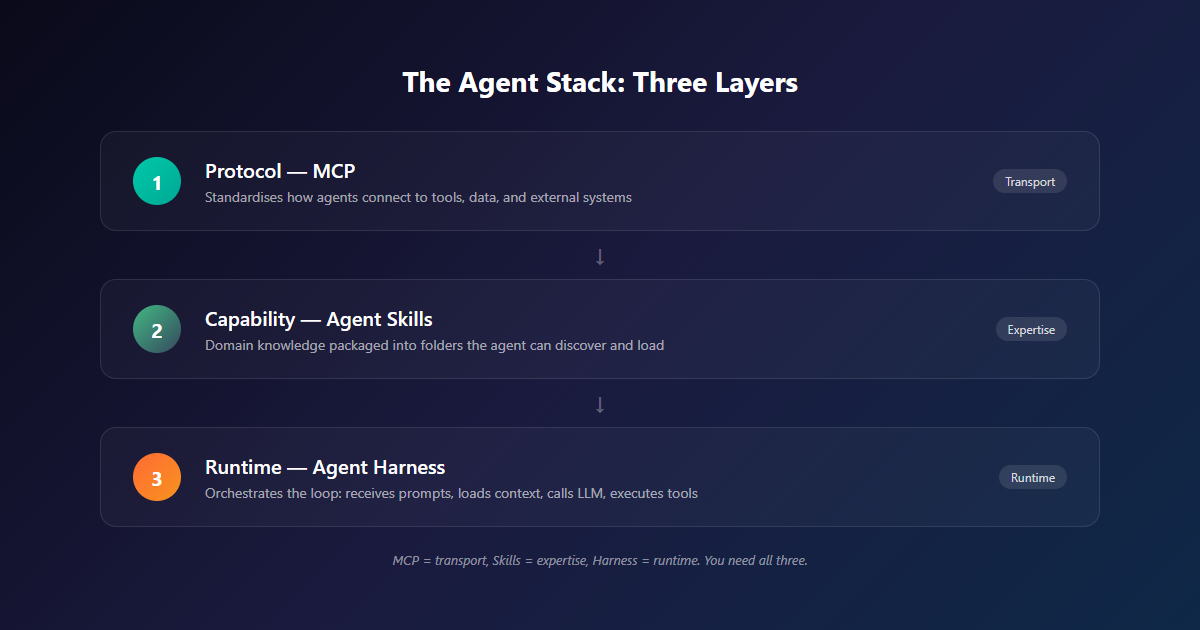
Layer 1: Protocol — MCP
MCP (Model Context Protocol) is the transport layer. It standardises how agents connect to tools, data, and external systems. Without MCP, every agent-tool connection is custom code. With MCP, you build a server once and any agent can use it.
Layer 2: Capability — Agent Skills
Agent Skills are the expertise layer. They package domain knowledge (instructions, scripts, reference docs) into folders the agent can discover and load. Without Skills, you have a smart agent that doesn’t know your work. With Skills, you have an expert.
Layer 3: Runtime — Agent Harness
The harness is where it all runs. It receives prompts, loads context, calls the LLM, executes tools, handles errors, manages permissions, maintains sessions, and returns results. Without a harness, you have components. With one, you have an agent.
The architecture: MCP = transport, Skills = expertise, Harness = runtime. They compose. You need all three for production agents.
The Agent Loop
At the core of every harness is the agent loop: a repeating cycle that turns a prompt into a result. The Claude Agent SDK runs this loop automatically. Understanding it helps you reason about agent behaviour and debug issues.
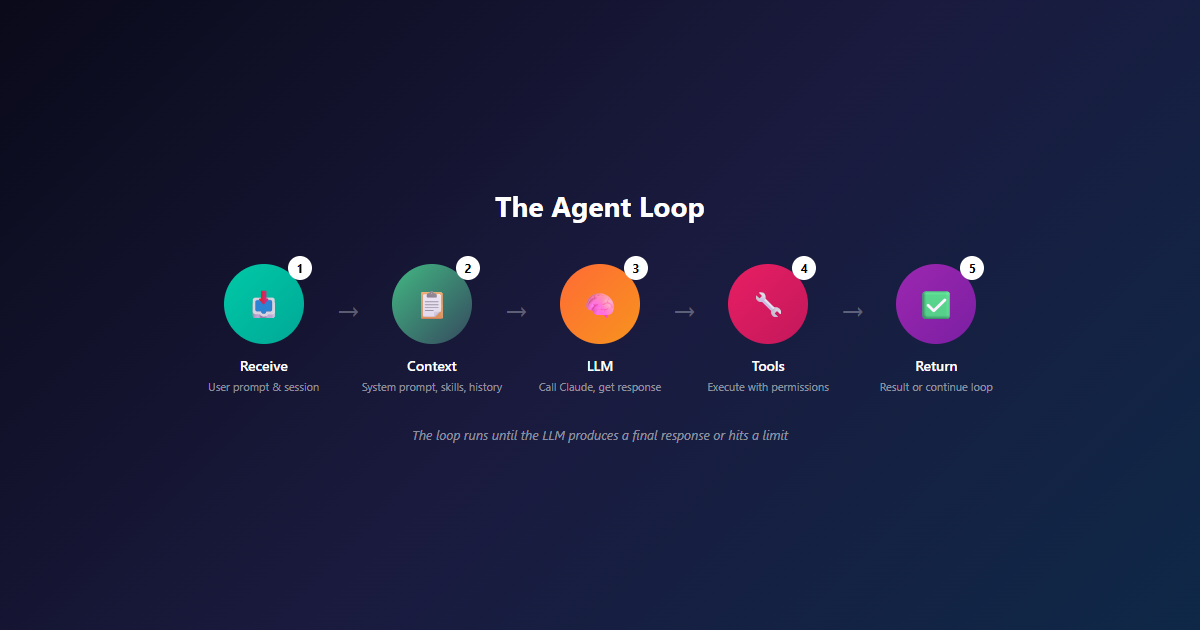
The loop runs in five steps. Each iteration, the harness:
- Receives the prompt — Captures the user’s request and creates a new session
- Loads context — System prompt, Skill metadata, conversation history, tool definitions
- Calls the LLM — Sends the assembled context to Claude and waits for a response
- Executes tools — If the LLM requested tool calls, runs them with permission checks and hooks
- Returns the result — Sends tool results back to the LLM, which either continues the loop or produces a final response
The Loop Is Where Quality Happens
The loop seems simple, but every production agent has a sophisticated harness around it. Error recovery, retries, permission checks, hooks, context management, session persistence — these are the features that turn a demo into a production system.
What a Harness Does
A production Agent Harness handles eight core responsibilities. Each one is a feature you’d otherwise have to build yourself.
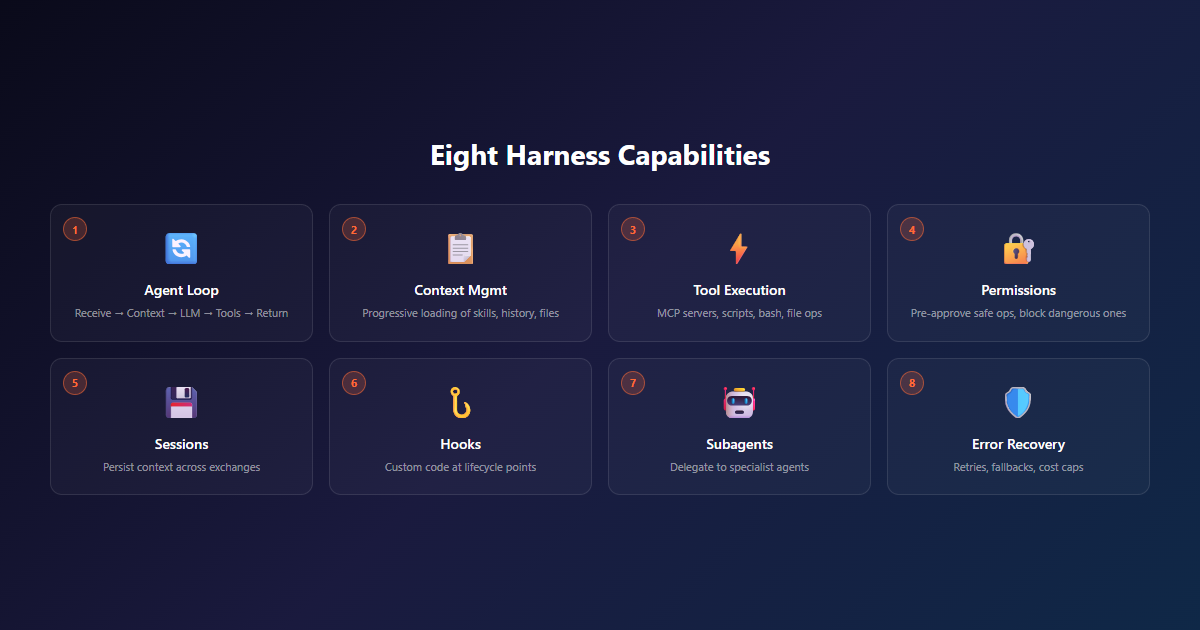
Here’s what each one does in production:
1. Agent Loop Management
The basic receive → context → LLM → tools → return cycle. The harness runs this loop until the LLM produces a final response, hits a max-iteration limit, or errors out.
2. Context Management
Loading the right context at the right time: Skill metadata at startup, Skill body when triggered, referenced files on demand, tool results from previous turns. The harness handles progressive disclosure automatically.
3. Tool Execution
Running MCP tools, scripts, bash commands, file operations, and any other capability the agent needs. The harness handles async coordination, result capture, and error propagation.
4. Permission System
Pre-approving safe operations (Read, Glob, Grep), blocking dangerous ones (rm -rf), and requiring user approval for sensitive actions. Without this, your agent can do anything the tools allow — including things you didn’t intend.
5. Session Management
Maintaining context across multiple exchanges, capturing session IDs, and supporting resume or fork operations. Without this, every conversation starts from zero.
6. Hooks
Running custom code at key points in the agent lifecycle: PreToolUse (before a tool runs), PostToolUse (after a tool runs), Stop (when the agent finishes), SessionStart, SessionEnd, UserPromptSubmit.
7. Subagents
Spawning specialised agents for focused subtasks. Your main agent delegates work to subagents (like “code-reviewer” or “test-runner”) and gets results back. Subagents can have different tools, prompts, and permissions.
8. Error Recovery
Retrying transient failures (network timeouts, rate limits), surfacing permanent failures with context (so the LLM can adapt), and preventing runaway loops (max iterations, cost caps).
When to Use a Harness
Not every AI use case needs a harness. Here’s how we decide.
Use a Harness When
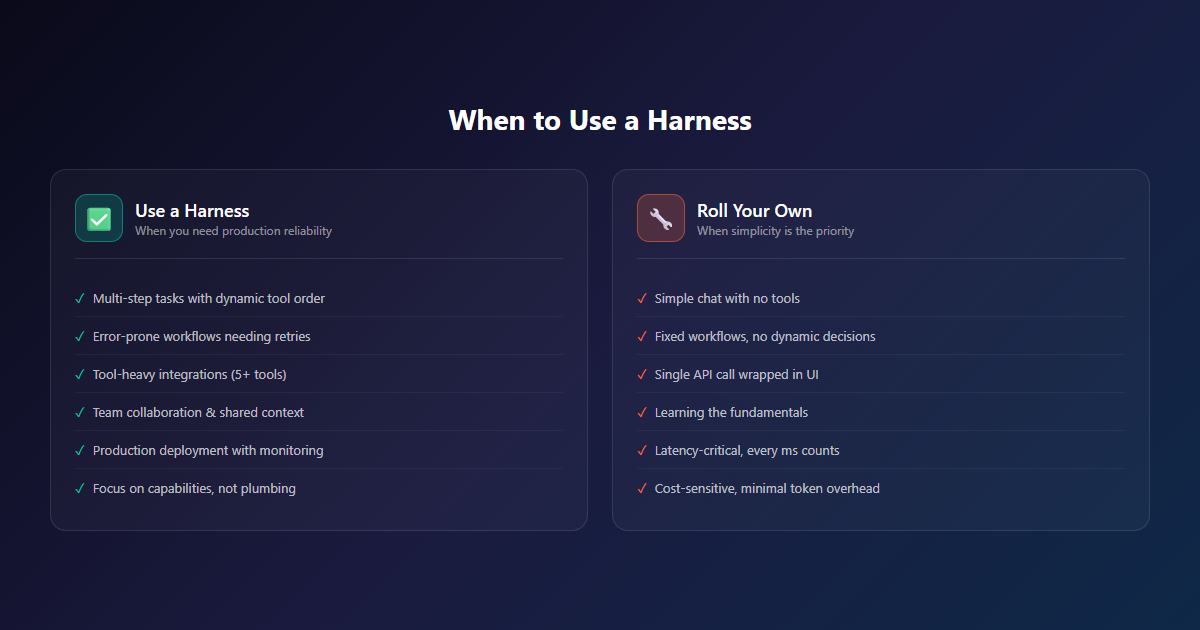
- Multi-step tasks — The agent decides tool order dynamically based on intermediate results
- Error-prone workflows — You need retries, fallbacks, and audit logs to trust the agent
- Tool-heavy integrations — You’re combining 5+ tools, MCP servers, and file operations
- Team collaboration — Multiple agents need to share context or work together
- Production deployment — You need sessions, permissions, monitoring, and reliability
- Time to market — You want to focus on capabilities, not plumbing
Roll Your Own When
- Simple chat — You just need an LLM with no tools, no decisions, no orchestration
- Fixed workflows — The same steps every time, no dynamic decision-making
- Single tool — One API call wrapped in a chat interface
- Learning — You’re trying to understand the fundamentals
- Latency-critical — Every millisecond matters and you can’t afford harness overhead
- Cost-sensitive — Bare API calls are cheapest; harnesses add token overhead
Start Simple, Scale Up
Most production agents need a harness by month three. You can start with a simple loop and add harness features as you hit the walls: “we need retries”, “we need permissions”, “we need sessions”, “we need observability”. The Claude Agent SDK gives you all of these from day one, which is why we recommend it for most teams.
Build Your First Agent with Claude Agent SDK
Let’s build a real agent. The Claude Agent SDK is available in Python and TypeScript. Here’s a working example that reads files, searches code, and runs commands.
Python
import asyncio
from claude_agent_sdk import query, ClaudeAgentOptions

async def main():
    async for message in query(
        prompt="Find and fix the bug in auth.py",
        options=ClaudeAgentOptions(
            allowed_tools=["Read", "Edit", "Bash", "Grep"],
            permission_mode="acceptEdits"
        )
    ):
        if hasattr(message, 'result'):
            print(message.result)

asyncio.run(main())
TypeScript
import { query } from '@anthropic-ai/claude-agent-sdk';

for await (const message of query({
  prompt: 'Find and fix the bug in auth.ts',
  options: {
    allowedTools: ['Read', 'Edit', 'Bash', 'Grep'],
    permissionMode: 'acceptEdits'
  }
})) {
  if ('result' in message) console.log(message.result);
}
What the SDK Gives You
That 15-line script gives you a production-grade agent with:
- Agent loop — Automatic receive → context → LLM → tools → return
- Tool execution — Read, Edit, Bash, Grep all work out of the box
- Permissions —
acceptEditsmode pre-approves file modifications - Session management — Capture the session ID to resume later
- Error recovery — Transient failures retry automatically
- Observability — Every action is logged with full context
Compare that to writing a loop yourself. Even the simple example above (loop until stop_reason != tool_use) is 20-30 lines. The error handling, permissions, and logging would push it to 200+.
Harness Options: SDK vs Managed vs CLI
Claude has three main harness options. Each one fits a different use case.
Claude Agent SDK
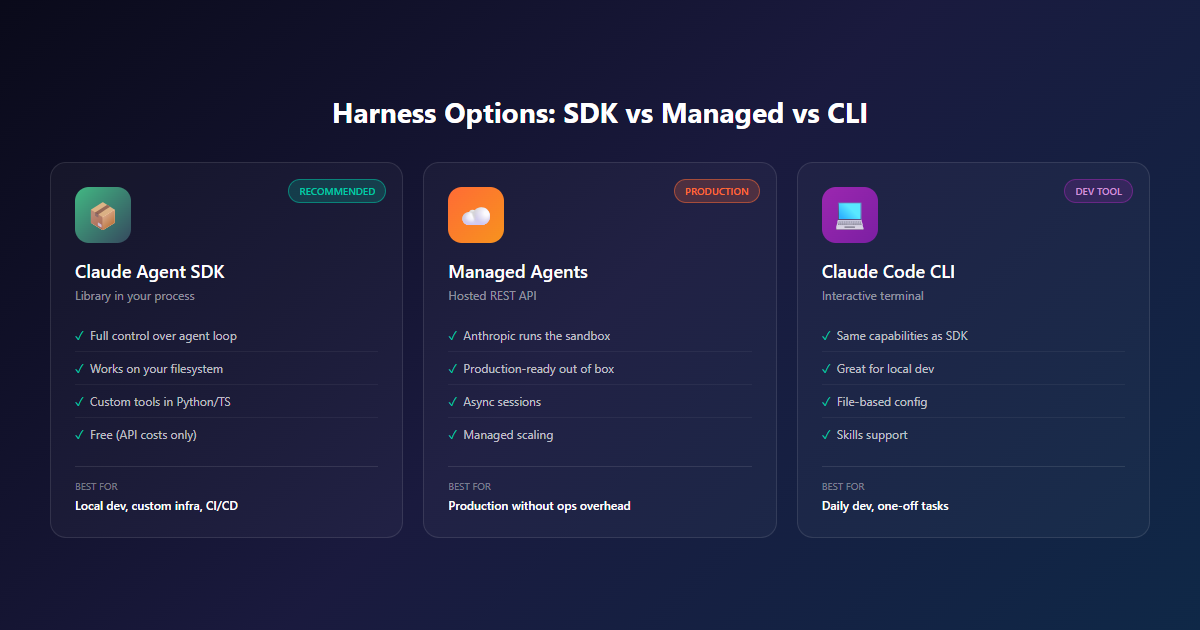
A library that runs the agent loop in your process. You provide the infrastructure, the SDK provides the harness.
- Best for: Local prototyping, agents on your infrastructure, custom integrations, CI/CD pipelines
- Pros: Full control over the agent loop, works on your filesystem, custom tools in Python/TS, free to use (API costs only)
- Cons: You manage the infrastructure, no managed sandbox, you handle scaling
Managed Agents
A hosted REST API. Anthropic runs the agent and the sandbox; your application sends events and streams back results.
- Best for: Production agents without ops overhead, long-running sessions, async workflows
- Pros: Anthropic runs the sandbox, production-ready out of the box, async sessions, managed scaling
- Cons: Less control over environment, vendor lock-in, higher per-session cost
Claude Code CLI
The interactive development tool. Uses the same harness as the SDK, but with a terminal interface instead of a programmatic API.
- Best for: Daily development, one-off tasks, learning agent patterns
- Pros: Same capabilities as SDK, great for local dev, file-based config, Skills support
- Cons: Not for production automation, no programmatic API, manual session management
Our Recommendation
Start with the Claude Agent SDK for prototyping and learning. Move to Managed Agents when you need production reliability without ops overhead. Use the CLI for daily development. Most teams end up using all three.
Advanced Harness Patterns
Once you’ve got a basic agent working, the harness enables patterns that would be impossible to build from scratch.
Subagents for Specialisation
Spawn focused agents for subtasks. Your main agent delegates work to specialists:
agents={
  "code-reviewer": AgentDefinition(
    description="Expert code reviewer for quality and security reviews.",
    prompt="Analyze code quality and suggest improvements.",
    tools=["Read", "Glob", "Grep"]
  ),
  "test-runner": AgentDefinition(
    description="Runs tests and reports results.",
    prompt="Execute tests, parse output, report failures.",
    tools=["Bash", "Read"]
  )
}
Hooks for Observability
Run custom code at every key point in the agent lifecycle. Use hooks for logging, validation, or side effects:
async def log_file_change(input_data, tool_use_id, context):
    file_path = input_data.get("tool_input", {}).get("file_path", "unknown")
    with open("./audit.log", "a") as f:
        f.write(f"{datetime.now()}: modified {file_path}\n")
    return {}

hooks={
  "PostToolUse": [
    HookMatcher(matcher="Edit|Write", hooks=[log_file_change])
  ]
}
Sessions for Continuity
Capture the session ID from the first query, then resume with full context:
session_id = None

async for message in query(
    prompt="Read the authentication module",
    options=ClaudeAgentOptions(allowed_tools=["Read", "Glob"])
):
    if isinstance(message, SystemMessage) and message.subtype == "init":
        session_id = message.data["session_id"]

# Resume with full context
async for message in query(
    prompt="Now find all places that call it",
    options=ClaudeAgentOptions(resume=session_id)
):
    pass
The Bigger Picture: Why This Matters
Agent Harnesses are the missing layer in most AI architectures. Teams build an LLM wrapper, wire up a few tools, and call it an “agent.” Then they hit the walls: errors, permissions, sessions, observability. They patch each one. Six months later, they’ve built a worse version of the Claude Agent SDK.
The alternative is to start with a battle-tested harness. Focus on the capabilities that make your agent useful — the Skills, the MCP servers, the domain logic. Let the harness handle the plumbing.
The pattern: Don’t build infrastructure you can adopt. Use the Claude Agent SDK, build Skills on top, deploy MCP servers for tools. Focus on what makes your agent your agent — the expertise, the integrations, the workflows. Leave the rest to the harness.
For South African teams, this matters even more. Building agent infrastructure from scratch is expensive. Building agent capabilities on top of a proven harness is fast. The teams that adopt first will have a structural advantage — they ship features instead of fixing plumbing.
Final Thoughts
Most agent architecture articles focus on the LLM, the tools, and the Skills. Those are the visible parts — the parts that look impressive in a demo. The harness is the invisible part. The plumbing. The thing nobody talks about until it breaks.
But the harness is what makes production agents possible. Error recovery. Permission control. Session persistence. Observability. Hooks for custom code. Subagents for delegation. These aren’t features you build once and forget. They’re features you need from day one and refine forever.
The Claude Agent SDK gives you all of this. It’s the runtime we use for our own production agents. It’s what we’d build if we were starting from scratch. Use it, and focus on the parts that actually differentiate your agent — the Skills, the integrations, the domain expertise.
The best agent infrastructure is the kind you don’t have to build — so you can focus on the agent.
What’s Next
The Agent Harness ecosystem is evolving. We’re tracking:
- Managed Agents GA — Moving from preview to generally available
- More harness features — Better error recovery, cost controls, audit logging
- Skill-harness integration — Deeper patterns for Skills in production agents
- Multi-agent orchestration — Coordinating multiple harnesses for complex workflows
For South African teams specifically, we see two big opportunities:
- Local-first production agents — Run the SDK on your own infrastructure, keep data in-country
- Managed scale-out — Prototype locally, deploy to Managed Agents for production
Both patterns are early. The teams that start now will own the deployment patterns the rest of the market follows.
Ready to Build Production Agents?
We help South African teams design, build, and deploy production AI agents using the Claude Agent SDK. From architecture design to Skills development to MCP server integration, we handle the agent layer so you can focus on the capabilities.
Related Reading
- MCP Explained — The protocol layer that the harness connects to
- Agent Skills Explained — The capability layer that the harness loads
- AI Architecture Consulting — Scoping sessions for AI agent projects, R10,000 starting
- AI Development Services — Custom AI solutions, including agents and MCP integrations
- MCP Integration Service — Custom MCP servers for your stack, starting from R55,000
References
- Claude Agent SDK Overview — Official documentation
- Agent SDK Quickstart — Build your first agent in minutes
- Managed Agents Overview — Hosted agent runtime
- Building Effective Agents — Anthropic’s patterns for production agents
- Agent SDK Demos — Example agents built with the SDK
