
Most AI agents today are still just chatbots with a tool call bolted on. They can chat, but they can’t reliably do specialised work. The ones that ship real value — document editing, brand compliance, data analysis, deployment — have something the others don’t: Skills.
Agent Skills are an open standard from Anthropic for packaging domain expertise into portable, composable units that AI agents can discover and use. Released in October 2025 and published as an open standard in December 2025, Skills turn fragmented, custom-built agent behaviours into folders any agent can load — and they’re already changing how we build.
This is the second layer in the agent stack. We covered MCP (the protocol layer) — how agents connect to tools and data. Now we’re covering Skills — how agents acquire expertise.
What You’ll Learn
-
What Agent Skills Are
Folders of instructions, scripts, and resources for AI agents.
-
The SKILL.md Format
YAML frontmatter, body, and bundled files.
-
Progressive Disclosure
Unlimited context, lean context window.
-
Build Your First Skill
Real SKILL.md, scripts, and resources.
TL;DR
Agent Skills are an open standard from Anthropic for packaging AI agent expertise into portable, composable folders. A Skill is a directory containing a SKILL.md file (with YAML frontmatter) plus optional scripts and resource files. Claude discovers Skills automatically by reading their name and description, loads the full body when relevant, and follows references into deeper context as needed.
Released October 16, 2025. Made an open standard December 18, 2025. Used today in Claude.ai, Claude Code, the Claude Agent SDK, and the Claude Developer Platform.
The key design principle is progressive disclosure: Skills bundle unlimited context (megabytes of code, docs, templates) but only load what’s needed into the context window. This is what makes them composable and scalable.
Skills are the missing layer between MCP (the protocol) and the agent runtime. MCP gives agents access to tools. Skills give them the expertise to use those tools well.
The Problem: General Agents, Specialised Work
Here’s the tension every team building AI agents runs into.
You have a powerful general-purpose agent. Claude Code can read files, run commands, search code, and do incredible things. But it doesn’t know your company’s brand guidelines. It doesn’t know how your team formats WordPress posts. It doesn’t know the specific validation rules for your CSV imports.
The naive fix: write longer system prompts. Stuff everything into the context. But context windows are finite, and the more you add, the more you dilute the signal. Your “brand compliance” instructions get the same weight as “don’t write any code that touches production.”
The other naive fix: build custom agents for each use case. A PDF-filling agent, a WordPress-publishing agent, a data-analysis agent. Now you have a maintenance nightmare. Every model update, every capability change, every bug fix — you ship N agents instead of one.
Agent Skills solve both problems. They’re composable (stack them together), portable (use across Claude apps, Claude Code, and the API), efficient (only loads what’s needed), and powerful (can include executable code for deterministic tasks).
Think of Skills as putting together an onboarding guide for a new hire. Instead of building fragmented, custom-designed agents for each use case, you specialise your agents with composable capabilities by capturing and sharing procedural knowledge.
Anatomy of a Skill
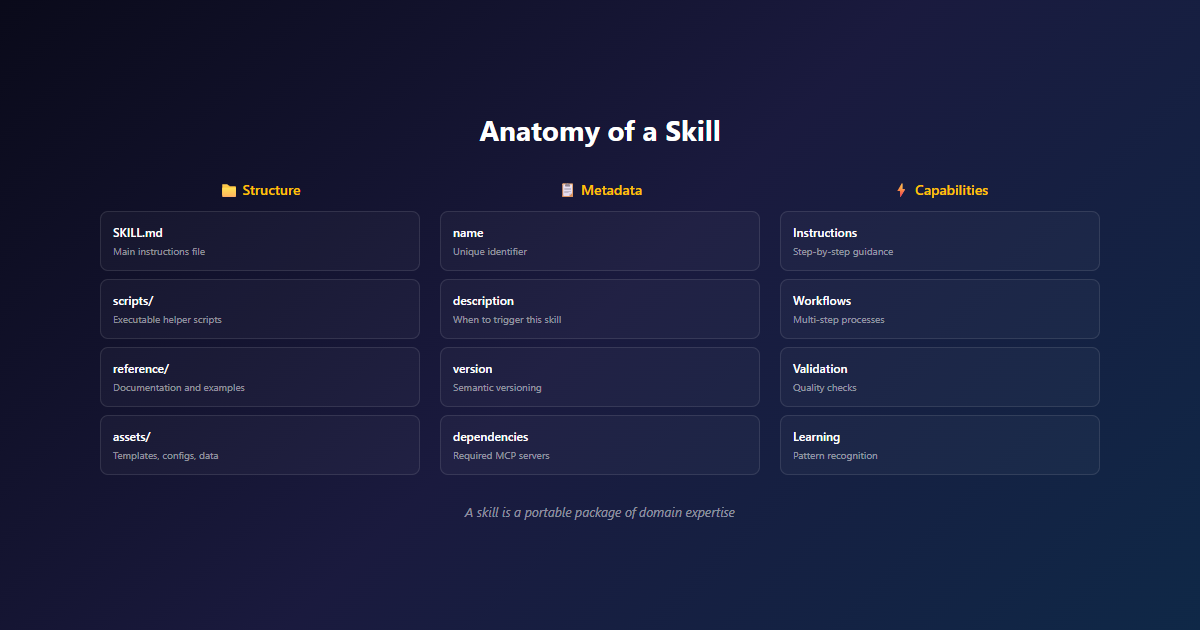
A Skill is a directory. At its simplest, it’s just one file: SKILL.md. As Skills grow, they can bundle additional files — scripts, reference docs, templates, assets.
SKILL.md — The Core File
Every Skill must have a SKILL.md file. It starts with YAML frontmatter containing two required fields:
---
name: pdf-skill
description: Fill and extract PDF form fields. Use when working with fillable PDF documents.
---

# PDF Form Skill

## When to use this skill
The user asks to fill, extract, or validate fields in a PDF form.

## How to fill a form
1. Run `scripts/extract_fields.py` to get a field map
2. See `reference.md` for field-specific rules and formatting
3. Use the Write tool to update the PDF

## Edge cases
- Encrypted PDFs: ask the user for the password before proceeding
- Multi-page forms: see `reference.md` for pagination handling
- Form validation: run `scripts/validate.py` after filling
The name and description in the frontmatter are loaded into the agent’s system prompt at startup. This is the first level of progressive disclosure — just enough for the agent to know when to consider using the Skill.
The body of SKILL.md is loaded when the agent decides the Skill is relevant to the current task. This is the second level — detailed instructions for how to actually do the work.
Bundled Files — Deeper Context
When Skills need more context than fits in SKILL.md, they can bundle additional files and reference them by name. These are the third level of disclosure (and beyond), loaded only when needed.
- scripts/ — Executable code the agent can run. Large language models excel at many tasks, but sorting a list via token generation is far more expensive than running a sorting algorithm. Scripts give Claude deterministic, efficient execution for tasks where traditional programming is more reliable than LLM generation.
- reference.md / forms.md — Detailed documentation that’s only relevant in specific scenarios. The agent reads these on demand, keeping the always-loaded context lean.
- assets/ — Templates, examples, binary resources. The PDF skill includes an
invoice-template.pdfas a starting point for new forms.
Key Insight: Progressive Disclosure
Progressive disclosure is the core design principle that makes Agent Skills flexible and scalable. Like a well-organised manual that starts with a table of contents, then specific chapters, and finally a detailed appendix, Skills let Claude load information only as needed. Agents with filesystem and code execution tools don’t need to read the entirety of a Skill into their context window when working on a particular task. The amount of context that can be bundled into a Skill is effectively unbounded.
Progressive Disclosure: How Skills Scale
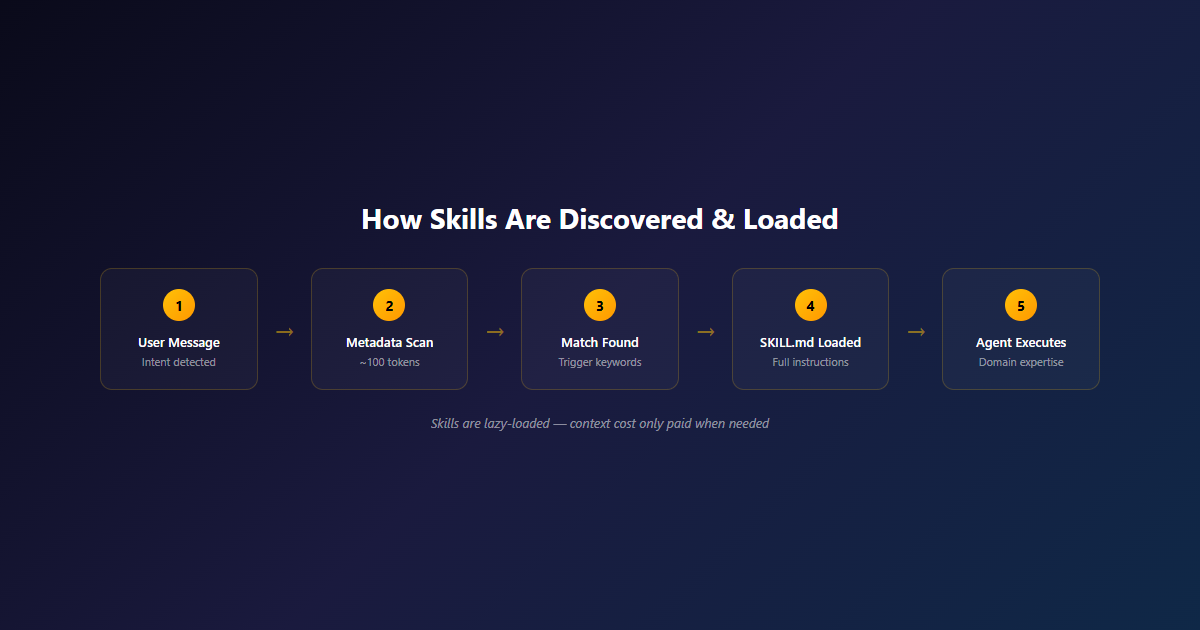
Progressive disclosure is the technical innovation that makes Skills work. It’s a multi-stage loading strategy that keeps the context window lean while allowing Skills to bundle unlimited content.
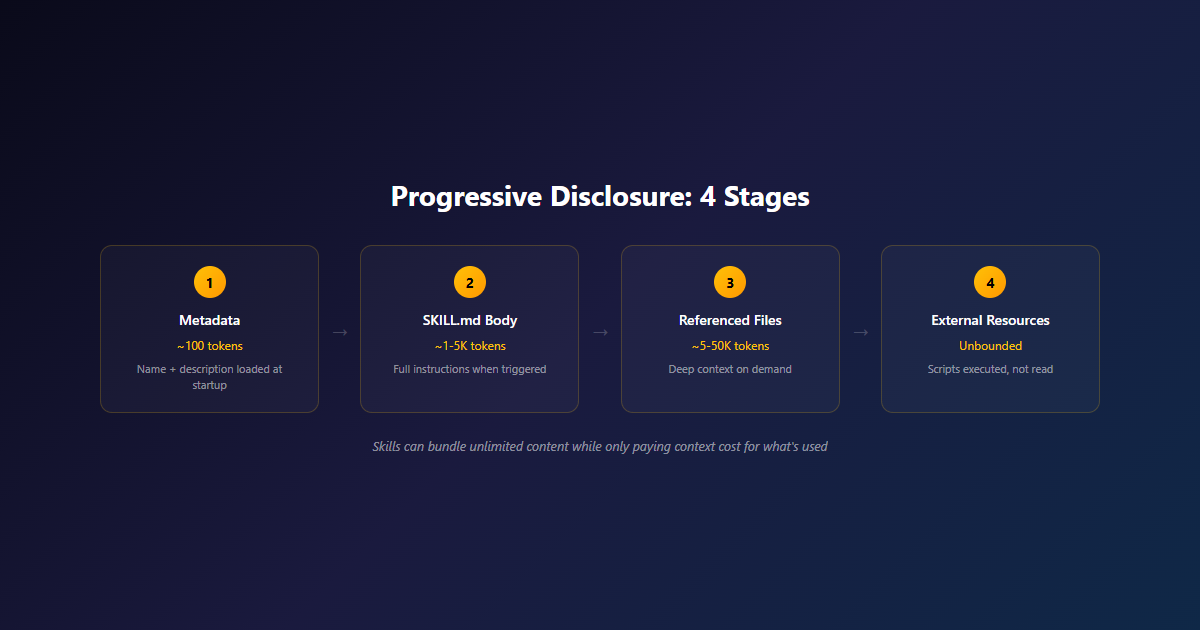
The sequence of how context flows when a Skill is triggered:
Stage 1: Metadata (~100 tokens per Skill)
At startup, the agent pre-loads the name and description of every installed Skill into its system prompt. This is minimal — just enough for Claude to know which Skills exist and when each might be relevant. If you have 50 Skills installed, that’s roughly 5,000 tokens of overhead.
Stage 2: SKILL.md Body (~1-5K tokens)
When the agent decides a Skill is relevant to the current task, it loads the full body of SKILL.md into context. This contains the actual instructions — when to use, how to do it, edge cases. This is the “chapter” of the manual.
Stage 3: Referenced Files (~5-50K tokens)
If the Skill’s body references other files (like reference.md or forms.md), the agent reads those on demand. These contain deep context that’s only relevant in specific scenarios. The agent navigates this hierarchy like a reader flipping to the appendix.
Stage 4: External Resources (Unbounded)
Skills can include scripts that the agent executes without reading into context. A 500-line Python script for PDF extraction? The agent runs it, sees the output, but never has to load the source into the context window. The same goes for binary assets, templates, and reference data.
Why This Matters
Skills can bundle effectively unlimited content — megabytes of code, documentation, templates, reference data — while only paying the context cost for what’s actually used in a given conversation. This is what makes Skills composable: you can install 50 Skills and only pay for the ones that get triggered.
Skills vs Prompts vs Tools vs MCP
Where do Skills fit in the AI capability stack? They’re not a replacement for prompts, tools, or MCP — they’re the layer that makes all of them work together effectively.
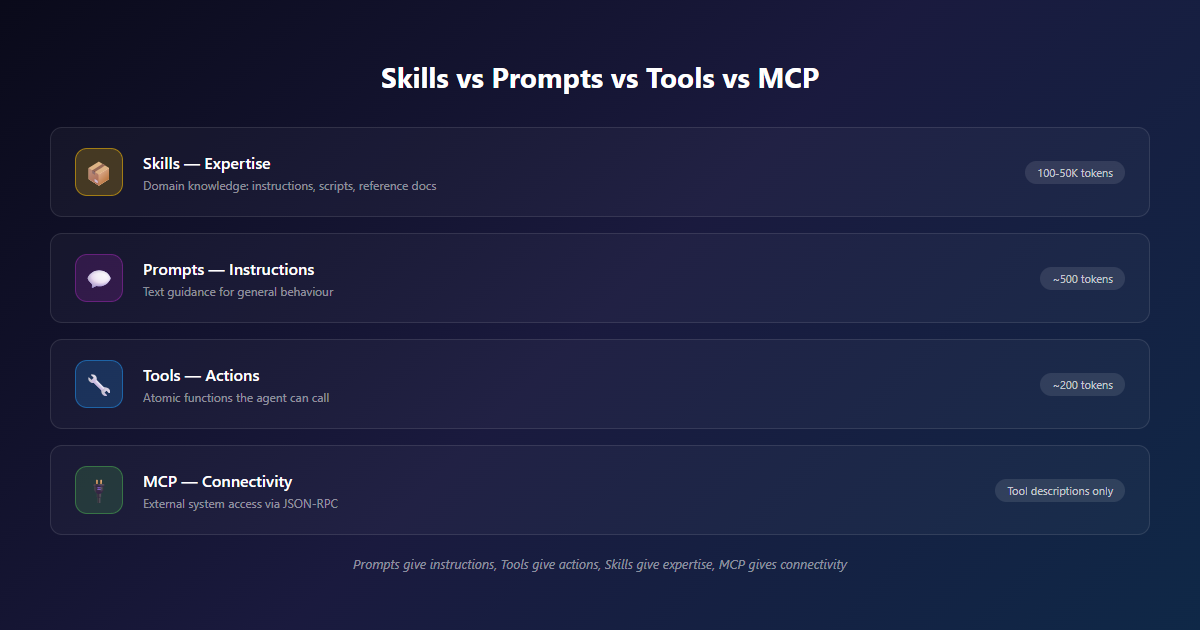
| Layer | What It Is | Context Cost | When to Use |
|---|---|---|---|
| Prompt | Text instructions to a model | ~500 tokens | Quick, in-conversation guidance |
| Tool | Function the model can call | ~200 tokens | Atomic actions (fetch, search, calculate) |
| Skill | Folder with SKILL.md, scripts, resources | ~100-50K tokens (loaded progressively) | Specialised expertise with code and docs |
| MCP Server | Service exposing tools via JSON-RPC | Tool descriptions only | External system access (databases, APIs, files) |
Think of it as a stack: Prompts give the model general instructions. Tools give it actions. Skills give it expertise. MCP servers give it connectivity.
Skills are the layer where domain knowledge lives. The PDF Skill knows how to fill forms. The brand Skill knows your style guide. The data Skill knows your validation rules. When the agent encounters a task, the right Skill gets triggered and provides the context to do the job well.
The pattern: Use prompts for general behaviour. Use tools for atomic actions. Use Skills for specialised expertise. Use MCP for external connectivity. They compose.
How to Build a Skill
Building a Skill is a four-step process. The good news: if you can write a markdown file, you can build a Skill.
Step 1: Identify a Gap
Start with evaluation, not invention. Run Claude on representative tasks and watch where it struggles. The places where it makes consistent mistakes, asks too many clarifying questions, or produces output that needs significant revision — those are your Skill candidates.
At NemesisNet, we watch for three signals:
- Repeated corrections — Users keep fixing the same type of mistake in Claude’s output
- Context dumping — We’re stuffing too much domain knowledge into system prompts
- Workflow drift — The same multi-step process is being re-described in every conversation
Step 2: Create SKILL.md
Write the frontmatter first. The name should be short and descriptive. The description is the most important part — it’s how Claude decides when to trigger your Skill. Be specific about when to use it and (critically) when not to use it.
Then write the body. Cover:
- When to use — Clear trigger conditions
- How to do it — Step-by-step procedure
- Edge cases — What to do when things go wrong
- Examples — Concrete examples of inputs and outputs
Step 3: Bundle Resources
Once your SKILL.md is working, identify what could be:
- Extracted to scripts — Deterministic operations (sorting, validation, data transformation) should be code, not instructions
- Moved to reference files — Deep context that’s only relevant in specific scenarios
- Added as assets — Templates, examples, binary resources the agent can reference
The goal is to keep the always-loaded context as lean as possible while preserving access to the full depth of your expertise when needed.
Step 4: Test with Claude
Iterate based on real usage. Watch for:
- Overtriggering — Claude uses your Skill when it shouldn’t (tighten the description)
- Undertriggering — Claude doesn’t use your Skill when it should (loosen the description, add more trigger conditions)
- Wrong execution — Claude triggers the Skill but does the work wrong (refine the body)
Ask Claude to capture its successful approaches and common mistakes into reusable context within the Skill. This process helps you discover what Claude actually needs, instead of trying to anticipate it upfront.
Build a Real Skill: The PDF Form Skill
Let’s build a production-quality Skill from scratch. This is a real Skill that handles PDF form filling — the kind of work that would otherwise require a custom agent.
The Folder Structure
pdf-skill/
├── SKILL.md              # Required - main instructions
├── reference.md          # Detailed docs, loaded on demand
├── forms.md              # Edge case handling, loaded when needed
├── scripts/
│   ├── extract_fields.py # Run, not read into context
│   └── validate.py       # Deterministic validation
└── assets/
    └── invoice-template.pdf  # Binary resource
SKILL.md
---
name: pdf-skill
description: Fill and extract PDF form fields. Use when the user asks to fill, read, or validate fields in a fillable PDF document. Don't use for general PDF reading or non-form PDFs.
---

# PDF Form Skill

## When to use this skill
- The user asks to fill fields in a PDF form
- The user asks to extract data from a PDF form
- The user asks to validate that a filled PDF is correct

## How to fill a form
1. Run `scripts/extract_fields.py <path-to-pdf>` to get a field map
2. For each field, check `forms.md` for field-specific rules (date formats, required values, etc.)
3. Use the Write tool to update the PDF with the filled values
4. Run `scripts/validate.py <path-to-pdf>` to confirm all fields are valid

## How to extract data
1. Run `scripts/extract_fields.py <path-to-pdf>`
2. Parse the JSON output for the user's needs

## Edge cases
- Encrypted PDFs: ask the user for the password before proceeding
- Multi-page forms: see `reference.md` for pagination handling
- Required fields: validate with `scripts/validate.py` before declaring complete
- Date fields: check `forms.md` for the expected format

## Don't use this skill for
- Reading general (non-form) PDFs — use the Read tool instead
- Creating new PDFs from scratch
- Converting between PDF and other formats
scripts/extract_fields.py
#!/usr/bin/env python3
"""Extract form fields from a PDF and output as JSON."""
import sys
import json
import subprocess

def extract_fields(pdf_path):
    """Use a PDF library to extract form fields."""
    # Implementation using pypdf or similar
    # Returns: {"field_name": {"type": "text", "value": "current_value"}, ...}
    pass

if __name__ == "__main__":
    if len(sys.argv) != 2:
        print("Usage: extract_fields.py <pdf-path>", file=sys.stderr)
        sys.exit(1)
    fields = extract_fields(sys.argv[1])
    print(json.dumps(fields, indent=2))
That’s the pattern. The agent never reads the Python source — it just runs the script and gets JSON output. The script is deterministic, fast, and doesn’t consume context window.
Security: Install Skills From Trusted Sources
Skills provide Claude with new capabilities through instructions and code. This makes them powerful, but also means that malicious Skills may introduce vulnerabilities. We recommend installing Skills only from trusted sources. When installing from a less-trusted source, thoroughly audit it before use — read the contents of all bundled files, paying particular attention to code dependencies and instructions that connect to external network sources.
Skills and MCP Together
Skills and MCP aren’t competing — they compose. Skills teach agents how to think about tasks. MCP gives them tools to act. The combination is what makes production agents useful.
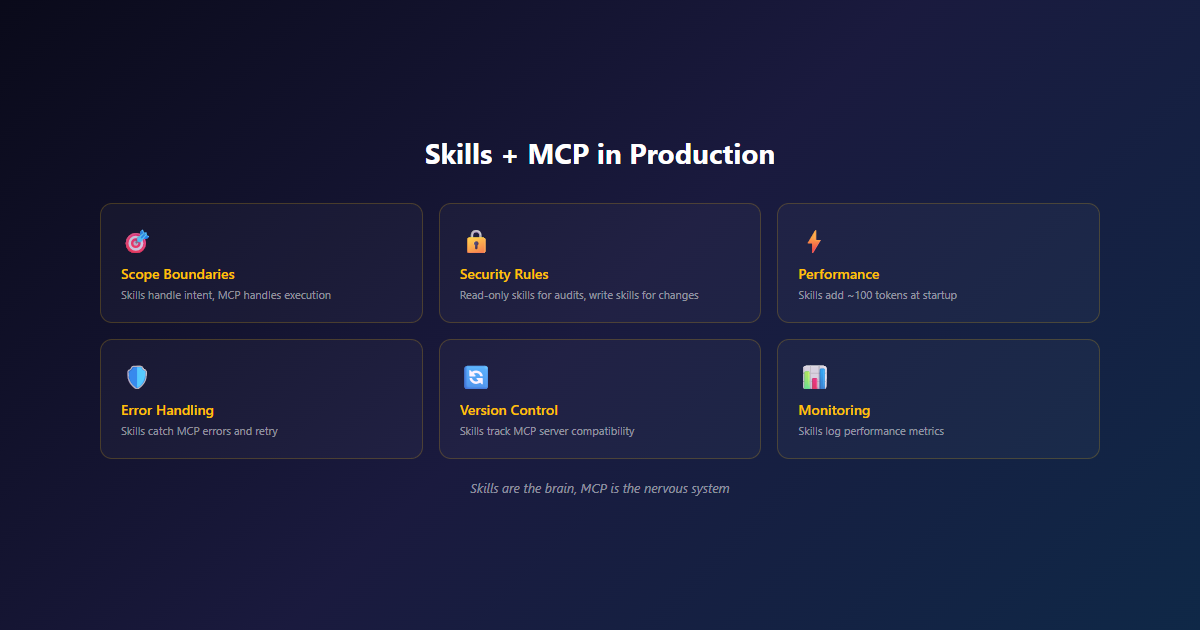
The architecture looks like this:
- Skills layer (top) — Domain expertise: pdf-skill, brand-skill, data-skill, deploy-skill. Each one is a folder with instructions and code.
- Claude (middle) — The agent that reads Skill metadata at startup, triggers Skills when relevant, and uses MCP tools to take action.
- MCP layer (bottom) — External systems: WordPress, PostgreSQL, GitHub, Slack. Each one is a server exposing tools via JSON-RPC.
When a user asks “publish this blog post to WordPress with our brand voice,” here’s what happens:
- Claude checks Skills — Sees the brand-skill is relevant (from the frontmatter description)
- Loads brand-skill — Reads the SKILL.md body, which says “use these voice guidelines, these formatting rules”
- Checks MCP tools — Sees the WordPress MCP server is connected with
create_postandupload_mediatools - Executes — Writes the content following brand guidelines, then calls
create_poston the WordPress MCP server
Skills without MCP = smart agent that can’t do anything. MCP without Skills = capable agent that doesn’t know how to do your work. Together = productive agent that does things your way.
For South African teams: This combination is powerful for local-first AI. Run Skills on your homelab (they’re just folders with markdown files), connect to MCP servers running in the same environment, and your data never leaves your infrastructure while still giving Claude the full context to do useful work.
Production Skills We’ve Built
At NemesisNet, we’ve built Skills for everything from content publishing to deployment automation. Here are the ones shipping real work:
NemesisNet Blog Style
Brand voice, formatting rules, cross-link patterns, and CSS class conventions for the NemesisNet blog. Triggered automatically when publishing content.
Result: Consistent style across all posts, zero manual editing.
Multi-Tenant Data Patterns
Schema conventions, RLS rules, and tenant isolation patterns for SaaS applications. Includes validation scripts and reference docs.
Result: New SaaS projects start with correct patterns, fewer bugs.
Self-Hosted Deployment
CI/CD pipeline patterns, environment management, and rollback procedures for our self-hosted infrastructure.
Result: 5-minute deploys, zero-downtime rollbacks.
South African Compliance
POPIA requirements, VAT calculations, ZAR currency formatting, and local date/time conventions.
Result: Compliance built in from day one.
These aren’t theoretical. They’re the actual Skills that ship in our production agent infrastructure. The WordPress publishing Skill is the same one we used to publish the MCP article and this very post.
The Future of Skills
Agent Skills launched in October 2025 as a product feature and became an open standard in December 2025. Here’s where it’s heading.
What’s Already Here
- Claude.ai, Claude Code, Claude Agent SDK, Claude Developer Platform — All support Skills today
- Skills marketplace — Anthropic-curated directory of partner-built Skills
- Skill-creator Skill — An official Skill that helps you build new Skills through interactive guidance
- Organisation-wide management — Admins can enable Skills for entire teams
What’s Coming
- Skill creation workflows — Simplified tools for non-developers to build Skills
- Enterprise-wide deployment — Distribute Skills across teams with proper access controls
- Skill composition — Combine multiple Skills for complex workflows
- Agent-created Skills — Agents that can create, edit, and evaluate their own Skills
The Bigger Picture
Skills are part of a larger shift in how we build AI systems. We’re moving from “prompt engineering as a dark art” to “capturing expertise in portable, composable units.” Every team that invests in Skills is building institutional knowledge that doesn’t walk out the door when employees leave.
For South African businesses, Skills offer a way to capture local expertise — regulatory knowledge, industry conventions, customer expectations — in a format any agent can use. That’s competitive advantage encoded.
Our take: Skills aren’t just a technical feature. They’re how organisations encode expertise for AI systems. The companies that invest in building Skills now will have a structural advantage as the agent ecosystem matures. Every Skill is institutional knowledge that survives employee turnover, model changes, and tool migrations.
Final Thoughts
Most AI teams are still in the “long system prompt” era — stuffing every guideline, every exception, every piece of context into the conversation and hoping Claude figures it out. It works until it doesn’t.
Skills change the equation. They let you package domain expertise into folders Claude can discover, load, and navigate. The always-loaded context stays lean. The full depth of your knowledge is available when needed. The agent gets smarter at the task without getting slower at everything else.
Once you’ve built a few Skills, the pattern clicks. You stop writing prompts and start writing Skills. You stop hoping the agent remembers and start packaging what it needs to know. The work becomes teachable, reviewable, shareable.
The best agent expertise is the kind that lives in a folder, not a prompt.
What’s Next
Skills continue to evolve. We’re tracking:
- Skill marketplace growth — More partner-built Skills for common use cases
- Improved authoring tools — Visual editors, validation, and testing frameworks for Skills
- Enterprise deployment patterns — Distributing Skills across teams with proper governance
- Skills + MCP integration — Deeper patterns for using Skills with MCP servers
For South African teams specifically, we see three big opportunities:
- Compliance Skills — POPIA, VAT, and regulatory knowledge encoded once, used everywhere
- Industry Skills — Domain expertise for finance, healthcare, retail, and other SA sectors
- Integration Skills — Connect Claude to local tools (PayFast, Yoco, SARS eFiling, etc.)
All three are early. The teams that start now will own the patterns the rest of the market follows.
Ready to Build Your First Skill?
We help South African teams design, build, and deploy Agent Skills for their domain. Whether you need a PDF form skill, a brand compliance skill, or a custom workflow skill, we can help you package your expertise into portable, composable units.
Related Reading
- MCP Explained: The Open Standard That Makes AI Agents Actually Useful — The protocol layer that Skills sit on top of
- AI Architecture Consulting — Scoping sessions for AI integration projects, R10,000 starting
- AI Development Services — Custom AI solutions including Skills and MCP integrations
- MCP Integration Service — Custom MCP servers for your stack, starting from R55,000
- WordPress MCP Automation Case Study — A real Skill + MCP integration in production
References
- Equipping agents for the real world with Agent Skills — Anthropic’s engineering blog on Skills
- Introducing Agent Skills — Anthropic’s product announcement (October 2025)
- Agent SDK Skills Documentation — Technical reference for building Skills
- Claude Agent SDK Overview — The runtime that hosts Skills
- MCP Explained — The protocol that Skills build on
