
On the morning of Wednesday 21 October 2026, the PHP project published an emergency security release fixing two critical remote code execution vulnerabilities in the language that runs a large share of the web. By 14:00 UTC the patches were live, Linux distributions had them in advance, and security agencies were telling operators to patch immediately or take their sites offline. If your site runs PHP — and if you run WordPress, it runs PHP — this is the week to check what you are actually serving.
Part of our engineering practice series on shipping software that survives production — verification first, always.
WordPress
Security Operations
Incident Response
TL;DR
- Two critical PHP vulnerabilities, CVE-2026-109618 and CVE-2026-109619, were fixed on 21 October 2026. Both are CVSS v4.0 9.2 and both allow unauthenticated remote code execution.
- Patch to 8.5.12, 8.4.27, 8.3.36 or 8.2.35. PHP 8.1 and older receive no further upstream updates; 7.4, 8.0 and 8.1 have source backports only.
- Not every PHP site is equally exposed. Risk is highest on Apache
mod_php, and exploitability depends on your configuration and application behaviour. - Updating is the only complete fix. PHP’s temporary configuration mitigations narrow specific attack paths; they do not make an unpatched install safe.
What You’ll Learn
What actually happened
The timeline, the two defects, and the versions that fix them.
Four different problems
Vulnerable software, misconfiguration, incompatibility and compromise are not the same thing.
A response sequence
The order of operations that actually reduces risk, in five steps.
What help looks like
What emergency remediation can and cannot do for a site owner.
What Happened
On 20 October 2026, the PHP security team gave advance notice of an upcoming security release, scheduled for 14:00 UTC the following day. Two critical vulnerabilities, both rated CVSS v4.0 9.2, would be fixed. The team explicitly reserved the right to release earlier if details leaked or evidence of active exploitation appeared.
On 21 October 2026 the release landed: PHP 8.5.12, 8.4.27, 8.3.36 and 8.2.35, published with a security advisory and separate GitHub security advisories. Linux distributions and LTS vendors had received the patches in advance.
The scale of the response is the part worth understanding. Reuters reported that websites were taken offline, and that government websites went dark while agencies warned operators they may need to take sites down until patching was possible. The New York Post reported major sites in the US and Europe going dark as operators raced to protect systems. Cloudflare reported attack traffic specifically targeting these vulnerabilities, including attempts to evade its own protections; Amazon Threat Intelligence and Patchstack also reported exploitation activity. The PHP Foundation and the NSA both issued advisories urging immediate updates.
Two things that were not established, and that you should keep in mind when you read the coverage: the scale of any actual compromise, and whether most sites that went dark were taken offline deliberately as a precaution rather than knocked over. Taking a site offline while you patch is a decision, not a casualty.
One more detail that is genuinely unusual and worth knowing: the flaws were surfaced with AI assistance. Reporting credits an organisation called Calif, working with an AI model, alongside independent discovery and reporting by security firm Wiz. OpenAI, Google, Wiz and Cloudflare all contributed to the coordinated response. AI-assisted vulnerability discovery arriving as a first-class part of a coordinated disclosure for a language this widely deployed is a new pattern, and it will shape how the next one is handled.
The Two Vulnerabilities
Both bugs live in how PHP manages memory and request state internally, and both lead to the same outcome: code execution as the web server, without needing credentials.
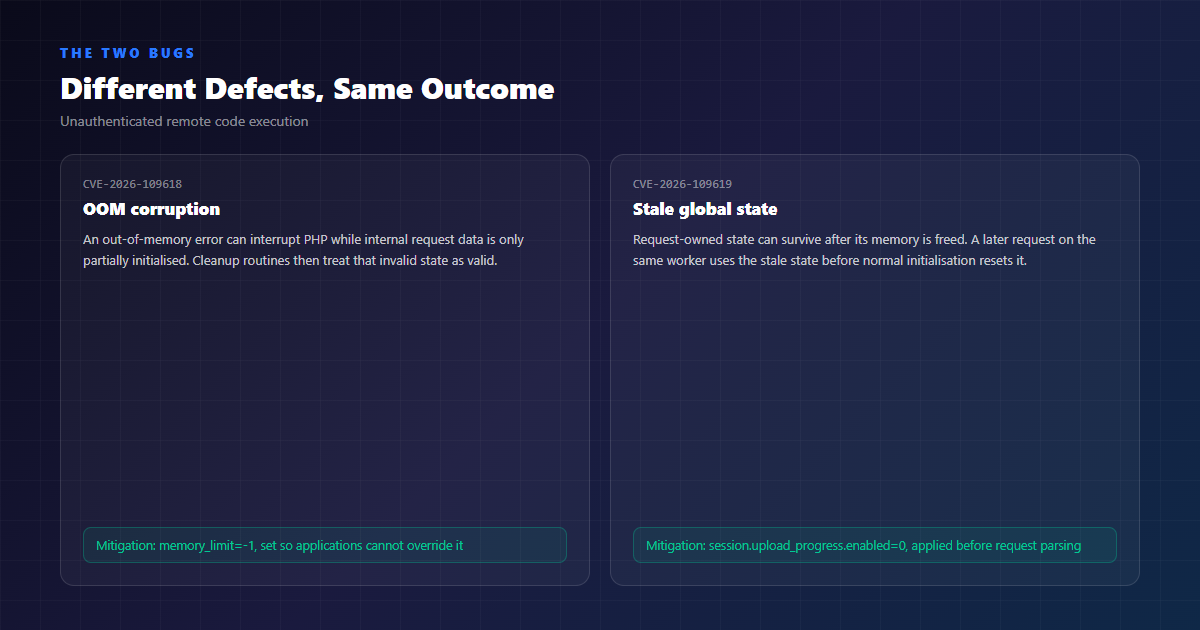
CVE-2026-109618 — Out-of-Memory Corruption
When an out-of-memory error interrupts a vulnerable operation, PHP can be left holding request data that is only partially initialised. Cleanup routines then process that invalid state as though it were valid, which opens a path to remote code execution. The practical significance: the trigger is a memory allocation failure, and on a server with a finite memory_limit, an attacker can influence when that failure happens.
CVE-2026-109619 — Stale Global State
PHP can retain references to request data after its backing memory has been freed. A later request handled by the same worker may then use that stale state before normal initialisation resets it — a use-after-free, with a demonstrated remote code execution path.
There is a second dimension to this one. Researchers have demonstrated unauthenticated disclosure of PHP worker memory. That memory can contain passwords, authentication tokens and API keys that the running application had loaded. If you are running a vulnerable version, it is worth treating the secrets in memory as potentially disclosed, not as still confidential.
Lesson: The trigger is the interesting part
The root cause is memory management, but the operational reality is that PHP’s own memory_limit is often the attacker’s lever. This is why the official mitigation for one of these is to remove that limit administratively, even temporarily.
Which Versions Are Fixed
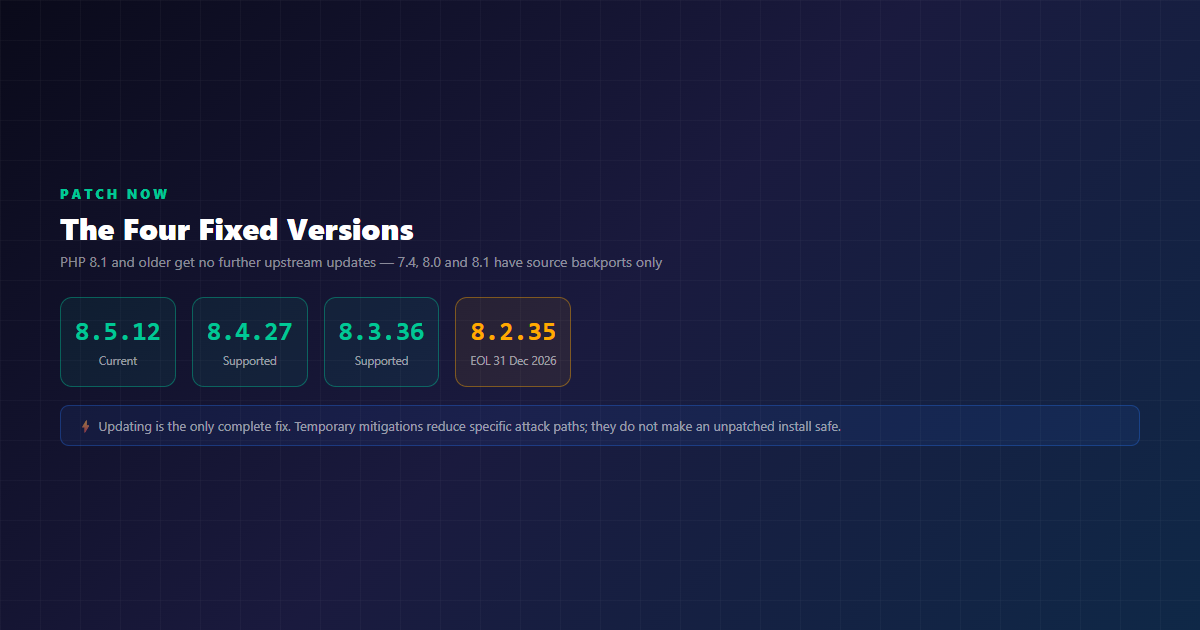
| PHP branch | Fixed version | Status |
|---|---|---|
| 8.5 | 8.5.12 | Current |
| 8.4 | 8.4.27 | Supported |
| 8.3 | 8.3.36 | Supported |
| 8.2 | 8.2.35 | Reaches end of life on 31 December 2026 — no further security fixes after that date |
| 8.1 and older | No upstream release | Outside regular support. Source backports exist for 7.4, 8.0 and 8.1 only, and require you to build from source or use an LTS vendor |
Two practical notes. If your hosting provider manages the PHP version for you — shared hosting, managed WordPress, most cPanel hosts — the patch may already be applied, but verify rather than assume. And if you build from source, the PHP team specifically urged people to move off community-maintained RPM repositories, which had not received the release.
Who Is Actually at Risk
PHP’s own guidance is that all installations serving web requests are in scope: PHP-FPM, Apache with mod_php, php-cgi, FrankenPHP and LiteSpeed. But “in scope” and “equally exploitable” are not the same statement, and conflating them is how people talk themselves into either panic or complacency.
Risk is highest for mod_php, because PHP reports a demonstrated exploit there where an unauthenticated request can trigger the attack before any application code runs. For PHP-FPM, the startup behaviour blocks one specific out-of-memory attack path — but PHP has separately validated session-lifecycle remote code execution against FPM under suitable application conditions. Exploitability varies with configuration and application behaviour, which is the honest answer to “are we affected?”: the software is vulnerable, and whether a given deployment is reachable depends on details you need to check.
Lesson: Check which PHP your server is actually using
The version your shell reports may not be the version serving web requests. Shared hosts routinely keep several branches installed, and a vhost can point at a different one. Find the one that answers HTTP before you conclude you are safe.
Four Different Problems, Not One
“We might be affected” usually bundles four separate questions. They have different answers, and different urgency.
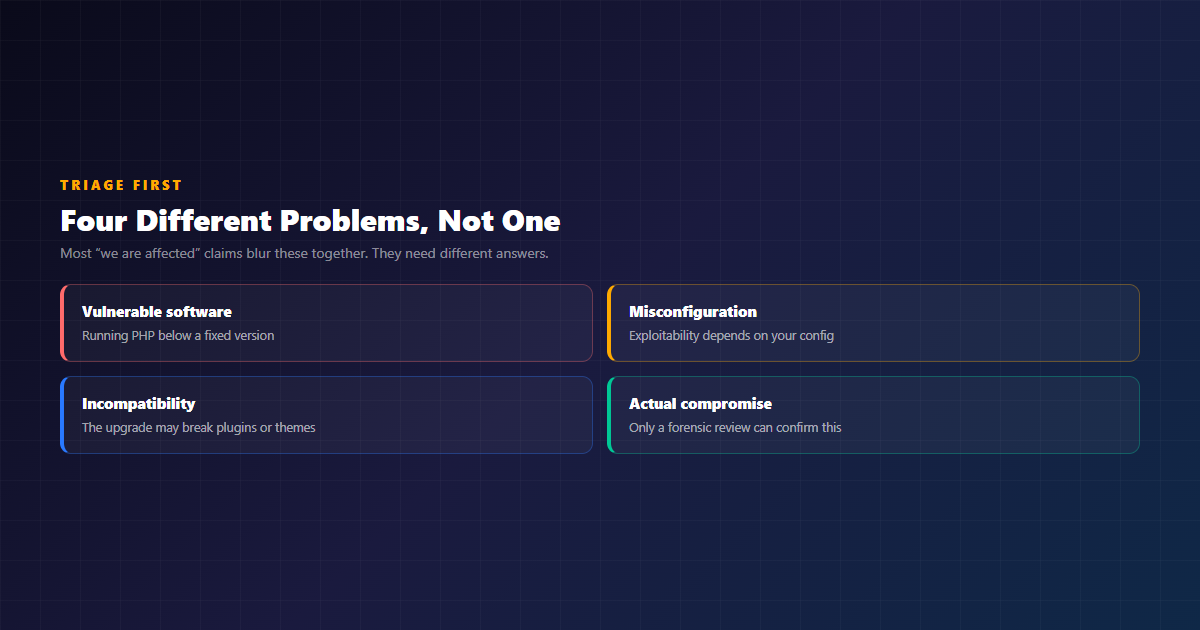
| Problem | What it means | How you establish it |
|---|---|---|
| Vulnerable software | The PHP runtime serving requests is below a fixed version | Query the version your web server uses, not just the one on your shell |
| Misconfiguration | Settings such as a finite memory_limit or enabled session upload progress affect exploitability |
Review the FPM pool, php.ini and the web server configuration |
| Incompatibility | The patched or upgraded version may break plugins, themes or custom code | Test on a staging copy before the change reaches production |
| Actual compromise | An attacker actually used the flaw against your system | Only a forensic review of logs, file integrity and outbound traffic can answer this |
Almost every piece of alarming coverage collapses these four into the first one, which is the least informative of them. A patched system with a broken plugin is not secure. An unpatched system on a configuration that is not reachable is not the catastrophe the headline implies. A patched system that was compromised two weeks ago and never cleaned up is worse than either.
If You Run WordPress
WordPress does not need a patch for this. These are defects in the PHP runtime underneath it, so the fix is in the runtime, and WordPress core, your theme and your plugins are unaffected by the vulnerabilities themselves.
That said, a WordPress site is exactly the kind of deployment where the upgrade is the hard part. WordPress plugins and themes have their own compatibility ranges, and a PHP major version jump can break a site that was working fine. The sensible order for a WordPress owner is:
- Ask your host what PHP version is serving your site, and whether their platform has already been patched. Managed WordPress providers usually update the runtime centrally.
- Take a database and file backup before you change anything, and confirm you can restore it. See our backup management service if that is not something you trust.
- Clone the site to staging and update the runtime there first. This is the step that prevents a security release from becoming a lost weekend.
- Build a change plan, not a sequence from a blog post. The right order depends on your site: whether core, theme or plugins are the constraint, and whether your host patches the runtime centrally. Establish a baseline of what works today, apply the required changes on staging in the order your site actually needs, then deploy the combination you verified — with a rollback plan for each step.
- Run the site through its critical flows after the change, not before: login, checkout or form submission, any admin pages that call out to the database, and anything using sessions or cron.
One WordPress-specific note: if your host runs mod_php, that is the configuration PHP rates as highest risk, and it is worth knowing before you decide how urgently to move.
And a caution about the other side of that advice. Compatibility ranges are declarations, not guarantees, and a plugin that has not been updated in two years is a genuine unknown rather than a formality. Testing on staging is what turns that unknown into a fact, and a rollback plan is what turns a broken Friday into a ten-minute recovery. If your setup does not allow staging, that is a gap worth closing before the next emergency release, not during one.
The Response Sequence
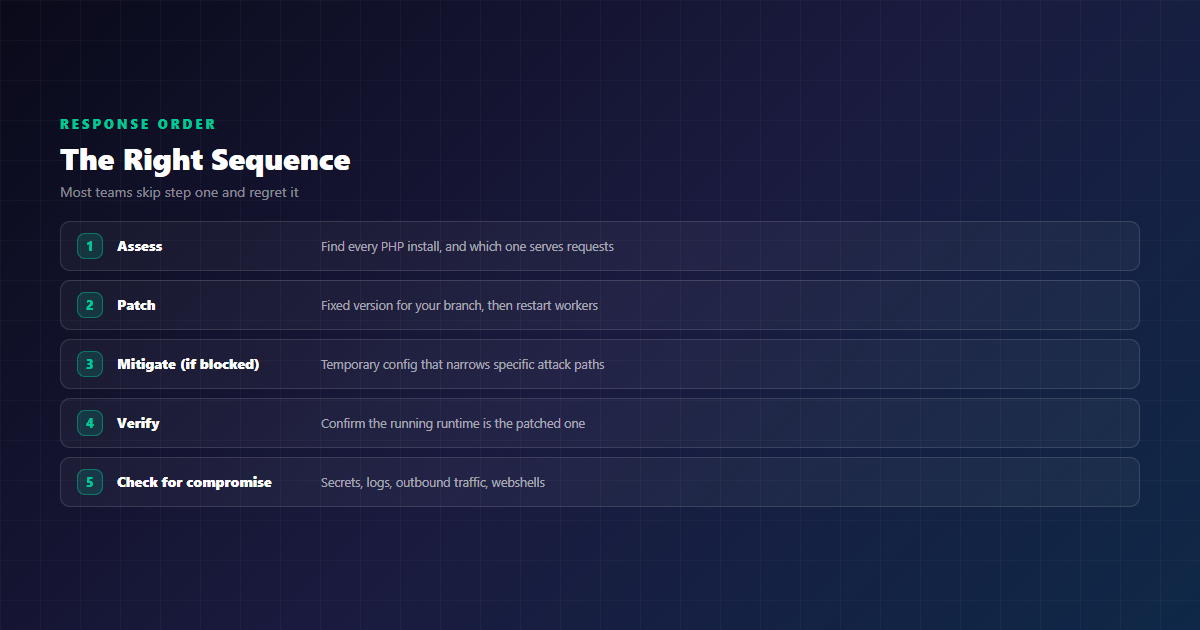
Here is the order that actually reduces risk, rather than the order most people reach for under pressure.
1. Assess Before You Touch Anything
Find every PHP installation on the host — including parallel branches, containers, hosting-panel packages, and PHP bundled with appliances. Then establish which one is answering web requests. The version your shell prints may belong to a completely different installation from the one serving your site.
2. Patch the Right Thing
For distribution packages, check the complete package version against your vendor’s advisory, because backported fixes often keep an older upstream version number. For containers, get a patched image or rebuild with patched dependencies. Then restart or replace the workers, and confirm no worker is still running the old build.
3. If You Genuinely Cannot Patch Yet
PHP published temporary measures. For CVE-2026-109618: set memory_limit=-1 administratively, ideally via php_admin_value in the FPM pool or Apache configuration, and verify that no pool, directory or application setting puts a finite limit back. Set a low post_max_size — 8M for applications without uploads, 32M where uploads are required.
Read this before you change production settings
memory_limit=-1 removes PHP’s per-request memory cap. That is the point — it removes the attacker-controllable failure that triggers CVE-2026-109618 — but it also means a single request can consume the machine’s memory. Without a boundary somewhere else, you have traded a remote code execution bug for a resource exhaustion outage. If you apply it, bound the worker or container somewhere else first, treat it strictly as a temporary measure, and put restoring a finite limit on your list. This is a configuration change with real operational consequences, and it is exactly the kind of thing worth having assessed before it is applied to a live site.
Enforce request size and complexity limits at the web server or proxy, including for requests without a usable Content-Length. Enforce request size and complexity limits at the web server or proxy, including for requests without a usable Content-Length. Use a container or cgroup limit as an availability boundary, and do not substitute RLIMIT_AS or RLIMIT_DATA, which can force the very allocation failure that triggers the bug.
For CVE-2026-109619: set session.upload_progress.enabled=0 before request parsing — in php.ini, an FPM pool, or server configuration — and restart every worker. Do not rely on application-level ini_set() or an FPM .user.ini; they apply too late. On PHP 8.5, also set fatal_error_backtraces=0 administratively. Fix attacker-reachable fatal errors and timeouts, because changing timeout settings alone does not cover the other paths.
Be clear about what these buy you: they narrow specific attack paths. They are not a substitute for the update. If the window has to stretch, and the site carries real revenue, taking it offline behind a maintenance page is the conservative and defensible choice — which is what security agencies advised.
4. Verify the Remediation
Installing a package is one step. Confirm each application is actually running the patched runtime, that workers have restarted, and that no second PHP copy is still serving traffic. Then review the emergency configuration changes: restore an appropriate finite memory_limit rather than leaving -1 in place permanently, and test application behaviour under memory pressure. The patched runtime can terminate a worker immediately at its hard memory threshold, bypassing normal shutdown handlers — which can surface as dropped requests that look like an unrelated flakiness.
5. Then Look for Signs of Compromise
Patching closes the door; it does not tell you whether the door was open. If your system ran a vulnerable version while it was internet-facing, a review is warranted: rotate database credentials, API keys and application secrets; check web server and PHP logs for the memory-error and stale-state patterns the vulnerabilities produce; look for unexpected files, webshells and modified plugin or theme files; and check outbound traffic for anything your site should not be talking to.
When a Vulnerability Becomes a Data Breach
Patching closes a door. It does not tell you whether the door was open, and in the specific case of these two PHP flaws the gap between “vulnerable” and “breached” is narrow: an unauthenticated remote code execution bug is a complete compromise of the server, and a database on that server is a complete loss of confidentiality. Researchers have also demonstrated unauthenticated disclosure of PHP worker memory, which is where application secrets live — database passwords, API keys, session tokens.
Which is why the privacy question is not hypothetical. If you patch and then find evidence that your site was accessed while it was vulnerable, the obligations attached to personal information may already have started running. The answer depends on whose data you hold, and the regimes differ in ways that catch people out.
| Regime | Trigger | Notification expectation |
|---|---|---|
| POPIA (South Africa) | Reasonable grounds to believe personal information was accessed or acquired by an unauthorised person | Notify the Information Regulator and affected data subjects, in writing, as soon as reasonably possible. The threshold is reasonable grounds to believe — the compromise does not have to be confirmed first |
| GDPR (EU / EEA) | A personal data breach likely to result in a risk to people’s rights and freedoms | Notify the supervisory authority without undue delay and, where feasible, within 72 hours of becoming aware. High-risk breaches also require notifying the individuals concerned. All breaches must be recorded |
| US state laws (California and others) | Exposure of personal information, usually with a resident threshold | No single federal rule. California requires notice to affected residents within 30 calendar days of discovery, and other states set 30, 45 or 60-day limits or require notice without unreasonable delay. All breaches are reportable to the state Attorney General above a threshold |
| HIPAA (US health data) | Compromise of protected health information | Individuals notified within 60 days, with reporting to HHS |
Two practical consequences. First, if your site handles EU residents’ data, or customers in California, South African POPIA obligations are not the only ones that apply to you — a 72-hour clock and a 30-day clock can run alongside a South African one. Second, and more usefully: these clocks only start if you find out. An investigation that turns up nothing means no notification duty; an investigation you never run means you never know either way, and the exposure sits in your system until something else finds it. That is the strongest argument for doing the review, and for doing it properly.
We are engineers, not lawyers, and nothing here is legal advice. What we can do is make sure you know which data you hold, so that when your counsel asks the question, the answer is not a guess. Notification obligations in these regimes are a legal question with hard deadlines attached, and they are exactly the kind of question to put to a lawyer while you are still deciding what to do.
What Emergency Remediation Can and Cannot Do
It is worth being precise about this, because emergency work is bought under pressure and nobody wants to discover the limits afterwards.
Three different things get confused in a security emergency, and they are scoped differently. Keeping them separate is what makes a quote honest.
| Engagement | What it is | What it is not |
|---|---|---|
| Security assessment | Establishes what is running and what is exposed, and produces a prioritised list of findings | It changes nothing on your site. Findings, not fixes |
| Remediation | Applies the changes you authorise — runtime patching, core, plugin and theme updates, configuration corrections — and verifies them against your real traffic paths | It does not include continuous monitoring, and it does not rebuild a compromised site |
| Investigation and recovery | Reviewing available logs, file integrity, unexpected files, modified plugin or theme files, and outbound traffic; and planning recovery from a restorable backup | It is scoped work, not a 24/7 incident response or digital forensics retainer, and it is not a guarantee that a compromised site is clean without rebuilding it from known-good code and a known-good database |
What it can do: establish your actual exposure; patch the runtime and restart the workers; apply the temporary mitigations while a full upgrade is arranged; test a staged upgrade for plugin and theme compatibility; verify the running runtime is the patched one; and review for evidence of compromise, including rotating credentials that may have been exposed in worker memory.
What it cannot do: guarantee that your site was never touched while it was vulnerable; guarantee that a compromised site is clean without rebuilding it from known-good code and a known-good database; guarantee that every plugin and theme is compatible with a new PHP version — that has to be tested, and occasionally a plugin has to be replaced; recover data you never backed up; or provide continuous monitoring after the fact. Emergency remediation is a stabilisation effort, not a security posture.
There is also a scoping boundary worth stating plainly. Routine patching, configuration changes and troubleshooting sit inside our Maintenance & Support service — hourly work at R850–R1,100 per hour with no commitment, or a Support Retainer from R7,500 per month with reserved hours and defined response targets. A major PHP version jump, a framework migration, or a dependency upgrade that needs code changes is explicitly engineering work rather than maintenance, and is scoped separately through the Development Retainer. That distinction is not a sales device; it exists because the two kinds of work genuinely need different skills and different time.
Pricing for emergency work follows the same model, not a special one: R850–R1,100 per hour with no commitment for assessment and remediation, a fixed scope and price agreed up front for a defined patching or hardening project, and a Support Retainer from R7,500 per month for the ongoing version. We have deliberately not invented a separate emergency price list, because two price lists for the same work is how trust gets lost. The applicable proposal or quotation is the authoritative source.
Emergency PHP & WordPress Support
If you are reading this because your site runs PHP and you are not sure what you are actually serving, you do not need to become a PHP security specialist today. You need three things answered: which PHP version is answering web requests, whether it is patched, and whether anything looks wrong.
That is the assessment we start from. We establish your exposure, apply the patching or the temporary mitigations appropriate to your hosting model, test the change against a copy of your site before it goes live, verify what is actually running afterwards, and tell you plainly what we found and what remains outstanding. The full scope, the process and the pricing are on our Emergency PHP & WordPress Support page.
- Assessment and patching — under our Emergency PHP & WordPress Support service (R850–R1,100 per hour, no commitment required; Support Retainer from R7,500 per month).
- Compatibility work and major upgrades — staged testing and code changes scoped through the Development Retainer.
- WordPress and CMS work — theme, plugin and migration work under our CMS development service.
- Ongoing patching and monitoring — if the underlying issue is that nobody owns your hosting, managed hosting from R300 per month includes uptime monitoring, SSL and DNS management, and OS security patches.
We will not tell you a site is secure, and we cannot promise every plugin will work on a new PHP version. We can tell you exactly what you are running, what needs to change, and whether the change broke anything — which is the part that matters at 09:00 on a Wednesday when your website is your business.
Conclusion
The PHP project did something rare and genuinely good: it warned people in advance, shipped a patch the same morning, gave the distributors early access, and published detailed mitigations for anyone who could not update immediately. The response from hosting providers and security vendors was fast, and in some cases sites were deliberately taken offline rather than left exposed.
What is left for site owners is unglamorous work. Find out which PHP is actually answering your requests. Patch it. Test that the patch did not break your site before it goes live. Verify afterwards that the running runtime is the patched one. Rotate any secrets that lived in worker memory while the vulnerability was exposed. And then decide whether your patching process is a one-off scramble or something you want to own.
If it is the latter, that is a conversation worth having before the next emergency release lands.
Unsure What Your Site Is Running?
Start with an assessment. We will tell you which PHP version serves your requests, whether it is patched, and what has to change — before anything breaks, and while you still have options.
