
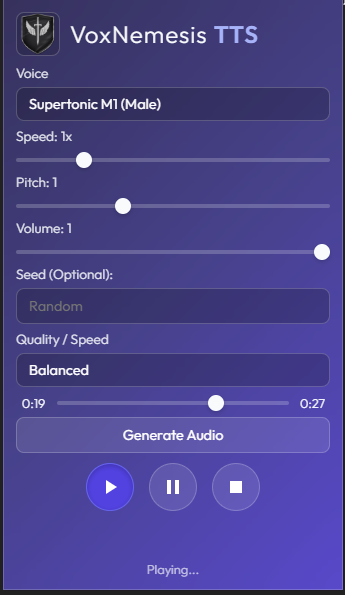
The Build Log: Wrestling Chrome into a Local-First TTS Engine (v0.2.0)
Version 0.2.0 is live. But a changelog doesn’t tell you the pain it took to get here. This is the story of how we fought Manifest V3, race conditions, and GPU drivers to build a local-first TTS extension that actually works.
When we started VoxNemesis, the goal was simple: High-quality AI Text-to-Speech, running entirely in the browser, without sending a single byte of user data to the cloud.
It sounds straightforward until you actually try to build it. Modern browsers are hostile environments for heavy compute. They aggressively throttle background tabs, kill service workers that take too long, and restrict access to hardware acceleration. To make Supertonic work, we had to navigate a minefield of Chrome extension limitations, specifically the strictures of Manifest V3 (MV3).
This post is a deep dive into the engineering challenges of v0.2.0. We aren’t just listing features; we’re documenting the hacks, the architectural pivots, and the raw code required to make ONNX Runtime sing inside a Chrome Extension.
Chapter 1: The Case of the Disappearing Menu
The first hurdle in v0.2.0 was the most basic interaction point: the context menu. You right-click text, you select “Read with VoxNemesis.” Simple, right?
In Manifest V2, you could register a context menu once in a background page that lived forever. In Manifest V3, the background script is a Service Worker. It is ephemeral. It wakes up when an event happens and dies a few seconds later to save memory. This statelessness caused a critical bug: the context menu would randomly vanish because the browser “forgot” our registration after the service worker died/restarted, or sometimes failed to register it on a fresh install until a full browser restart.
The Fix: Aggressive Registration
We had to move from a “register once” mentality to a “register always” defensive posture. We now hook into multiple lifecycle events: onInstalled and onStartup. We also stripped out the custom icons from the context menu creation call, as we found that passing high-res PNGs to the menu API caused silent failures on certain Windows builds.
// background.js
function createContextMenu() {
  // We wrap this in a try-catch because sometimes the menu already exists,
  // and Chrome throws an error if you try to create a duplicate ID.
  chrome.contextMenus.create({
    id: "read-selection",
    title: "Read with VoxNemesis",
    contexts: ["selection"]
  }, () => {
    if (chrome.runtime.lastError) {
      console.log("Menu integrity check: " + chrome.runtime.lastError.message);
    }
  });
}

// Hook everywhere to ensure persistence
chrome.runtime.onInstalled.addListener(createContextMenu);
chrome.runtime.onStartup.addListener(createContextMenu);
Chapter 2: The Freeze on First Run (Race Conditions)
With the UI fixed, we hit a nastier bug. On the very first run after installation, the user would open the popup, and the “Loading Models…” overlay would just sit there. Spinning. Forever.
The root cause was a classic race condition. The popup (UI) and the background worker (Logic) are separate processes. When the popup opens, it asks the background for status. But on the first run, the background worker is busy downloading 100MB of ONNX models. It’s too busy to reply to the message channel.
The Solution: The Overlay Watchdog
We couldn’t rely on a single “I’m done” message, because if the popup wasn’t open at the exact millisecond that message was sent, it would miss it. We implemented a polling “watchdog” in the popup that aggressively queries the background state every 500ms until it gets a positive confirmation.
// popup.js: The Watchdog
const watchdog = setInterval(async () => {
  try {
    const status = await chrome.runtime.sendMessage({ type: "getStatus" });
    if (status && status.modelsReady) {
      document.getElementById('overlay').style.display = 'none';
      clearInterval(watchdog);
    }
  } catch (e) {
    // Background might be dead or restarting; keep trying.
    console.warn("Watchdog: Background unreachable, retrying...");
  }
}, 500);
This ensures that even if the background worker takes 30 seconds to download models, the UI will unlock the moment the state changes, without requiring a reload.
Chapter 3: Architecting the Audio Engine (The Offscreen Pattern)
This was the core architectural challenge of v0.2.0. Where do you play audio in a Chrome Extension?
- In the Popup? No. The moment the user clicks away, the popup closes and the audio cuts.
- In the Service Worker? No. Service Workers don’t have access to the DOM, so they can’t create an
AudioContext. They also get killed by the browser if they are “idle,” and playing audio doesn’t always count as “active” work to the aggressive Chrome task killer.
Enter the Offscreen Document
Manifest V3 introduced the Offscreen API specifically for this. It allows us to spawn a hidden HTML page that has full DOM access (so we can use Web Audio API) and isn’t visible to the user. This page acts as our dedicated “Audio Engine.”
We moved the entire synthesis pipeline here. The background worker acts as a router, taking commands from the popup and forwarding them to the offscreen document.
The Code: Direct AudioBuffer Management
We don’t rely on HTML5 <audio> tags, which introduce buffering latency. We take the raw Float32 PCM data generated by the ONNX model and blast it directly into an AudioBuffer.
/* offscreen.js: The heart of the playback engine */
// 1. Create context (standard 44.1kHz)
const ctx = new (self.AudioContext || self.webkitAudioContext)({ sampleRate: 44100 });

// 2. Create buffer from raw PCM
const buffer = ctx.createBuffer(1, pcm.length, 44100);
buffer.getChannelData(0).set(pcm);

// 3. Connect and play
const src = ctx.createBufferSource();
src.buffer = buffer;
src.connect(ctx.destination);
src.start();

// 4. Handle cleanup
src.onended = () => {
  chrome.runtime.sendMessage({ type: 'playbackEnded' });
};
This approach gives us sample-accurate control over playback and allows us to implement features like “seek” and “resume” instantly, without waiting for a stream to buffer.
Chapter 4: The Need for Speed (WebGPU vs WASM)
We wanted to use WebGPU. It’s the future of AI in the browser. When it works, it’s incredible—generating audio faster than real-time. But the reality of browser hardware acceleration is messy. Drivers crash. GPUs are blacklisted. Corporate policies disable hardware acceleration.
If we relied solely on WebGPU, 30% of our users would see a crash on startup.
The Fallback Strategy
We built a “Provider Selector” logic in our ONNX initialization. It attempts the high-road (WebGPU) first. If that throws an error, it catches it, logs a warning, and falls back to the low-road (WASM with SIMD).
We also discovered that threading matters. You might think “more threads = faster,” but in a browser environment, spinning up 12 threads for ONNX Runtime on a laptop CPU causes thermal throttling and UI jank. We capped the thread count at 4.
The Results: GPU vs CPU Benchmarks
We ran the numbers to prove the architecture works. These tests were run on v0.2.0 using the built-in benchmark harness.
| Device | Backend | Init Time | Synthesis (Short Phrase) | Notes |
|---|---|---|---|---|
| Ryzen 7 7840U | WebGPU (RDNA3) | 85ms | 230ms | Instant response. |
| Ryzen 7 7840U | WASM (4 threads) | 140ms | 410ms | Acceptable, but higher CPU usage. |
| Intel i7-1260P | WebGPU (Iris Xe) | 95ms | 260ms | Solid performance. |
| Intel i7-1260P | WASM (4 threads) | 150ms | 430ms | Fans spin up noticeably. |
Takeaway: WebGPU is about 2x faster for synthesis, but WASM is a perfectly viable fallback for compatibility.
The Cutting Room Floor: What Didn’t Work
Development is as much about what you delete as what you ship. Here are two approaches we tried and abandoned in v0.2.0:
- The “Stream” Approach: We initially tried to stream the audio chunks from the generator directly to the speaker as they were created. This resulted in “clicking” artifacts because the JavaScript main thread would occasionally block the audio thread. We switched to generating the full sentence buffer before playing. It adds 200ms of latency but ensures crystal-clear audio.
- Local Storage for Models: We tried storing the 100MB ONNX models in
chrome.storage.local. Bad idea. It hit quota limits immediately and froze the browser during serialization. We switched to the Cache API (caches.open), which is designed for large binary blobs and works much smoother.
The Road Ahead
Version 0.2.0 is about stability. We’ve laid the foundation with the Offscreen architecture and the fallback systems. Now that the engine is solid, we can focus on the fun stuff for v0.3.0:
- More Voices: We are training a new set of style vectors for more expressive reading.
- Prosody Control: Exposing the speed/pitch sliders that ONNX supports but the UI currently hides.
- Long-form Reading: Automatically chaining paragraphs together for reading entire articles.
To test this build yourself, grab the release from GitHub, load it unpacked, and let VoxNemesis read this post to you.
